


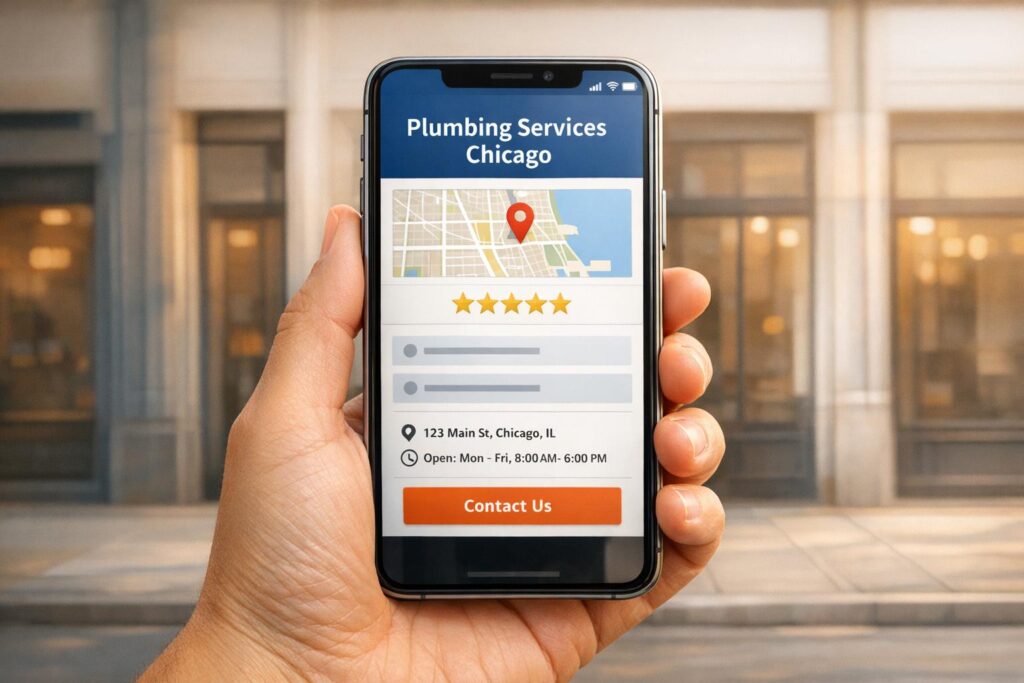
When people search for services like yours in your area, your service pages are key to attracting them. Local SEO ensures your business appears in location-based searches, like "plumber in Austin" or "dentist near me." Here’s a summary of how to optimize your service pages:
- Use Local Keywords: Include location-specific terms (e.g., "emergency plumber in Denver") and long-tail phrases that match high-intent searches.
- Optimize On-Page Elements: Use clear, keyword-rich title tags, meta descriptions, and headers. For example, "Drain Cleaning in Houston" works better than generic titles.
- Add Local Schema Markup: Implement structured data (e.g., LocalBusiness schema) to help search engines understand your business details like location, services, and hours.
- Focus on Small Business Website Design and Mobile Usability: Ensure fast load times, clear navigation, and mobile-friendly CTAs like click-to-call buttons.
- Create Unique Pages: Build dedicated pages for each service and location with localized content, photos, and FAQs.
These strategies help your business rank higher in local searches, driving more traffic, calls, and bookings.

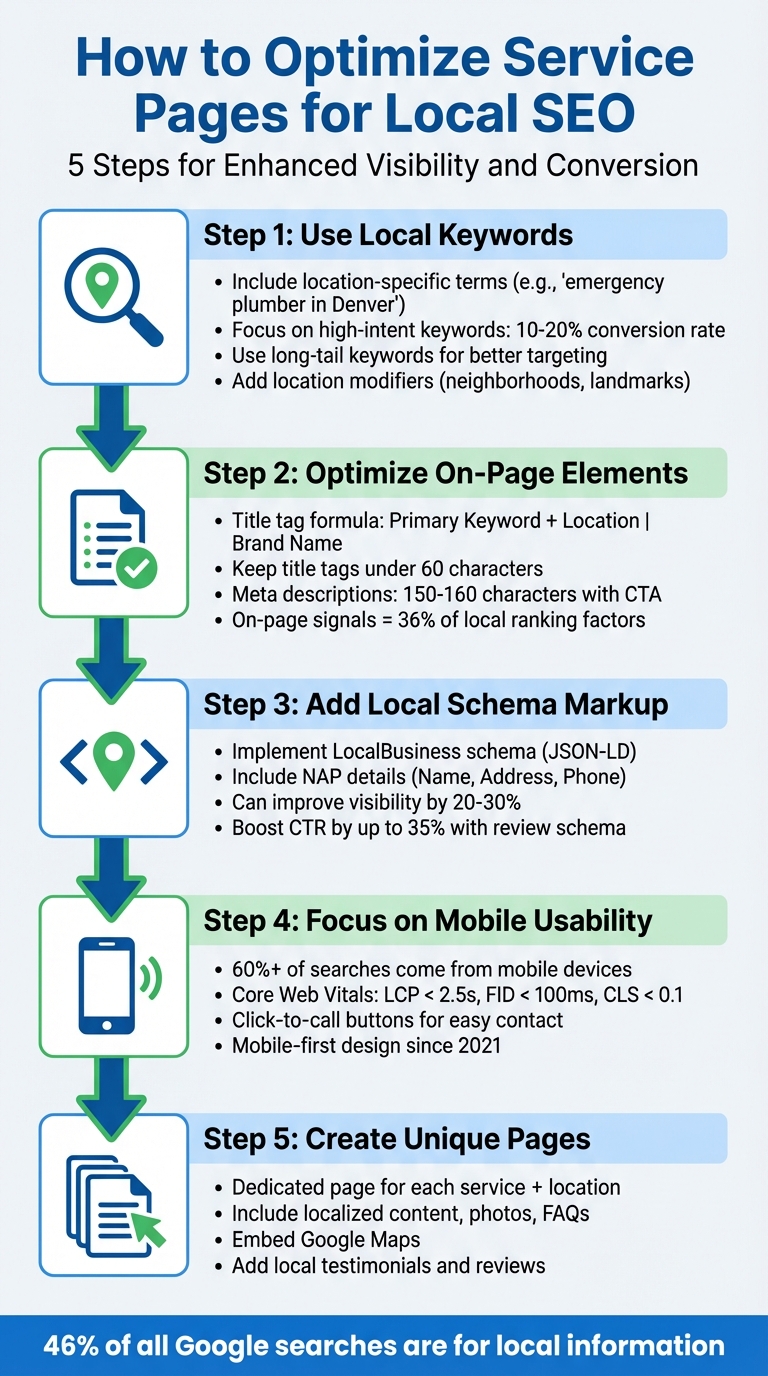
5 Steps to Optimize Service Pages for Local SEO
Conduct Local Keyword Research
To make your service page stand out, start by zeroing in on the exact phrases your potential clients use when they’re searching for help. Begin by listing your main services and the specific problems customers describe in their own words. For instance, a plumber might focus on terms like "burst pipe", "clogged drain", or "water heater repair". To dig deeper, review call logs or ask your front desk staff to jot down the exact language customers use when they call for help. This approach helps you uncover the unique ways people talk about their needs.
Leverage free tools from Google to expand your keyword list. Type your service into the search bar and pay attention to autocomplete suggestions, "Related Searches", and the "People Also Ask" section. Additionally, your Google Business Profile’s Performance tab can provide valuable insights into the search terms already driving traffic to your listing.
Find High-Intent Local Keywords
Not all keywords are created equal. Some signal a stronger intent to book services than others. For example, transactional phrases like "hire plumber near me" often convert at rates of 10–20%, while informational searches such as "how to unclog a drain" typically only convert at 1–3%. Focus on high-intent keywords – these are the ones used by people who are ready to take action. Reviewing your competitors’ Google Business Profile categories and analyzing common themes in their reviews can also help you identify "Place Topics" that are already working in your local market.
Use Long-Tail Keywords
Long-tail keywords, which are longer and more specific phrases, might not attract as much search volume, but they often lead to higher conversion rates. For instance, a local bakery saw a 300% increase in organic traffic by targeting phrases like "gluten-free birthday cakes in [city name]" instead of just "bakery". These detailed searches are often used by people who know exactly what they’re looking for. Plus, long-tail keywords are becoming even more important with the rise of voice search – 76% of consumers now use voice search at least weekly to find local businesses.
Add Location Modifiers
Adding location details to your keywords is a simple way to emphasize local intent. Instead of competing for a broad term like "plumber", try something more specific, like "emergency plumber in Downtown Denver." This type of query is more likely to attract customers who are ready to book. Use local landmarks, neighborhoods, or districts in your keywords. For example, type your service followed by "in…" into Google and see what local terms autocomplete suggests. Also, keep regional language in mind – terms like "sub", "hoagie", or "grinder" can vary depending on the area.
"The more effort you put into proper optimization, the stronger a signal you will send to both the public and search engines that the local brand you’re marketing can meet specific needs within a specific geography."
– Miriam Ellis, Local Search Subject Matter Expert
Once you’ve identified the right keywords, use them to fine-tune your service pages by optimizing key on-page elements.
sbb-itb-5b82b38
Optimize On-Page SEO Elements
Once you’ve nailed down your local keyword strategy, it’s time to weave those keywords into your on-page elements. These elements are a big deal – on-page signals make up about 36% of local search ranking factors. The best part? You have full control over these and don’t need to be a tech wizard to get a professional website and get them right.
Title Tags and Meta Descriptions
Your title tag is more than just a headline; it’s a confirmed Google ranking factor and your first impression with both search engines and potential customers. For local service pages, the formula is simple: Primary Keyword + Location | Brand Name. For example, "Emergency Plumber in Downtown Denver | Mile High Plumbing" immediately signals to Google – and users – what you do and where you do it.
Place your primary keywords at the start of the title tag since Google gives more weight to those early terms. Keep it under 60 characters to avoid getting cut off in search results. Joel Headley, VP at Rio SEO, experimented by adding nearby locations to title tags (e.g., "San Jose Junk Removal | Evergreen | Silver Creek | Little Saigon…") and saw a 16% ranking boost. That said, Joy Hawkins, owner of Sterling Sky Inc., advises not to stress too much about character limits:
"Don’t worry about the character length whatsoever. It’s fine to exceed it".
Meta descriptions might not directly affect rankings, but they play a huge role in click-through rates, which can indirectly help your SEO over time. Use this space to highlight what sets you apart – think "24/7 Emergency Service" or "Free Quotes" – and end with a strong call-to-action like "Get your free quote today". Aim for 150–160 characters and include the current year (2026) when it makes sense to show your content is up-to-date.
Even small tweaks can make a big difference. For instance, Ryan Jones from SEOTesting updated a title tag from "Premier Inn Deals – Rooms from $19" to "Premier Inn Deals and Discount Codes 2023 (Rooms from $19)" and saw a 59.65% jump in daily clicks and a 34.82% increase in impressions.
H1 and Subheadings
Your H1 tag is your headline for both users and Google, so make it count. It should clearly state the service and location, like "Blocked Drain Services in Houston", instead of something vague like "Our Services". Even if someone only sees your H1 or title tag, they should instantly know what your page is about.
Blake Denman, President of RicketyRoo, suggests:
"Make sure that your H1 tag mirrors an engaging title tag while incorporating your brand’s style".
While your H1 should be clear and direct, it also needs to feel natural – not just a string of keywords.
Use H2 and H3 tags to organize your content and reinforce local relevance. For example, an H2 might read "Why Choose Our Houston Plumbers?" and an H3 could dive deeper with "Drain Cleaning in the Heights District." A logical structure (H1 > H2 > H3) helps both users and search engines understand your page better. Including neighborhood names or local landmarks in subheadings can further boost your geographic signals.
Content and Internal Linking
Search engines rank pages higher when they clearly connect a specific service to a specific location. Generic content won’t cut it here. Speak directly to your local audience by referencing neighborhoods, landmarks, or even unique challenges in the area. For instance, a plumber in New Orleans might mention "historic cast-iron plumbing common in the French Quarter", while a Miami roofer could discuss "hurricane-resistant materials for coastal homes".
FAQs are another great way to add local flavor and long-tail keywords. Use real questions from your customers to create a natural, conversational tone. For example:
"Wondering ‘where can I get the best vegan tacos near me?’ Use our map to find your nearest branch".
Internal linking is also key to boosting local relevance. Your service pages shouldn’t stand alone – link them to related services, location-specific pages, customer reviews, or case studies using descriptive anchor text. Avoid generic phrases like "click here." Instead, use keyword-rich links to provide context for search engines. Clean URLs, like /services/dentist-madison-wi/, further reinforce your local focus.
If you cover multiple locations, each page should be unique. Include local photos, team images, area-specific promotions, and reviews from that location to avoid thin or duplicate content. These small details help search engines – and your customers – see that you’re genuinely local.
Use Local Schema Markup
What is Local Schema Markup?
Local schema markup is structured JSON-LD data that communicates key details about your business – like its location, services, and operating hours – to search engines. Think of it as a way to ensure search engines fully understand your business and where it operates. It works alongside your Google Business Profile, reinforcing that information throughout your web presence.
And the results can be impressive. Properly implementing LocalBusiness schema can improve local search visibility by 20–30%. Additionally, schema-powered review-rich results can boost click-through rates by as much as 35%. With nearly half of all Google searches (46%) focusing on local information, schema markup is now a vital tool to rank higher locally. Yue Zhu, Product Manager at Seenos.ai, explains:
"AI search engines are becoming the new local directory. When someone asks ChatGPT for ‘the best Italian restaurant near me,’ your local schema determines whether you’re in that conversation".
To get started, make sure your business’s key contact details are embedded using NAP schema for consistency across your online presence.
Add NAP (Name, Address, Phone) Details
Your NAP details – Name, Address, and Phone number – need to be consistent across your schema, Google Business Profile, and website footer. Even small inconsistencies, like using "St." instead of "Street", can confuse search engines and hurt your visibility. Use your primary local phone number in the schema’s telephone property, even if toll-free numbers appear elsewhere on your site.
In your schema code, include the NAP details under the address property using the PostalAddress type. This should cover:
- Street Address (
streetAddress) - City (
addressLocality) - State (
addressRegion) - Postal Code (
postalCode) - Country (
addressCountry)
For more accuracy, include latitude and longitude using the GeoCoordinates property. This helps search engines pinpoint your location on maps.
If you operate a service area business without a physical storefront, skip the street address and instead use the areaServed or serviceArea properties to define the regions you cover. For businesses with multiple locations, create a dedicated page for each branch and apply unique NAP schema to each one. Before going live, validate your schema using the Google Rich Results Test to catch any errors that might affect your rankings.
Service-Specific Schema
Once your core local details are marked up, refine your schema further by specifying your services. Instead of using the generic LocalBusiness tag, opt for schema subtypes that match your business category. For example, use PlumbingService, Dentist, or HairSalon to make your business type crystal clear to search engines. Service-based businesses can also use the Service schema within the LocalBusiness type via the makesOffer property.
| Business Category | Recommended Schema Subtype |
|---|---|
| HVAC / Plumbing | HVACBusiness or PlumbingService |
| Medical / Dental | MedicalClinic or Dentist |
| Law Firm | LegalService or Attorney |
| Hair Salon / Spa | HairSalon or BeautySalon |
| Auto Repair | AutoRepair |
To maximize the impact, create dedicated service pages (e.g., "Emergency Drain Cleaning" or "Water Heater Installation") and apply the relevant Service schema to each one. Within the Service schema, include fields for the service name and description. If your pricing is public and consistent, add price and priceCurrency fields as well.
Use the @id property – a unique, permanent URL – to establish your business as a Knowledge Graph entity. This allows other schema elements, like reviews or events, to link back to it. Finally, incorporate AggregateRating and Review schema under your LocalBusiness schema to display star ratings in search results.
Improve Mobile Experience and User Engagement
Mobile-First Design
Since 2021, Google has prioritized mobile versions of websites for ranking purposes. With over 60% of web traffic and searches coming from mobile devices, it’s crucial that your service pages load quickly and function smoothly on smaller screens.
Focus on meeting Core Web Vitals benchmarks: aim for an LCP (Largest Contentful Paint) under 2.5 seconds, an FID (First Input Delay) below 100 milliseconds, and a CLS (Cumulative Layout Shift) under 0.1. Even a one-second delay in loading can reduce conversions by 20%.
To improve page speeds, compress images, minimize HTML and CSS files, and enable browser caching. Design for usability by ensuring buttons are at least 48×48 pixels for easy tapping, fonts are readable without zooming, and navigation is simple and thumb-friendly. Avoid large pop-ups that obscure content, as they frustrate users and negatively impact SEO.
When your mobile experience is seamless, users are more likely to engage with strategically placed calls-to-action.
Clear Calls-to-Action
A fast, responsive mobile design sets the stage for effective calls-to-action (CTAs). Mobile users want quick solutions, so place a clear, actionable CTA prominently on your service page – like “Book Now” or “Get a Quote”. Use straightforward, benefit-focused language; for instance, “Get Your Free Quote Today” outperforms generic phrases like “Click Here.”
Incorporate click-to-call buttons to encourage immediate interaction. These buttons should be large enough to tap easily and designed with high-contrast colors – orange or green on a white background typically performs well. Keep the text concise and action-driven, and position CTAs in high-engagement areas, such as after you explain how your service solves a problem or near customer testimonials.
Add Localized Contact Information
Including your NAP (Name, Address, Phone number) in a crawlable text format builds trust and highlights your local presence, which is critical since most users search online for nearby businesses.
Embed a Google Map on your service pages to emphasize local relevance and help users visualize your location. If you operate as a service area business without a physical storefront, use a shaded map to outline the neighborhoods you serve. Additionally, consider adding a localized FAQ section to address city-specific concerns – like “How quickly can your team reach downtown during rush hour?”.
Conclusion
Optimizing service pages is an ongoing effort. Regularly update your keywords, refine on-page elements, tweak schema markup, and ensure your mobile design is user-friendly. Focus on creating dedicated service and location pages. Use concise "service + city" title tags (under 60 characters), implement LocalBusiness schema with consistent NAP (Name, Address, Phone) details, and make mobile usability a priority with features like click-to-call buttons. These steps are key to turning local searches into real customers.
"Local SEO is what turns your website into a lead engine for nearby customers – not just traffic, but calls, directions, and bookings." – Rankley
The success of these strategies is backed by results. By applying them, you can fine-tune your service pages and attract more local leads.
How to Get Started
Start by auditing your current service pages to spot gaps in on-page SEO, missing schema markup, or mobile performance issues. Create a unique page for every core service and city you serve – steer clear of generic "services" pages. Use the "Service in City | Brand Name" format for title tags, keep meta descriptions between 150–160 characters with a clear call-to-action, and ensure your NAP details are consistently displayed across your site.
Claim and verify your Google Business Profile – it’s one of the most effective ways to show up in local map pack results. Build a hub page that links to all your service area pages to improve crawlability. Embed Google Maps on each service page, add localized FAQs to address city-specific concerns, and feature real photos and testimonials from local customers to build trust.
How UENI Can Help

Feeling overwhelmed by the technical side of SEO and the constant need for updates? UENI offers a done-for-you website service that delivers professional, mobile-friendly websites in just seven days. These sites come with built-in SEO optimization, verified Google Business Profiles, custom domains, and secure hosting.
For Plus and Growth members, UENI takes care of managing your Google Business Profile, syncing content automatically, and providing monthly SEO audit reports to monitor your search visibility. The Growth Plan goes a step further, offering 1-on-1 marketing sessions and a tailored growth strategy. With UENI’s centralized Business Hub, you can manage your website, reviews, and social media all in one place – no need for complicated tools or costly agencies.
FAQs
How many service-area pages should I create?
When deciding how many service-area pages to create, it all comes down to the number of locations your business serves. For every major city or region you cater to, it’s smart to have a dedicated page. This can significantly enhance your local SEO efforts.
If your business operates across multiple markets, a scalable approach is key. Build individual pages for each location. This way, you can boost your visibility in local search results and draw in more relevant traffic.
What local schema markup should I add to a service page?
To give your service page a boost in local SEO and visibility, consider adding the LocalBusiness schema. This structured data helps search engines better understand your business and its offerings. Key properties to include are:
- Business Name: Your official name as customers would recognize it.
- Address: Ensure the full address is accurate and matches your Google Business Profile.
- Phone Number: Use a local number for added credibility.
- Service Details: Highlight what your business provides.
For even more clarity, you can incorporate the Service schema. This addition outlines your specific services, making it easier for search engines to match your page with relevant local searches. When implemented correctly, these schemas not only improve your rankings but also build trust with users, increasing the likelihood of clicks from local search results.
How can I make my service page convert better on mobile?
If you want your service page to perform well on mobile, responsive design is a must. Your site should adapt smoothly to different screen sizes, making navigation and reading effortless.
Another critical factor? Fast load times. Compress your images and cut down on unnecessary scripts to ensure your page loads quickly – mobile users won’t stick around for a slow site.
Don’t forget about clear, standout calls-to-action (CTAs). Place them prominently at both the top and bottom of the page. This ensures users can take action – like booking or contacting you – without hunting around.
Finally, make sure your contact details and booking buttons are easy to find and simple to click. Visitors shouldn’t have to scroll endlessly to reach what they need. A smooth, hassle-free experience can make all the difference in converting mobile users.