


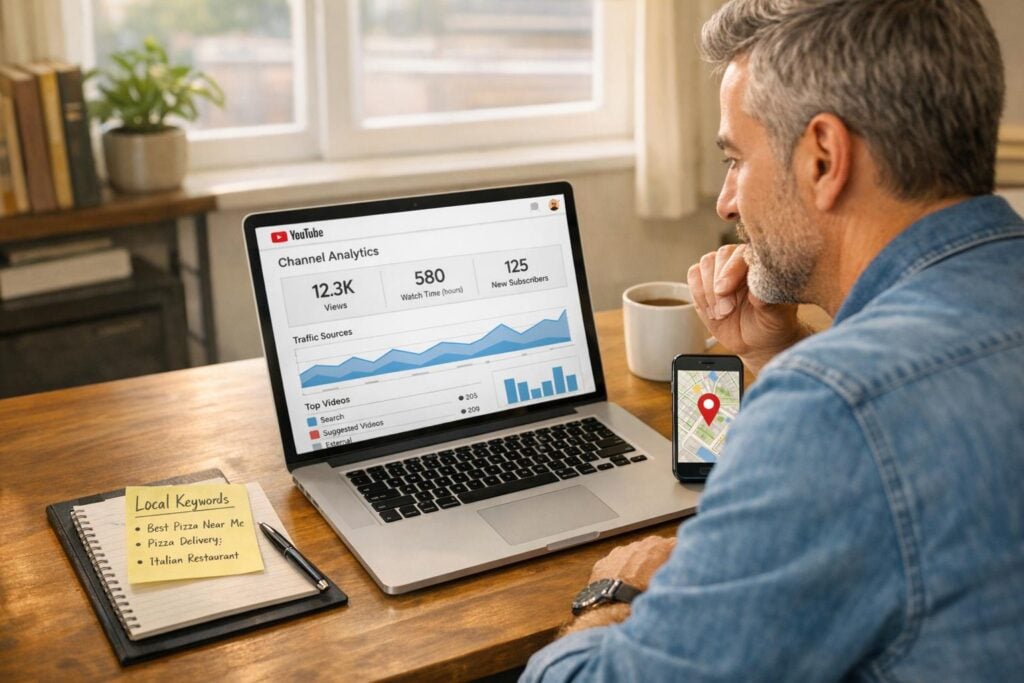
Local businesses often ignore YouTube, despite its potential to boost visibility and attract local customers. With only 5%–9% of small businesses using YouTube for marketing, there’s a huge opportunity to stand out. By optimizing videos for local search, you can rank on both YouTube and Google, including local packs and video carousels. This approach is cost-effective, as creating and uploading videos is free, and it can lead to measurable results like increased profits and customer trust.
Here’s a quick rundown of the most effective YouTube SEO strategies for local businesses:
- Use city and service keywords in video titles to match local searches.
- Design custom thumbnails featuring landmarks or your storefront to grab attention.
- Add your address and service area in video descriptions for better local relevance.
- Tag videos with specific neighborhoods, zip codes, and “near me” phrases.
- Break videos into chapters for different locations or services.
- Include captions with local keywords to improve searchability.
- Start videos with local customer stories to build trust and engagement.
- Add end screens linking to location pages or contact info.
- Share videos on your Google Business Profile to enhance visibility.
- Track viewer locations using YouTube Analytics to refine your strategy.
- Organize videos into location-specific playlists to boost watch time.
- Encourage viewers to mention their location in comments to increase engagement.
These tips can help your business rank higher in local searches, build trust, and convert viewers into customers. Start with simple steps like optimizing video titles and descriptions, then expand into more advanced strategies like using local thumbnails and captions.
1. Include Your City and Service in Video Titles
Your video title is the first clue YouTube’s algorithm uses to figure out your content and who it’s meant for. For local businesses, this means you need to be crystal clear about where you operate and what you offer. If someone nearby searches for “plumber in Chicago” or “bakery near me”, your title should match that search perfectly.
Put your key information upfront. Start your title with your service and city to catch attention immediately. For example, “Plumbing Repair in Chicago: 5 Emergency Tips” is far more effective than “Learn How to Find the Best Plumbing Repair Services in Chicago for Your Next Emergency.” Why? The first version gets straight to the point, making it easier for both the algorithm and viewers to understand.
Keep your titles around 60 characters so they display properly in search results without being cut off. Simple formats like “How to [Service] | [City]” or “[City] [Service]: [Benefit]” work well. For instance, “Austin Bakery: How We Make Award-Winning Cupcakes” gives location, service, and value – all within the character limit.
Want to know what your customers are actually searching for? Use YouTube’s autocomplete feature. Start typing your service and city into the search bar, and see what suggestions pop up – these are real phrases people in your area are looking for. If “emergency plumber Brooklyn” shows up frequently, that’s a title you should seriously consider using.
Getting your titles right can make a big difference. Optimized titles improve your chances of ranking higher on YouTube and Google, showing up in local search results and video carousels. And with only 9% of small businesses tapping into YouTube for local marketing, nailing this strategy could give you a huge edge over competitors. Next, focus on creating thumbnails that visually reinforce your local presence.
2. Use Thumbnails That Show Local Landmarks or Your Storefront
Your thumbnail is the first thing viewers notice about your video, and it plays a big role in whether they decide to click or keep scrolling. For local businesses, this is a chance to highlight your connection to the community. Featuring a familiar landmark or your storefront in the thumbnail can instantly signal to viewers that the content is relevant to their area.
Custom thumbnails are a game-changer – 90% of the top-performing videos on YouTube use them instead of the auto-generated frames the platform provides.
When creating your thumbnail, think about showcasing your storefront with clear signage, a recognizable local landmark, or even a cozy shot of your business interior. Add bold text overlays that highlight your location, like “Seattle Coffee Hacks” or “Denver Home Repairs,” and include your logo to boost brand awareness. Don’t forget to follow YouTube’s technical guidelines: your thumbnail should have a resolution of at least 1,280×720 pixels, a 16:9 aspect ratio, and a file size under 2MB in JPG, GIF, or PNG format.
Keep the design clean and high-contrast, so it stands out on smaller screens like mobile devices. Adding a human face alongside local elements can make the thumbnail feel more personal and engaging. Some businesses even include their phone number or website URL to encourage immediate action. The goal is to create a visually striking image that screams local relevance – something that makes viewers think, “Hey, that’s my neighborhood! I need to check this out.” Once your thumbnail draws them in, your video description can further emphasize your local connection.
3. Add Your Address and Service Area in Video Descriptions
Your video description plays a key role in local SEO, so make the most of the 5,000 characters available to you. Start by including your business name, full address, and phone number – commonly referred to as “NAP data.” This ensures consistency across platforms, helping both YouTube and Google confirm your business’s authenticity and connect your video to local search results. To enhance visibility, weave in local keywords that tie your content to the area you serve.
When summarizing your video content, aim for two short paragraphs that integrate these local keywords. For instance, if you’re a plumber in Austin, include phrases like “plumbing services in South Austin” or “serving the Zilker neighborhood.” Additionally, list the cities, neighborhoods, or zip codes you cater to. This helps YouTube’s algorithm understand the communities your business serves, increasing your chances of appearing in “near me” searches or in Google’s local video carousels.
Don’t forget to add your full website URL (including https://) to create clickable links that can drive traffic directly to your location-specific pages. Include a clear call-to-action that highlights your local presence, such as “Stop by our downtown Denver showroom” or “Call today for a free estimate in Orange County.” With only 9% of U.S. small businesses currently leveraging YouTube for marketing, you have a great opportunity to stand out. The more detailed you are about your service area, the easier it becomes for potential customers nearby to find you.
Lastly, use YouTube’s Advanced Settings to set your video location by pinning it to the exact latitude and longitude. This geo-tagging feature adds another layer of local SEO, reinforcing the geographic signals you’ve established throughout your video optimization efforts.
4. Tag Videos with Neighborhood Names and Local Search Terms
YouTube’s tagging system is a powerful tool for connecting with your local audience. Tags act as geographic markers, signaling YouTube and Google about your business location and the audience that should see your videos. To make the most of this system, combine your main service term (like “carpet cleaning”) with modifiers (such as “best” or “emergency”) and your specific location. These customized tags highlight your local focus and make your content more discoverable to nearby users.
Start with straightforward local keywords that pair your service with a city or region. For instance, terms like “plumber in Brooklyn” or “HVAC repair Manhattan” work well. Then, broaden your reach with general service-related keywords, such as “emergency roofing” or “pet grooming tips.” Since search engines often use a searcher’s location to deliver results, these broader terms can still attract local viewers. Don’t stop at city-level tags – go deeper. Include neighborhood names, zip codes, landmarks, or even local nicknames that locals commonly use. For example, if your bakery is near Central Park, tag it with “Central Park bakery”.
Think in layers when crafting your tagging strategy. Cover neighborhoods (like “SoHo” or “Tarrytown”), towns, counties, states, and even Designated Market Areas (DMAs). Also, include “near me” as a tag – this is especially effective since nearly 80% of local mobile searches result in a conversion.
Leverage YouTube’s autocomplete feature to identify real search terms and refine your tags. Simply type your service and location into YouTube’s search bar, and use the autocomplete suggestions – these reflect actual searches being made in your area. With local YouTube markets still relatively untapped, this approach gives you a chance to dominate search results with well-chosen tags.
“Local SEO keyword research helps small businesses reach potential customers in their area… it targets potential customers who are already interested in what you have to offer.” – Neil Patel, Co-Founder, NP Digital
5. Break Videos into Chapters for Different Locations or Services
YouTube chapters function like a built-in table of contents, making it easier for viewers to jump straight to the part of your video that interests them most. Just like optimizing your titles and thumbnails, adding chapters can guide local viewers through your content more effectively. For businesses serving multiple neighborhoods or offering a variety of services, chapters not only enhance the viewing experience but also help Google index specific segments, increasing click-through rates and search impressions.
Start by adding a 00:00 timestamp, followed by at least two more timestamps in ascending order. Make sure each segment is at least 10 seconds long. After each timestamp, include a short, descriptive title that naturally incorporates your target keywords. For example, a chapter titled “03:45 Service in [Location]” can highlight local keywords and geotags, drawing attention to specific areas you serve.
Here’s why this matters: video results are 50 times more likely to rank organically on Google compared to text-based results. By breaking your video into clear, keyword-rich chapters, you not only help viewers find what they’re looking for faster but also signal to search engines that your content is well-organized and relevant.
“Add a concise title after each timestamp and include your main keywords where applicable. This can be a great opportunity to emphasize local keywords and geotags.”
– Tyler Golberg, Founder, CYBERsprout
If you’re managing a large number of videos, YouTube’s automatic chapters can save you time. However, manually creating chapter titles gives you more control over keyword placement and optimization. Don’t forget to include your business’s name, address, and phone number (NAP) in the video description to further reinforce your local relevance. After that, focus on refining captions to align with your local SEO strategy.
6. Include Captions with Local Business Names and Area References
Captions play a crucial role in local SEO. Not only do they make your videos more accessible, but they also provide YouTube with text that search engines can index. By incorporating your city, neighborhood, or local landmarks into your video, those specific references show up in captions, signaling search engines that your content is relevant to a local audience.
Here’s why this matters: video content has the potential to increase organic traffic by up to 157%, and small businesses that optimize their YouTube videos often see a 49% profit growth year-over-year. However, auto-generated captions frequently misinterpret local names, so it’s important to manually review them to ensure accuracy, especially for local keywords.
“Adding captions and transcripts makes your video accessible while boosting SEO. Captions improve viewer retention and provide YouTube with keyword data, which can enhance ranking.”
– Leadhub
To maximize the impact, include phrases like “serving the [City Name] area” or “located near [Local Landmark]” early in your script. This approach ensures that these local keywords are captured in the transcript right from the start. Additionally, you can repurpose your transcript to enrich your video description, further reinforcing your local relevance.
Consistency is key. Align the local references in your spoken content with your video title and description. This strategy not only demonstrates local authority but also improves your chances of appearing in local search results. By keeping your captions, titles, and descriptions aligned with local keywords, you strengthen your overall local SEO efforts.
7. Start Videos with Local Stories or Customer Examples
The first few seconds of a video are crucial – they decide whether viewers stick around or click away. Kicking things off with a local customer story or a neighborhood-specific example grabs attention right away and tells YouTube’s algorithm that your content is relevant to a specific area. This approach can directly boost your average view duration, which is one of the key factors YouTube considers when ranking videos.
Using real stories from your community adds a personal touch that text-based content just can’t match. For example, a plumber in Austin might start a video like this: “Last week, we helped the Martinez family in Hyde Park fix a burst pipe just in time for their holiday guests.” A story like this not only connects with local viewers but also builds trust by showing your expertise in action.
And the stats prove it: 73% of customers are more likely to make a purchase after watching a video about a product or service. Plus, the longer people watch your video, the more likely YouTube is to recommend it to other viewers in your area. Starting with a compelling local story sets you up for success by engaging your audience and signaling to YouTube that your content deserves more visibility.
To make your opening even more impactful, keep it relatable to local culture and avoid coming across as overly salesy. Mention specific streets, landmarks, or other details your audience will recognize. These small touches guide YouTube in identifying your target audience and help reinforce your presence in the local community. The longer you keep viewers engaged, the more YouTube will push your video to others nearby.
sbb-itb-5b82b38
8. Add End Screens That Link to Location Pages or Contact Info
End screens are a great way to turn viewers into customers. These interactive elements appear during the last 5–20 seconds of your video and can direct viewers to specific landing pages, contact forms, or booking tools on your website. Instead of sending people to your homepage, guide them to a page tailored to a specific location or service area. You could also link to a “Contact Us” page with your business’s local phone number and address.
You can also use end screens to connect viewers to location-specific playlists or tours. For example, if your home services business operates in several neighborhoods, link to a playlist like “Our Projects in [City Name]” or share a video tour of a particular storefront. This not only keeps viewers engaged with your local content but also boosts overall watch time – something YouTube’s algorithm values. In fact, well-optimized video content can increase organic traffic by up to 157%.
To set up end screens, use YouTube Studio’s Link, Video, or Playlist elements. Just make sure your video is at least 25 seconds long. Provide clear calls to action, such as “Click here to book an appointment at our Midtown location”, and double-check that your NAP (Name, Address, Phone) details match those on your Google Business Profile.
Since mobile browsers (except iPads) limit end screen functionality, include essential contact details in the video description. Use YouTube Analytics to track click-through rates and fine-tune your strategy as needed. This not only enhances your local SEO efforts but also complements how captions and descriptions can drive local engagement.
9. Share Videos on Your Google Business Profile

Adding videos to your Google Business Profile is a great way to strengthen your local SEO efforts and connect with your community. Your profile plays a key role in increasing visibility on Google Search and Maps. Once your Business Profile is verified, any videos you upload will show up alongside your photos, making your listing more appealing to potential customers. Google monitors interactions with these videos, and higher engagement can signal to the platform that your business is relevant and worth highlighting.
While there’s no direct option to import videos, you can repurpose your top-performing YouTube content for your profile. Focus on short, impactful clips – especially YouTube Shorts – and trim them to under 30 seconds, ensuring the file size stays below 75 MB and the resolution is at least 720p. You can upload videos through the Google Maps app or on desktop by clicking the “+” button. Keep in mind that uploaded videos may take 24–48 hours to appear.
When creating content, aim for authenticity. Ben Fisher, a Google Business Profile Diamond Product Expert, advises:
“Google Business Profile is a way to show off the people, personality, culture, products and services of your business… so that means no stock photos or stock videos!”
Share videos that highlight your business’s unique character, such as quick tours of your storefront, team introductions, or behind-the-scenes footage of products being prepared. Since around 85% of social media video is watched without sound, focus on strong visuals that can grab attention even in silence.
Profiles with at least two videos can unlock a dedicated video subtab on mobile devices. Consistently adding fresh visual content not only keeps your profile engaging but also tends to drive more clicks to your website. Fisher points out:
“Just the movement of a video is enough to stop a person as they’re scrolling on a page”
This simple yet effective strategy ensures your profile remains dynamic and appealing, supporting your broader local SEO goals while keeping your online presence fresh and engaging.
10. Track Which Cities and Regions Watch Your Videos
YouTube Analytics can show you exactly where your viewers are tuning in from – a valuable tool for targeting local audiences. To find this data, head over to YouTube Studio, click on the Analytics tab, and navigate to the Audience section. There, the Top Geographies card highlights the cities and regions where your videos are getting the most views. This helps you confirm whether your content is reaching your intended local audience or attracting viewers from areas outside your focus.
For a deeper dive, click See More to open Advanced Mode. Here, you can compare metrics like watch time and views by region. If you notice strong engagement from a nearby city that isn’t currently part of your service area, it might be worth creating content tailored to that location. This can help you widen your local SEO reach and connect with new audiences.
“If you’re advertising a local product, but your videos aren’t generally being viewed locally, it may be time to investigate your keywords.” – Neil Patel, Co-Founder, NP Digital
Regularly reviewing this data is crucial for fine-tuning your local strategy. Check your geographic analytics weekly to spot trends and shifts in viewership. You can also export this data to Google Sheets or as a CSV file to analyze it alongside your other marketing metrics. Additionally, use the When your viewers are on YouTube report in the Audience tab to time your video releases for when your local audience is most active.
If your analytics show that most of your viewers are outside your target area, it’s time to tweak your approach. Update your video titles and descriptions with localized details – mention specific city names, zip codes, or even phrases like “near me.” This small adjustment can help align your content with the areas showing the most engagement and boost your visibility in local searches.
11. Group Videos by Location into Dedicated Playlists
Once you’ve identified where your audience is located, take the next step by organizing your content into location-specific playlists. This not only strengthens your connection with local viewers but also boosts your overall watch time. Why does that matter? YouTube’s algorithm rewards videos that are watched back-to-back, which can help improve your channel’s visibility.
When naming your playlists, use geo-targeted keywords like “Home Remodeling in Austin, TX” to clearly highlight your local focus. Keep the titles concise – under 66 characters – so they display fully in search results. Interestingly, playlists themselves can rank for these keywords, giving an added boost to the videos they contain.
“A playlist will allow you to organize your video content into categories. You can name your playlists with your relevant keywords. In essence, it’s like a blog that has organized and optimized categories.” – Zen Agency
If your business operates in multiple locations, create a separate playlist for each area. This mirrors the structure of location-specific pages on your website and makes it easier for viewers to find the videos most relevant to them. To take it a step further, you can embed these playlists on corresponding pages of your website. This not only enhances user experience but also keeps visitors engaged longer – a factor search engines pay attention to.
Don’t forget to review your existing videos and organize them into playlists retroactively, based on either location or service type. Doing so improves the experience for new visitors and helps YouTube better understand how your content is connected.
12. Ask Viewers to Mention Their Location in Comments
Encouraging viewers to share their location in the comments can strengthen your local optimization efforts while fostering a sense of community. These comments not only build engagement but also add local keywords that help YouTube recognize your video’s geographic relevance. When people mention their city or neighborhood, they’re essentially creating user-generated content that can influence how your video is ranked and recommended.
Rather than simply asking, “Where are you from?”, weave this question naturally into your content. For instance, if you’re a plumber demonstrating a common household fix, you might say: “Is this a problem you see a lot in your area? Let me know what city you’re in – I’d love to hear where folks are dealing with this!” This approach feels more personal and encourages meaningful interaction.
“Encouraging viewer engagement through calls to action, responding to comments, and fostering a loyal community around your channel can boost your videos’ visibility.” – Connor Wilkins, CMO, Direction.com
Engagement doesn’t stop at asking questions – responding to comments quickly shows viewers that their input matters. This interaction builds trust, especially with local audiences. In fact, 73% of dissatisfied customers are willing to give businesses another chance when they feel their concerns are addressed effectively. Plus, active engagement can improve viewer retention.
The comments section also serves as a goldmine for insights. By analyzing where your audience is located, you can identify neighborhoods or cities that are engaging with your content the most. This information can help you refine your marketing efforts and target the areas that matter most.
Comparison Table

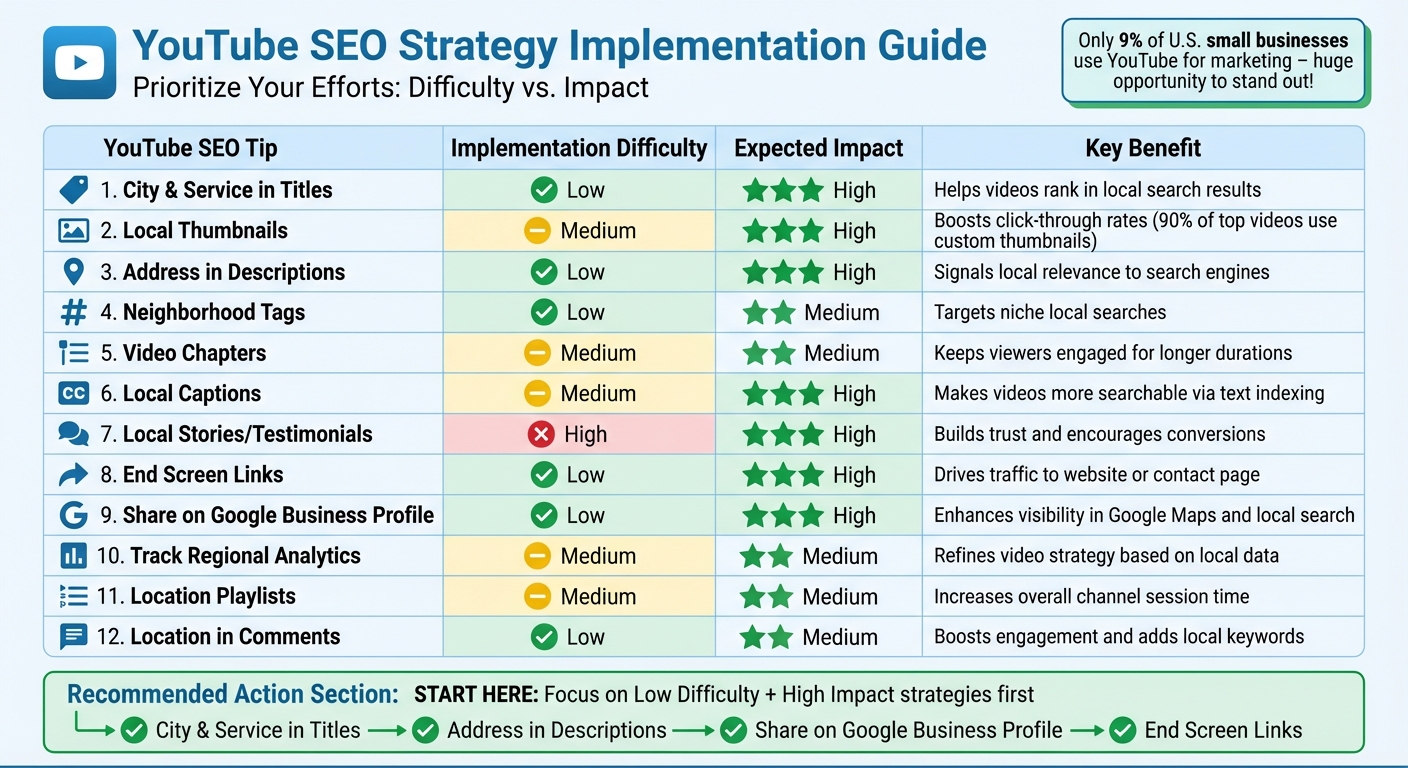
YouTube SEO Implementation Guide: Difficulty vs Impact for Local Businesses
Not every YouTube SEO tactic delivers the same results. As a busy small business owner, it’s smart to focus on strategies that pack the biggest punch with the least effort.
The table below outlines each tip based on how easy it is to implement and the type of impact it can deliver. Implementation difficulty ranges from low (quick and simple) to high (requires more time, skills, or resources). Expected impact indicates how much each approach can improve your local search rankings and engage your audience. This breakdown highlights where you should focus your efforts for the best local SEO outcomes.
| YouTube SEO Tip | Implementation Difficulty | Expected Impact | Key Benefit |
|---|---|---|---|
| City & Service in Titles | Low | High | Helps videos rank in local search results |
| Local Thumbnails | Medium | High | Boosts click-through rates (used by 90% of top videos) |
| Address in Descriptions | Low | High | Signals local relevance to search engines |
| Neighborhood Tags | Low | Medium | Targets niche local searches |
| Video Chapters | Medium | Medium | Keeps viewers engaged for longer durations |
| Local Captions | Medium | High | Makes videos more searchable via text indexing |
| Local Stories/Testimonials | High | High | Builds trust and encourages conversions |
| End Screen Links | Low | High | Drives traffic to your website or contact page |
| Share on Google Business Profile | Low | High | Enhances visibility in Google Maps and local search |
| Track Regional Analytics | Medium | Medium | Refines your video strategy based on local data |
| Location Playlists | Medium | Medium | Increases overall channel session time |
| Location in Comments | Low | Medium | Boosts engagement and adds local keywords |
Start with the low-difficulty, high-impact tips like including city and service keywords in titles, adding your address to descriptions, and sharing videos on your Google Business Profile. Once you’ve mastered those, move on to medium-difficulty tactics like using local thumbnails and captions to take your local SEO game to the next level.
Conclusion
YouTube SEO presents a fantastic opportunity to stand out in local search results, especially since only 9% of small businesses in the U.S. are using YouTube for marketing. By optimizing your videos, you can tap into this underutilized strategy and see real growth. In fact, businesses that focus on video optimization often experience increased profits, and many viewers go on to make purchases after watching videos.
To get started, focus on the simple steps outlined earlier. Add your city and service to your video titles, include your address in the video descriptions, and share your content on your Google Business Profile. These straightforward actions make it easier for YouTube and Google to recognize your local relevance. Once you’ve nailed these basics, take it up a notch with custom thumbnails featuring local landmarks and captions that mention specific neighborhoods. These small tweaks can significantly boost your click-through rates and visibility.
Pairing your YouTube efforts with a professional website can amplify your results even further. Embedding your videos on a mobile-friendly, SEO-optimized website strengthens your site’s appeal to search engines. Companies like UENI offer websites built in just seven days, complete with features like verified Google Business profiles. Their Plus and Growth plans also provide ongoing local SEO and content creation to complement your YouTube strategy, ensuring that your digital presence works cohesively to convert viewers into customers.
FAQs
How do I optimize my YouTube video titles for local searches?
To make your YouTube video titles pop in local search results, start by placing your main local keyword – like your city, neighborhood, or zip code – right at the beginning of the title. For instance, instead of a plain title like “Plumbing Tips”, go for something like “Seattle Plumbing Tips: Fix a Leaking Faucet.” Keep your titles short and snappy – under 60 characters – so they display fully in search results. Adding action words like “how-to”, “tips”, or “guide” can also help grab attention.
Take the time to research the exact phrases your local audience is searching for, such as “best coffee shop in Austin”, and weave those keywords naturally into your titles. If your business caters to multiple locations, consider creating separate videos with unique titles for each area. This avoids confusing the algorithm and ensures your content is relevant. Plus, make sure your title matches the video description, tags, and overall content for better consistency and improved rankings.
For small businesses wanting a more hands-off solution, UENI provides local SEO services, including keyword research and video optimization, to help your videos perform better in local search results.
How can I use local landmarks in YouTube video thumbnails effectively?
Incorporating recognizable local landmarks into your YouTube thumbnails can make your videos feel more relevant and engaging to viewers in your area. By using clear, high-quality images of popular landmarks, you create an instant connection with your audience, which can encourage more clicks on your content.
When creating your thumbnails, make sure the landmark is noticeable but doesn’t dominate the design. Pair it with bold text or eye-catching colors to make your thumbnail pop. Keep the layout clean and uncluttered, especially since many viewers will see it on smaller screens like smartphones. Simple, visually striking designs are key to grabbing attention.
How can captions help improve local SEO for my YouTube videos?
Captions play a crucial role in making your video content more accessible while also providing searchable text. This text helps YouTube better understand the topic of your video, which can enhance its relevance for local search queries by incorporating specific, location-based keywords.
On top of that, captions can increase viewer engagement and watch time – two important factors in YouTube’s ranking system. By improving accessibility and boosting keyword visibility, captions can have a big impact on how well your video performs in local search results.