Online reviews are critical for building trust and improving local SEO. They influence customer decisions and help businesses rank higher in search results. But consistently collecting reviews can be challenging for small business owners. Automating review requests solves this issue by ensuring every customer gets a timely prompt to leave feedback.
Here’s what you need to know:
- Why it matters: 70% of consumers trust online reviews as much as personal recommendations.
- The results: Businesses using automated systems saw review volumes increase by 300% to 500% and average star ratings improve.
- The process: Set up a verified Google Business Profile, organize your customer contact list, and use tools to automate review requests.
- Best practices: Personalize messages, time requests strategically, and respond to reviews promptly – both positive and negative.
Automated systems save time, boost credibility, and drive more customers, all while reducing manual effort.
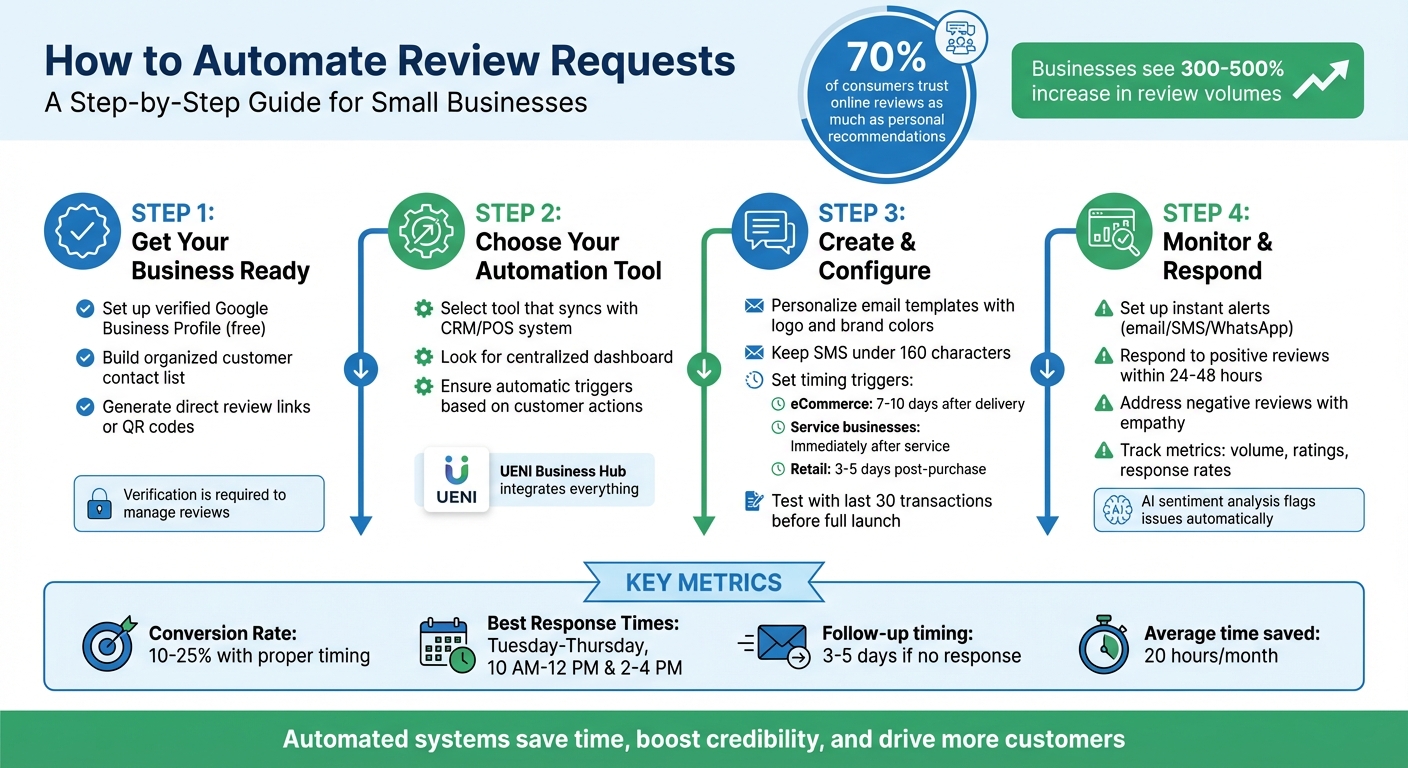
4-Step Guide to Automating Review Requests for Small Businesses
Getting Your Business Ready for Automated Review Requests
To automate review requests effectively, you need to set up a solid foundation. This involves two key steps: ensuring you have a verified Google Business Profile and maintaining an organized customer contact list. Without these, automation can’t function – there would be no platform to display reviews or a way to reach your customers. Once these essentials are in place, you’re ready to configure your automated review system.
Set Up Your Google Business Profile
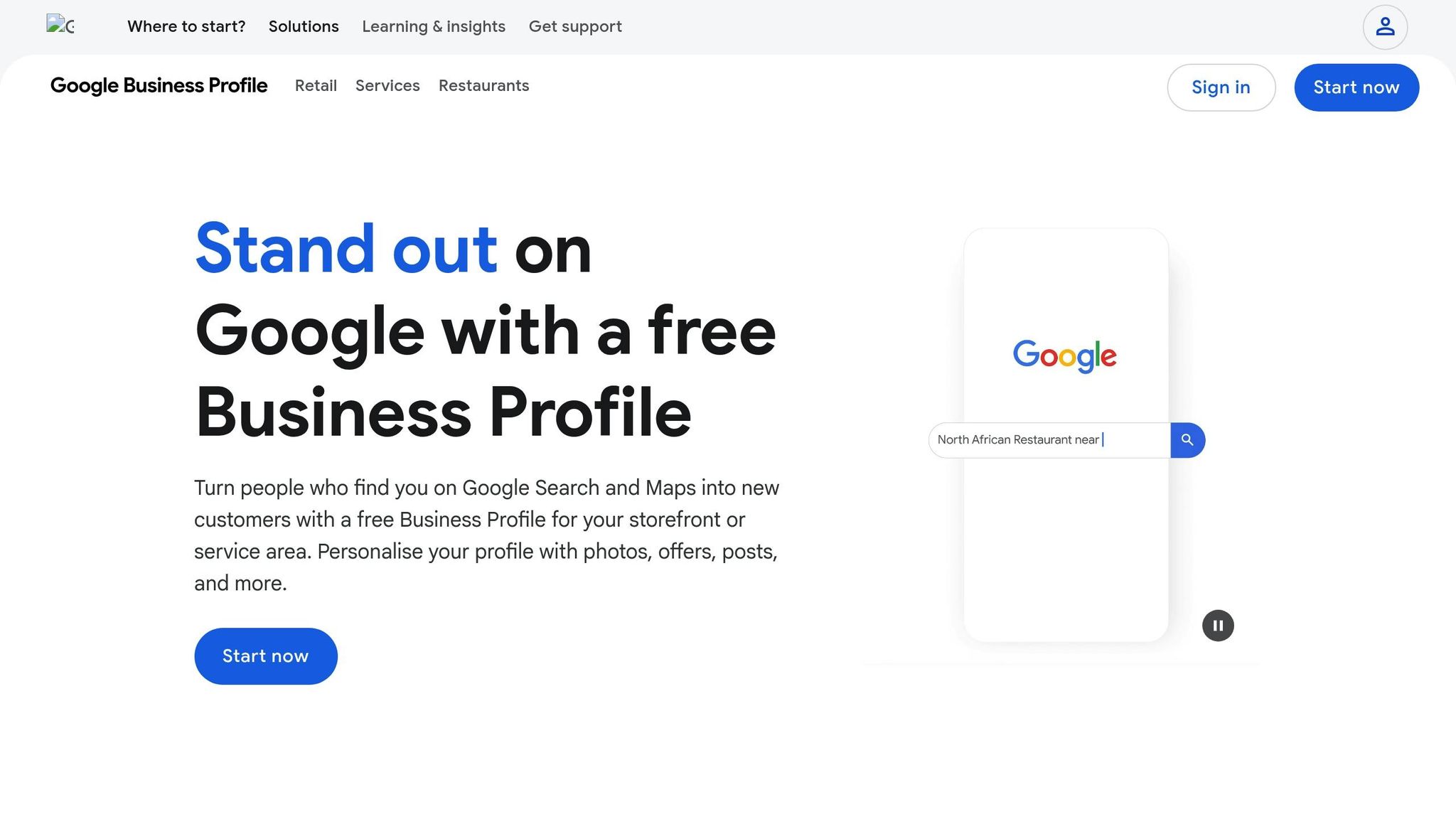
Your Google Business Profile serves as the hub for customer reviews, appearing across Google Search and Maps. To get started, search for your business name on Google or Maps. From there, you can either claim an existing listing or create a new one – and it’s completely free.
Verification is non-negotiable. Until your profile is verified, you won’t be able to reply to reviews or fully manage your business listing. Once verified, make sure to complete your profile with accurate details like business hours, contact information, and high-quality photos. This not only helps customers find you but also gives your profile a polished, professional appearance.
"Getting Yogolandia on Google was absolutely key. It truly legitimizes you as a business." – Yogolandia Yogurt and Botana Bar
After setting up your profile, take advantage of tools like direct review links or QR codes, which you can generate from your profile settings. These tools make it incredibly simple for customers to leave feedback with just one click. However, keep in mind that offering incentives – such as discounts or freebies – in exchange for reviews is against Google’s policies. Such practices are considered "fake engagement" and could result in restrictions on your profile.
Build Your Customer Contact List
For automation to work, it needs a trigger – a signal that tells the system when to send a review request. This trigger comes from your customer database. You can build this database using tools like lead capture forms, booking systems, or CRM platforms.
The key is to organize and segment your contacts based on specific actions, such as service completion, delivery confirmation, or payment. Adding opt-out instructions is also crucial to ensure compliance with U.S. communication laws. Proper segmentation allows you to send tailored review requests that reference the customer’s exact experience, making the request feel more personal and relevant.
How to Set Up Automated Review Requests
With your Google Business Profile verified and your customer contact list ready, it’s time to streamline the process of collecting reviews. Automating review requests ensures they’re sent at the right time, without requiring manual effort every single time. Here’s a step-by-step guide to getting this system up and running.
Pick a Tool That Syncs with Your Website Dashboard
Start by selecting a tool that integrates directly with your CRM or POS system. This way, review requests can be triggered automatically based on specific customer actions, eliminating the need for manual updates or switching between platforms.
UENI makes this process seamless. Its Business Hub centralizes everything – your website, bookings, sales, and review requests – into one dashboard. This means you can set up automated review workflows without needing to deal with complex integrations or multiple subscriptions. It’s an all-in-one solution for managing your business and reviews efficiently.
Create Personalized Review Request Templates
Your review requests should feel genuine and reflect your brand. Personalize each message with customer details to make it more engaging. For email templates, include your business logo and brand colors to make your message instantly recognizable. Keep the text concise, and add a clear call-to-action button like "Leave a Review" or "Share Your Feedback".
For SMS requests, stick to 160 characters or less. Include your business name, a short URL for leaving a review, and opt-out instructions for compliance. For example:
"Hi [Name], thanks for choosing [Business]! We’d love your feedback: [link]. Reply STOP to opt out."
Set Up Triggers for Review Requests
Triggers are the events that determine when a review request is sent. The timing varies depending on your business model. For example:
- eCommerce: Wait 7–10 days after delivery to give customers time to use the product.
- Service-based businesses: Send requests immediately after completing the service.
- Retail: A delay of 3–5 days usually works best.
Set triggers for moments like purchase completion, service delivery, or hitting key milestones in a customer’s journey. These "delight moments" are when customers are most likely to leave positive feedback.
Test and Launch Your System
Before rolling out your system fully, test it with your last 30 transactions. This helps you identify any issues, such as broken links or opt-out errors. Use A/B testing to experiment with subject lines, timing, and message templates, ensuring you achieve the best response rates.
"Automation doesn’t replace human touch – it enhances it by ensuring consistent, timely review requests that would otherwise be forgotten in busy operations." – David Park, ReviewInvite
Once testing is complete and everything works smoothly, activate the system for all new customers. Businesses that implement automated review requests often see review volumes increase by 300% to 500%. However, this success depends on a properly configured system from the start.
From here, you can fine-tune your approach, focusing on timing, personalization, and follow-ups to keep improving results.
Best Practices for Review Requests
Timing and Personalization
Timing is everything when it comes to asking for reviews. The key is to reach out when customers are most likely to be satisfied with their experience. For example, restaurants or cafés should send review requests within 24 hours of a visit. For home services like plumbing or HVAC, it’s best to ask right after the job is completed.
For email requests, aim to send them 24–48 hours after the service or purchase. This gives customers enough time to reflect on their experience while keeping it fresh in their minds. SMS requests, on the other hand, should be sent sooner – within 12–24 hours – because text messages are more immediate in nature. Data also shows that engagement peaks mid-week, particularly from Tuesday to Thursday, with the best response times between 10 AM–12 PM and 2 PM–4 PM.
Personalization makes a big difference, too. Including details like the customer’s name or specifics about their purchase can make automated messages feel more genuine. This personalized touch explains why customers are more likely to respond when the message feels relevant and timely.
"Between January 2020 and May 2025, Custom Maids used automated review requests triggered by paid invoices with a 15-minute delay to humanize their messages and drive lead generation without relying on paid ads."
While timing and personalization are crucial, refining your incentives and follow-up strategies can further improve response rates.
Incentives and Follow-Ups
Once you’ve nailed the timing and messaging, fine-tune your incentive and follow-up strategies to maximize results.
It’s important to avoid offering discounts or rewards in exchange for reviews. Instead, focus on internally rewarding your staff for securing positive feedback. If a customer doesn’t respond, send one follow-up message 3–5 days later, but avoid bombarding them with additional requests. Always include an unsubscribe option in your emails and honor opt-out requests promptly.
When crafting your message, use neutral language like "Share your experience" rather than directly asking for a 5-star review. Let customers know the process is quick – about two minutes – to encourage participation. For dissatisfied customers, redirect them to a private feedback form to address their concerns before they leave a public review.
Sample Email and SMS Templates
Here are some examples of effective review request templates:
Email Template for Service Businesses:
Subject: How was your experience with [Business Name]?
Hi [First Name],
Thanks for choosing [Business Name] for your [Service Type]. We’d love to hear about your experience.
[Leave a Review Button]
Your feedback helps us improve and assists others in finding the right service.
Thanks,
[Your Name]
SMS Template for Retail/eCommerce:
Hi [Name], thanks for your recent purchase from [Business]! We’d love your feedback: [short link]. Reply STOP to unsubscribe.
Email Template for Restaurants:
Subject: How was your meal at [Restaurant Name]?
Hi [First Name],
We hope you enjoyed your visit yesterday! Share your thoughts here: [Review Link]
See you again soon!
[Restaurant Name] Team
"In June 2024, Lake Powell Paddleboard used Podium’s automated review platform to increase their Google reviews from 11 to 400 while maintaining a 4.9-star average."
Their success came from sending review requests immediately after paddleboard rentals and keeping the messages concise and personalized.
sbb-itb-5b82b38
Monitoring and Responding to Reviews
Set Up Alerts for New Reviews
Once your Google Business Profile is verified, it’s time to configure your review tool to send instant notifications when a new review is posted. These alerts can come via email, SMS, or even WhatsApp, ensuring you’re always in the loop.
For small businesses, centralized dashboards make it easy to keep track of feedback from multiple platforms in one place. If you prefer automation, tools like Zapier can set up a "New Review" trigger, notifying you through your preferred channel.
To stay ahead of potential issues, enable sentiment-based escalation. This feature flags low-star reviews (1–2 stars) immediately, helping you respond within the recommended 24–48 hours.
"The moment a new review shows up, you get alerted by email. You can also set it up so your clients are notified as well. Once notified, you can respond to any review – positive or negative – in a timely manner." – Brooke Patton, Grade.us
How to Respond to Positive and Negative Reviews
When replying to positive reviews, keep it short and personal. Use the customer’s name and mention specific details from their feedback. For negative reviews, start by apologizing and showing empathy. Then, suggest continuing the conversation offline via phone or email.
Interestingly, having a mix of positive and negative reviews can build more trust than a flawless 5-star profile. How you handle criticism can actually enhance your reputation rather than harm it.
"Negative reviews aren’t necessarily a sign of poor business practices. Customer feedback presents opportunities to learn what they expect and may help you find ways to improve future experiences." – Google Business Profile Help
After addressing individual reviews, take time to analyze feedback trends. This can help you refine your approach and improve customer satisfaction.
Track Trends and Improve Your Requests
While responding to individual reviews is important, tracking patterns over time offers a broader perspective. Dashboards can help you monitor metrics like review volume, average ratings, response rates, and the speed of your replies. Many tools now include AI-powered sentiment analysis, which identifies recurring themes or frequent complaints automatically.
Exporting your review data to tools like Google Sheets can help you maintain a long-term record. This makes it easier to identify trends, such as which services earn higher ratings or seasonal spikes in complaints. Use these insights to adjust your strategy. For instance, send review requests only after "success" events like a completed delivery or a resolved support ticket.
| Feature | Manual Monitoring | Automated Monitoring |
|---|---|---|
| Response Speed | Slow; reviews often go unnoticed for days | Instant; alerts sent immediately via email/SMS |
| Time Efficiency | High; requires checking multiple sites daily | Low; all reviews aggregated in one dashboard |
| Consistency | Inconsistent; reviews easily missed | High; system-generated alerts for every entry |
| Sentiment Analysis | Manual; requires reading every review | Automated; AI flags negative feedback for escalation |
Automated review requests, when timed and framed correctly, can lead to conversion rates of 10–25%. By consistently monitoring trends and refining your system, you’ll gather more feedback while cutting down on manual work.
Using UENI for Review Automation
UENI offers a practical solution for automating review requests, simplifying the process and saving you time.
How UENI’s Business Hub Automates Reviews
The UENI Business Hub brings all the tools you need for automating review requests into one place. It collects customer data from your transactions and sends out personalized follow-up messages – via email or SMS – triggered by specific events.
Here’s how it works: Log in to your dashboard, connect your verified Google Business Profile, and sync your customer list from sales or bookings. You can then customize templates with dynamic tokens (like the customer’s name or service date) and set triggers, such as after a purchase or completed appointment. Review requests are sent within 24 hours of the service being completed.
For example, Wagner Krohling, the owner of Princess Flock in Kissimmee, used UENI’s tools to see incredible results. By optimizing his Google Business Profile with UENI, his business achieved a 5,000% ROI within six months in 2024. His company also reached the #1 ranking for "eggs Kissimmee" on Google Search and Google Maps.
"UENI’s platform has effectively bridged the gap between our physical presence and the online world".
Other Benefits of Using UENI
UENI doesn’t stop at review automation. It’s designed to boost your entire online presence. The platform offers a package that includes custom domains, professional email addresses, SEO services, commission-free e-commerce features, and a 24/7 booking system – all managed from one easy-to-use dashboard.
Subscribers to the Plus and Growth plans get even more: one-on-one marketing support and access to a dedicated growth marketer for managing SEO and online reputation. With over 700,000 small business owners already using UENI, the platform boasts a 4.8/5 rating on Trustpilot. On average, users save about 20 hours a month on website upkeep and reputation management, which translates into approximately $975 in monthly ROI.
Conclusion
Automated review requests take the hassle out of constant follow-ups while significantly increasing review volumes by 300–500% and improving conversion rates by 10–25%. Instead of manually reaching out to customers for reviews, an automated system does the heavy lifting, giving you more time to focus on growing your business. Plus, a consistent stream of reviews not only enhances your local SEO but also helps draw in more customers. With over 70% of consumers trusting online reviews as much as personal recommendations, having more reviews directly builds trust and boosts conversions.
This entire process is made simple with UENI’s integrated Business Hub. It combines review automation with your professional website, verified Google Business Profile, and SEO tools – all accessible from one central dashboard.
FAQs
How can automating review requests help improve my business’s online reputation?
Automating review requests can be a game-changer for boosting your business’s online reputation. Regularly collecting reviews from your customers not only helps build trust but also makes your business more appealing to potential clients, giving you an edge in your local market.
Plus, having more reviews can improve your local SEO, making it easier for people to discover your business online. Automation takes the hassle out of the process, ensuring feedback is gathered consistently while saving you time and effort. This approach helps you maintain a solid and trustworthy online presence.
What are the best tools to automate review requests for small businesses?
Automating review requests is a smart way for small businesses to save time and collect customer feedback more efficiently. Tools like UENI streamline this process by automatically sending review requests to your clients through an easy-to-use dashboard. This allows you to manage your online reputation without adding extra tasks to your plate.
By automating the process, you not only make it simpler but also improve the likelihood of receiving reviews. These reviews play a key role in building trust with potential customers and boosting your local SEO. With tools like these, you can focus on running your business while effortlessly gathering feedback from your customers.
How can I send personalized and well-timed review requests?
To craft review requests that feel personal and well-timed, start by pinpointing the most meaningful moments in your customer journey – like right after a purchase or once a service is completed. These are the times when feedback feels the most natural and relevant. Customize your message templates for different customer groups, making sure the tone and content reflect their specific experiences.
Getting the timing right is key. Give customers enough time to fully engage with your product or service before asking for their input. This not only boosts the chances of receiving detailed feedback but also increases the likelihood of it being positive. Using automation tools like UENI can streamline this process by sending tailored requests at just the right moment, saving you time while improving your results.
Don’t forget to test different timing intervals and adjust your strategy based on how customers respond. This ongoing refinement can make your review requests even more effective.