
When it comes to local SEO, your website’s page load speed can make or break your rankings. Here’s why it matters:
- Google prioritizes fast sites: Slow pages signal poor user experience, which can push your business down in search results.
- Core Web Vitals are key: Metrics like Largest Contentful Paint (LCP), First Input Delay (FID), and Cumulative Layout Shift (CLS) directly impact rankings.
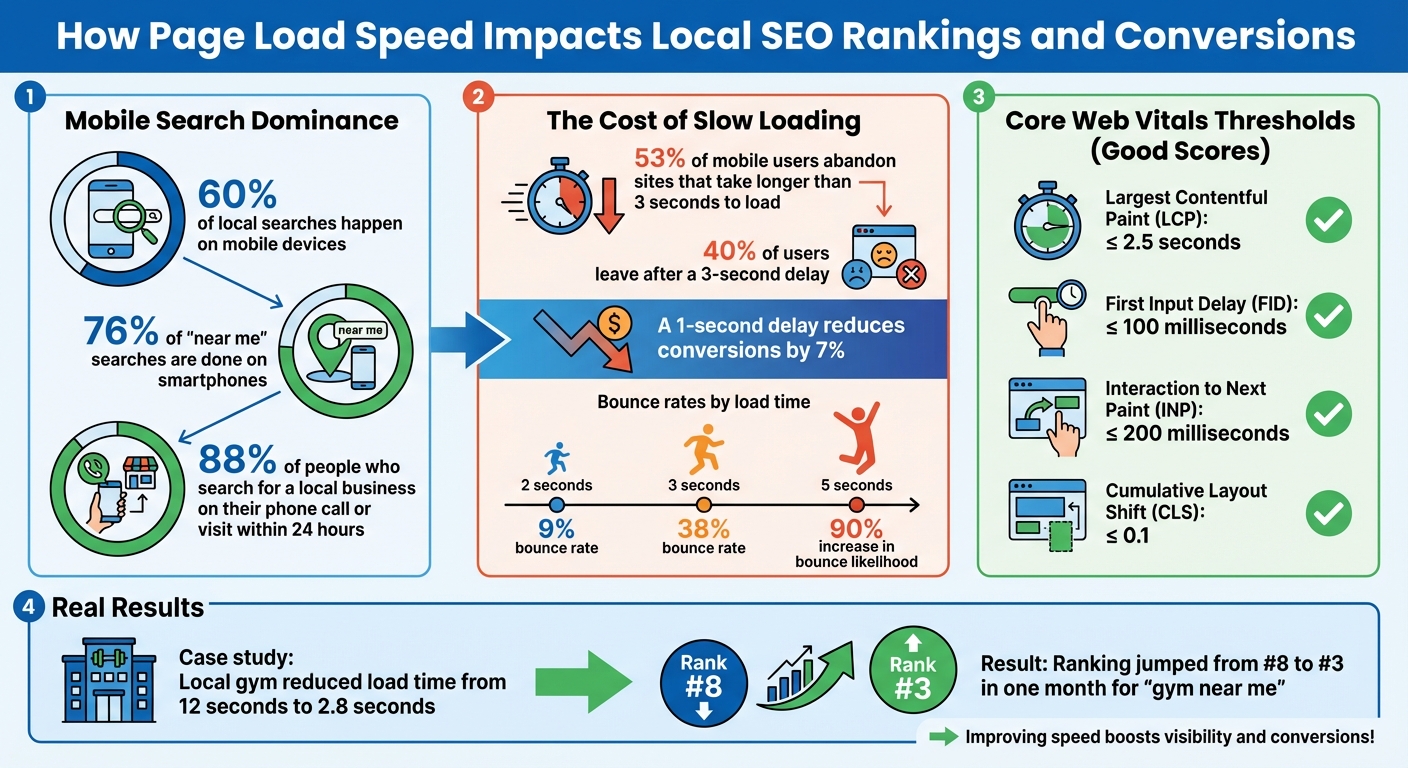
- Mobile users dominate: With 60% of local searches happening on mobile, a slow site means losing visibility and potential customers.
- Lost revenue: A 1-second delay can reduce conversions by 7%, costing businesses thousands monthly.
Improving your site’s speed isn’t just about SEO; it’s about staying competitive. Tools like Google PageSpeed Insights and GTmetrix can help identify problems. Simple fixes like compressing images, enabling browser caching, and optimizing code can drastically improve load times. Faster pages mean higher rankings, fewer bounces, and more customers.
How Page Load Speed Impacts Local SEO Rankings and Conversions
Google’s Core Web Vitals and Local SEO Rankings
Google uses Core Web Vitals to evaluate real user experiences, focusing on metrics like loading speed, interactivity, and visual stability. These factors directly affect local search rankings. When two businesses offer similar content and services, the one with better Core Web Vitals scores is more likely to rank higher. Let’s break down what these metrics mean and how they impact your site.
John Mueller has noted, "All three metrics must appear green if you want your site to get a ranking boost". This is especially important since 60% of local searches happen on mobile devices. As a result, Google places significant weight on mobile Core Web Vitals when determining rankings.
| Metric | Focus | Good Threshold |
|---|---|---|
| Largest Contentful Paint (LCP) | Loading Speed | ≤ 2.5 seconds |
| First Input Delay (FID) | Interactivity | ≤ 100 milliseconds |
| Interaction to Next Paint (INP) | Responsiveness | ≤ 200 milliseconds |
| Cumulative Layout Shift (CLS) | Visual Stability | ≤ 0.1 |
These metrics not only influence user experience but also play a key role in shaping your local SEO performance.
Largest Contentful Paint (LCP): Measuring Load Time
LCP measures how quickly the largest visible element on your page – like a hero image, a heading, or a key block of text – loads. This metric reflects what users first see when they land on your site, making it a strong indicator of perceived speed. For a good user experience, LCP should occur within 2.5 seconds.
A slow LCP score can send negative signals to Google, suggesting that your site doesn’t provide a seamless experience. For instance, if a vital element like a "Call Now" button or a key image takes too long to load, users might leave before engaging with your site. Common reasons for slow LCP include oversized, unoptimized images, sluggish server response times, and third-party plugins that delay rendering.
First Input Delay (FID): Measuring User Interaction
FID measures how quickly your site responds to a user’s initial interaction, such as clicking a "Get Directions" button or tapping your phone number. Ensuring these interactions work smoothly is a key part of optimizing your Google Business Profile. A good FID score is less than 100 milliseconds. Google also introduced Interaction to Next Paint (INP) as a broader measure of responsiveness, with a target of 200 milliseconds.
Fast interaction times are critical for local businesses. Imagine a potential customer searching for a service, landing on your site, and trying to engage with it. If the site doesn’t respond quickly, they’re likely to leave and look elsewhere. Poor FID scores can signal frustration, which may hurt your local search visibility.
Cumulative Layout Shift (CLS): Ensuring Visual Stability
CLS measures how much visible elements on your page move unexpectedly while loading. A high CLS score can lead to frustrating experiences, like tapping a button or link only to have it shift suddenly. To avoid this, aim for a CLS score of 0.1 or less.
For local businesses, unexpected layout shifts can be particularly harmful. They might cause users to click the wrong element or even abandon the page entirely. Common causes of high CLS include images or videos without set dimensions, dynamically injected content (like ads), and embedded social media widgets. By maintaining a stable layout, you create a smoother experience, which can build trust and improve your chances of ranking higher in local search results.
sbb-itb-5b82b38
How Slow Page Load Speed Hurts Local SEO Performance
A slow-loading website doesn’t just annoy visitors – it can also tank your local search rankings. For example, a delay of just 3 seconds can push away about 40% of users, cutting into your ability to attract local customers. On mobile, it’s even more critical: 53% of users will abandon a site that takes longer than 3 seconds to load. Every lost page view could mean fewer calls, visits, or purchases for your business.
Higher Bounce Rates and Lost Local Customers
When someone searches for a local business and lands on your site, they expect quick answers. If your page drags, they’ll hit the back button and turn to a competitor. The stats are clear: a page that loads in 2 seconds has a 9% bounce rate, but at 3 seconds, that rate jumps to 38%. Stretch it to 5 seconds, and the likelihood of a mobile user bouncing skyrockets by 90%.
"A one-second delay in page load time can result in a 7% reduction in conversions and 11% fewer page views. For local businesses, this translates directly to lost customers walking through your door." – Gombos Atila Robert, PhD, CEO, Jasmine Business Directory
High bounce rates send a clear signal to Google: your site isn’t meeting user needs. This hurts your ranking in local search results, creating a downward spiral. Slower speeds lead to more bounces, which lower your visibility, meaning fewer people find your business online. Worse, Google’s Core Web Vitals – key metrics that assess user experience – factor heavily into rankings. Poor performance here doesn’t just harm user satisfaction; it also slashes your chances of appearing in the Local Pack.
Lower Visibility in the Local Pack
The Local Pack – those top three map results on Google for local searches – is a critical space for small businesses. Google prioritizes fast websites for these spots because users want quick, reliable answers. If your site struggles with Core Web Vitals, you’re essentially out of the running, even if your reviews and business details are top-notch.
Jesse Dolan from Local SEO Tactics puts it plainly: "Website speed is a ranking factor, for Google. It’s official, Google has confirmed it! So, if you’re not paying attention to how fast your website is, then you’re completely ignoring something that can easily help your Google rankings!". Since Google’s July 2018 "Speed Update" made mobile page speed an official ranking factor, slow sites have faced an uphill battle in local search. Meanwhile, faster competitors are taking the lead in visibility – and winning over the customers you’re losing.
How to Test and Improve Your Page Load Speed
Speeding up your website is a key factor in climbing the local search rankings.
Testing Your Page Speed with Online Tools
Start by checking your page speed. Google PageSpeed Insights is a popular free tool that provides two types of data: Lab data (controlled environment testing) and Field data (real-world user experience from Chrome users). A score of 90 or higher is considered good, 50 to 89 means there’s room for improvement, and anything below 50 is poor.
Another excellent option is GTmetrix, which uses Waterfall charts to break down which files are slowing your site and the order they load. For a more in-depth analysis, Lighthouse, integrated into Chrome’s DevTools, evaluates performance, accessibility, and SEO in one go. If you want a broader overview of your website’s performance, check the Core Web Vitals Report in Google Search Console. This report categorizes your URLs as "Good", "Needs improvement", or "Poor" based on real user data. These tools provide actionable insights to target specific areas for improvement.
| Metric | Good | Needs Improvement | Poor |
|---|---|---|---|
| LCP (Largest Contentful Paint) | ≤ 2.5s | 2.5s – 4.0s | > 4.0s |
| INP (Interaction to Next Paint) | ≤ 200ms | 200ms – 500ms | > 500ms |
| CLS (Cumulative Layout Shift) | ≤ 0.1 | 0.1 – 0.25 | > 0.25 |
| FCP (First Contentful Paint) | ≤ 1.8s | 1.8s – 3.0s | > 3.0s |
Optimizing Images and Reducing File Sizes
Images are often the biggest culprits behind slow load times. Compressing images is an easy win – tools like Optimizilla, Squoosh, or Kraken.io can shrink file sizes without compromising quality. Switching to WebP format is another smart move, as it offers better compression compared to JPEG or PNG while keeping the images sharp.
Also, size your images appropriately. For example, avoid uploading a 2,000-pixel-wide image if it will only display at 300 pixels on your site. This simple step can significantly reduce load times. Another trick is enabling lazy loading, which ensures images load only when they are about to appear on the screen, rather than all at once when the page opens. For local businesses, using custom photos – like snapshots of your storefront or team – can add a personal touch. Be sure to name your files descriptively, like "chicago-plumbing-repair-service.jpg", instead of generic names like "IMG_001.jpg." This helps search engines understand the content better.
To further boost speed, focus on browser caching and code optimization.
Enabling Browser Caching and Minifying Code
Browser caching allows visitors’ browsers to save copies of your site’s files – images, stylesheets, and scripts – so they don’t need to download them again on repeat visits. For static assets, set cache expiration to at least one week, or even up to a year for better results. If you’re using an Apache server, you can adjust caching settings in your .htaccess file with Cache-Control headers.
Minifying your HTML, CSS, and JavaScript files is another way to boost speed. This process removes unnecessary spaces, comments, and formatting, making files smaller and quicker to load. Tools like CSSNano for CSS and UglifyJS for JavaScript are great for this task. Pair minification with Gzip compression for text files larger than 150 bytes to maximize performance. After making these changes, run your site through PageSpeed Insights to confirm which files still need attention and to fine-tune your caching policies. A faster website not only improves user experience but also gives your local SEO rankings a boost.
Improving Mobile Page Load Speed for Local Searches
Speed matters – especially when it comes to local searches on mobile devices. Did you know that over 70% of local searches happen on mobile? And 76% of "near me" searches are done on smartphones? Even more striking: 88% of people who search for a local business on their phone either call or visit that business within 24 hours. If your mobile site is slow, you’re not just losing rankings – you’re losing customers.
With Google’s mobile-first indexing, the mobile version of your site is what gets crawled and ranked. A sluggish mobile experience can tank your visibility in the Google Map Pack and hurt your chances of showing up in AI-driven search results. To put it into perspective, if your page load time jumps from 1 second to 5 seconds, there’s a 90% chance users will bounce. Ouch.
Using Mobile-Friendly Website Design
The backbone of a fast mobile site? Responsive web design. This method uses the same HTML and URL for all devices but adjusts the layout based on screen size. Google loves this approach because it avoids the hassle of separate mobile URLs and cuts down on redirect chains that slow loading times.
A responsive design ensures your site looks and works great whether someone’s on a smartphone, tablet, or desktop. It also helps avoid visual glitches that can mess with your Cumulative Layout Shift (CLS) score. For example, always set width and height attributes for images and reserve space for ads or embeds. This keeps your page layout stable as it loads.
"Mobile SEO is a speed date with Google – you’ve got to load fast, look clean, and speak structured data. Remember, Google doesn’t rank mobile sites – it ranks mobile experiences." – Kurt Fischman, Principal, Growth Marshal
Once you’ve nailed responsive design, you can take things further by using tools like AMP to supercharge your load speed.
Accelerating Mobile Load Speed with AMP
Accelerated Mobile Pages (AMP) is a game-changer for mobile speed. This open-source framework creates stripped-down versions of web pages that load almost instantly on mobile. It’s especially handy for content-heavy pages like blog posts or service descriptions.
For small businesses, AMP can make a big difference. Pages that load in under 2.4 seconds boast a 1.9% conversion rate, but for every extra second of delay, that rate drops by 0.5%. While setting up AMP takes some technical effort, the payoff is huge – faster load times mean better chances of capturing local customers who are searching on the go. Pairing AMP with responsive design ensures your site delivers the speed and stability that both users and search engines expect.
How UENI Helps Small Businesses Achieve Faster Page Load Speeds
Creating a fast-loading website can be tricky, especially if you’re not familiar with the technical side of things. That’s where UENI steps in, offering a done-for-you service that takes care of all the details. Instead of worrying about things like compressing images or tweaking code, you get a professionally built website that’s designed to load quickly. This is crucial for improving local SEO rankings, where speed plays a big role.
Speed-Optimized Websites, Ready in 7 Days
With UENI, you get mobile-friendly websites delivered in just 7 days, already optimized for speed. They use proven techniques like compressing images into modern formats like WebP, lazy loading (so images load only when needed), and minimizing CSS, JavaScript, and HTML code to keep file sizes small. These optimizations directly enhance your Largest Contentful Paint (LCP) score, which is a key factor in website performance. Plus, every site includes secure hosting and an SSL certificate, ensuring not just speed but also security.
Hosting and Local SEO: A Perfect Match
Speed optimization doesn’t stop once your website goes live. UENI’s local SEO services work alongside their hosting solutions to keep your site running fast and ranking well in local searches. Their hosting leverages Content Delivery Networks (CDNs), which distribute your website’s content across multiple servers worldwide. This means visitors load your site from the server nearest to them, cutting down on load times significantly.
For small businesses aiming to attract local customers, this is a game-changer. A faster website leads to better rankings in the Google Map Pack, fewer visitors leaving your site prematurely, and more potential customers sticking around to call or visit. UENI’s concierge service also offers ongoing support for updates and edits, so your website stays optimized as your business grows. This all-in-one approach not only enhances user experience but also boosts your visibility in local search results.
Conclusion
Fast load times are a game-changer for improving your local search rankings. Page speed isn’t just a technical detail – it directly impacts your visibility. With stats showing that 53% of mobile users leave sites that take over 3 seconds to load and 76% of people conducting local searches visiting a business within 24 hours, every second of delay can cost you potential customers. And as we’ve discussed, meeting Core Web Vital thresholds is critical – falling short could mean missing out on visibility in the Local Pack altogether.
The good news? Even small tweaks can lead to big results. For example, in May 2025, a local gym cut its page load time from 12 seconds to just 2.8 seconds by compressing equipment images. The result? Their ranking for "gym near me" shot from #8 to #3 in just one month.
For business owners who don’t have the time or expertise to tackle these optimizations, services like UENI can handle it all. Their websites come pre-optimized for speed, featuring modern image formats, lazy loading, and minified code right out of the box. Paired with their local SEO services and CDN-powered hosting, you’ll get a fast-loading website that ranks higher and converts more visitors – without needing to touch a single line of code.
Whether you choose to optimize your site yourself or work with a service like UENI, speed optimization isn’t optional anymore. Test your site with Google PageSpeed Insights or let UENI deliver a fast, SEO-ready website in just 7 days. Every second saved could mean more customers walking through your door.
FAQs
How do Core Web Vitals influence local SEO rankings?
Core Web Vitals are crucial for improving local SEO rankings because they zero in on user experience elements like how fast your site loads, how stable its visuals are, and how quickly users can interact with it. These metrics are part of Google’s Page Experience algorithm, which evaluates and ranks websites based on how user-friendly they are.
When your website is quick, responsive, and visually stable, it doesn’t just make visitors happy – it also boosts your chances of appearing higher in local search results. Fine-tuning these aspects can make your business more appealing to nearby customers searching for services or products online.
What are the best tools to boost my website’s loading speed?
Improving how fast your website loads is a key step toward enhancing user experience and boosting local SEO rankings. Here are some tools that can make a difference:
- GTmetrix: This tool evaluates your site’s performance and breaks down actionable steps you can take to improve it.
- Google PageSpeed Insights: It provides tailored suggestions to help you speed up your site, from image optimization to code tweaks.
- Lighthouse: Beyond just speed, Lighthouse audits your site for performance, accessibility, and SEO, giving you a comprehensive overview.
These tools can pinpoint areas that need attention, like compressing images, cutting down server response times, and cleaning up unnecessary code.
Why does mobile page speed matter for local businesses?
Mobile page speed plays a crucial role for local businesses since most local searches are done on mobile devices. If your site is slow to load, potential customers are likely to leave before engaging, which means missed opportunities and higher bounce rates.
On top of that, a sluggish mobile site can negatively impact your local SEO rankings, making it harder for people to discover your business online. Speeding up your mobile site not only improves the experience for users but also boosts your visibility in search results, giving your business a better chance to attract and keep local customers.