



Want to attract more local customers? Optimizing your Google Business Profile is one of the simplest, most effective ways to improve your local SEO and stand out in search results. Here’s why it matters and how you can get started:
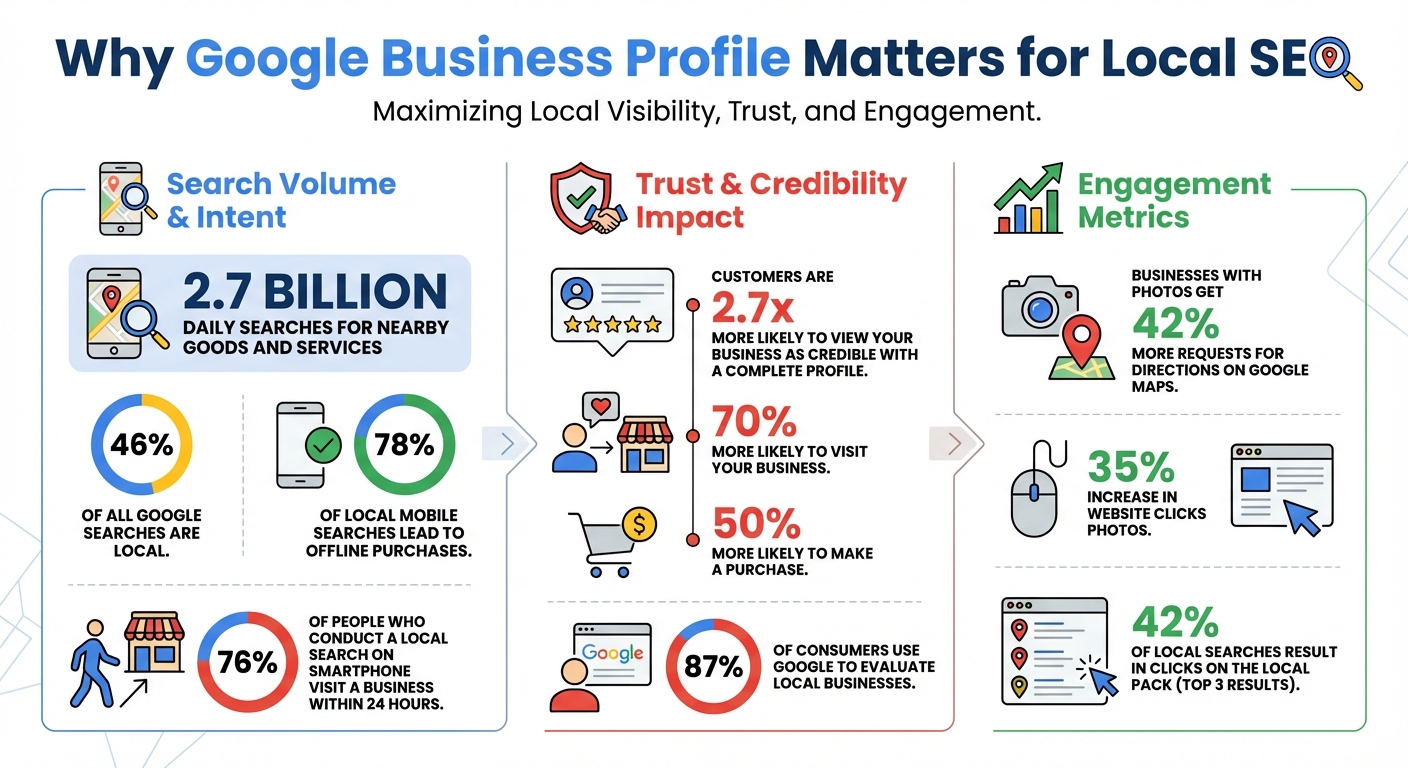
- Nearly half (46%) of Google searches are local, with billions of daily searches for nearby services like "plumber near me."
- A complete Google Business Profile increases trust – customers are 2.7x more likely to view your business as credible and 70% more likely to visit.
- Proper setup and optimization can land your business in the Local Pack (the top 3 results with a map), boosting visibility.
Key Steps to Get Started:
- Set up and verify your profile: Use your exact business name, accurate categories, and local contact details.
- Optimize your profile: Add high-quality photos, a keyword-rich description, and up-to-date hours.
- Engage with customers: Post updates, respond to reviews, and use the Q&A section to answer common questions.
With 78% of local mobile searches leading to in-store purchases, optimizing your profile isn’t just about being visible – it’s about driving real results. Let’s dive into the details.

Google Business Profile Local SEO Statistics and Impact
How to Set Up and Verify Your Google Business Profile

Creating Your Business Profile
Getting started with your Google Business Profile begins with a Google Account. If you don’t already have one, it’s best to create an account using your business email (e.g., name@yourbusiness.com). This not only keeps things professional but also ensures everything stays organized from the beginning.
Once logged in, head to the setup page and enter your exact business name. Make sure it matches what’s displayed on your storefront, business cards, and invoices. Avoid including marketing phrases, special characters, or store codes unless they’re part of your official brand name. If your business has already been claimed by someone else, you’ll need to go through Google’s process to request ownership.
Next, select your primary business category. Be as specific as possible – choose a category that describes what your business is, not what it offers. For instance, if you own a golf resort, pick "Golf Resort" rather than "Swimming Pool." The more accurate your category, the better Google can connect your business to relevant searches.
Now, it’s time to add your location details. If you operate from a physical storefront where customers visit, provide your full street address. Keep in mind that P.O. boxes and virtual offices don’t meet Google’s criteria. For service-area businesses – like plumbers or electricians who travel to customers – skip listing a physical address and instead define your service areas by city or postal code. You can list up to 20 service areas, ideally covering regions within about a two-hour drive. If you work from home, make sure to hide your address to comply with Google’s rules.
Finally, include your phone number and website URL. Use a local phone number that connects directly to your business. Once all the details are in place, you can move on to verifying your profile to unlock its full functionality.
Verification Process
Verification is essential to activate your profile fully. Without it, your business won’t appear on Google Search or Maps, and you won’t be able to update your information or interact with customers. Google determines the verification method for you based on your business type, location, and available public data – you can’t choose or change this method.
The most common way to verify is by mail. Google will send a postcard containing a five-digit code to your business address, which typically arrives within 14 days. Once you receive it, log in and enter the code. Be cautious not to change your business name, address, or category while waiting for the postcard, as this could invalidate the code. Remember, the code expires after 30 days, so act quickly.
Other verification options include phone or SMS, where you’ll receive a code via text or an automated call to your business phone number. Make sure your phone can receive texts or that someone is available to answer calls, as automated systems can’t handle voicemail. Some businesses might qualify for email verification, while others may need to provide a video recording showing their location, nearby landmarks, equipment, and proof that they manage the business (like unlocking the premises). Occasionally, Google may require a live video call with a support representative for manual verification.
If your website is already verified through Google Search Console, you might be eligible for instant verification, which speeds things up. After completing the verification process, Google typically reviews your submission within five business days. Once approved, you’ll receive a confirmation email, allowing you to manage your profile, add team members, and interact with customers.
"When you verify your business on Google, you gain ownership of your Business Profile and can make sure your business info is accurate." – Google Help
The best part? Setting up and verifying your Google Business Profile is completely free, making it one of the most affordable and effective marketing tools for local businesses.
sbb-itb-5b82b38
Optimizing Your Google Business Profile for Local SEO
Once your profile is set up and verified, fine-tuning it can significantly improve your visibility in local search results.
Choosing the Right Categories
Your primary category plays a crucial role in determining which keywords your business will rank for in local searches. Think of it as the backbone of your profile – if it’s not accurate, you may struggle to appear in relevant searches.
Follow the "IS a" rule: choose a category that defines what your business is, not what it offers. For example, a grocery store should select "Grocery Store" as its primary category, even if it also provides services like a pharmacy or ATM. Similarly, a nail salon should opt for "Nail Salon" rather than the broader "Salon." The more specific your category, the better your chances of ranking for highly targeted searches.
"Select categories that complete the statement: ‘This business IS a’ rather than ‘this business HAS a.’" – Google Business Profile Help
Your primary category also unlocks specific features. For instance, restaurants gain access to menu editors and reservation links, salons can add booking buttons with pricing details, and hotels can showcase class ratings and amenities. You can include up to nine additional secondary categories, but stick to only what accurately describes your business.
To make informed decisions, research the categories your top competitors are using. Tools like GMBspy or GMB Everywhere can help you identify their primary and secondary categories. Additionally, use keyword tools to compare search volumes for different terms – for example, "Mexican Restaurant" might attract more searches than "Taco Shop." Revisit your categories every three to six months to stay updated with new options Google may introduce.
Once your categories are fine-tuned, focus on crafting a detailed, keyword-rich business description.
Writing a Keyword-Rich Business Description
A well-written business description boosts your relevance in local search rankings. Google matches profiles to searches based on relevance, distance, and prominence. Providing a clear, detailed description improves your relevance score, increasing your chances of appearing in the Local Pack.
"Relevance is how well a Business Profile matches what someone is searching for. To help Google better understand your business and match it to relevant searches, provide complete and detailed business info." – Google Business Profile Help
Take advantage of the full 750-character limit to describe your services, mission, and what sets your business apart. Include relevant keywords naturally, but avoid overloading your description with them – it can lead to penalties, especially if you add keywords to your business name. Also, steer clear of promotional language like "50% off" or "best prices", and don’t include links or URLs, as Google prohibits these in descriptions.
With 87% of consumers using Google to evaluate local businesses and 42% of local searches resulting in clicks on the Local Pack, a strong, keyword-focused description can make a real difference in attracting customers.
Adding Photos and Videos
While accurate categories and detailed descriptions help with rankings, high-quality visuals build trust and make your profile more appealing. Businesses with photos see 42% more requests for directions on Google Maps and a 35% increase in website clicks.
Aim to upload at least three photos for each category: exterior shots from different angles, interior views that showcase your atmosphere, product images, and team photos. Use real images of your location and staff, as these resonate better with potential customers than stock photos. For best results, use JPG or PNG files between 10 KB and 5 MB in size, with a resolution of at least 720 x 720 pixels.
Videos can further enhance your profile. Keep them under 30 seconds, less than 75 MB, and ensure they’re shot in 720p or higher resolution. Use videos to give quick tours, highlight your services, or provide behind-the-scenes glimpses of your business. Considering that 76% of people who conduct a local search on their smartphone visit a related business within 24 hours, it’s essential that your visuals reflect what customers can expect.
Keep your profile dynamic by regularly updating your photos and videos to show that your business is active. Don’t forget to set a clear square logo and an eye-catching cover image, such as a team photo or an inviting exterior shot, to represent your brand’s personality.
Using Google Business Features to Engage Customers
Once your profile is polished, it’s time to tap into Google Business features to connect with your audience. A well-maintained Google Business Profile not only grabs attention but also turns casual browsers into loyal customers. With built-in tools designed for direct interaction, you can answer questions, build trust, and engage potential clients even before they reach out. Here’s how to make the most of these features.
Creating and Managing Google Posts
Google Posts are a powerful way to share updates, promotions, or events directly on your profile. These posts show up in the "Updates" tab on mobile and the "From the owner" section on desktop. You can choose from three types of posts: Updates for general news, Offers for limited-time deals, and Events for activities like workshops or webinars.
Each post can include a call-to-action button such as "Book", "Order online", "Buy", "Learn more", or "Call now", encouraging customers to take immediate action. Keep the text short and impactful – around 80–100 words – and prioritize key information at the beginning. To boost visibility, include high-quality images (minimum 400×300 pixels, ideally 1200×900 pixels) or short videos (up to 30 seconds).
"Stick with 80-100 words per Post… make sure to put keywords and the most important message towards the front of the paragraph of your Post." – Ben Fisher, Steady Demand
Posting consistently, at least once every two weeks, keeps your profile fresh and engaging. To track how well your posts are performing, add UTM parameters to your call-to-action links. Keep in mind that posts are archived after six months unless specific dates are set. Also, avoid adding phone numbers in the post description – use the "Call now" button instead for a professional touch.
Encouraging and Responding to Reviews
Reviews are a cornerstone of customer trust. In fact, businesses with complete profiles are 70% more likely to attract visits and 50% more likely to generate purchases. Interestingly, a mix of positive and negative reviews often appears more credible than a perfect five-star rating.
To make it easy for customers to leave reviews, create a direct review link or QR code by selecting "Read Reviews" and then "Get more reviews." Share this link via thank-you emails, chat messages, or printed receipts. However, avoid offering incentives like discounts or freebies in exchange for reviews, as this violates Google’s guidelines. Also, don’t use review stations, such as tablets or kiosks, to solicit feedback.
Responding to reviews – whether glowing or critical – is equally important. Public replies show up under your business name and notify reviewers instantly. Most replies are approved within 10 minutes, though some may take up to 30 days. If you come across a review that violates Google’s policies, use the "Report inappropriate reviews" feature instead of engaging in disputes.
Answering Customer Questions
The Q&A section is often overlooked – about 87% of businesses don’t use it at all. That’s a missed opportunity, as businesses with active Q&A sections see 42% more direction requests and 35% more website clicks compared to those that ignore it.
For example, a local plumber saw a 34% increase in calls after optimizing their Q&A section. Similarly, a law firm experienced a 156% jump in inquiries over six weeks by addressing common questions like "How much does a divorce lawyer cost in [city]?" and capturing a featured snippet.
"Every answer you provide becomes searchable content that Google indexes and considers when determining your relevance for local searches." – Gombos Atila Robert, CEO, Jasmine Business Directory
You can even ask and answer your own questions to address frequent inquiries proactively. Review your Q&A section weekly to correct inaccuracies. To ensure clarity, place the most critical information in the first sentence, as longer answers may get truncated. Upvote helpful answers to keep them visible, and use the three-dot menu to report irrelevant or offensive content.
This section can also help you qualify leads. For instance, an attorney in Atlanta posted the question "Do you do civil litigation?" and answered "No", which filtered out irrelevant inquiries and helped prevent the profile from ranking for unrelated keywords.
Tracking Performance and Avoiding Common Mistakes
Using Insights to Measure Success
Google Business Profile Insights is a powerful tool for understanding how customers discover and interact with your business listing. It provides up to six months of rolling data, divided into two key categories: how people find you (including search terms, devices, and platforms) and how they engage with you (such as calls, website clicks, direction requests, and messages).
One of the most important metrics to monitor is Discovery searches. These occur when users find your business through general terms like "plumber near me" rather than searching for your specific name. This metric reflects how effective your local SEO efforts are. Pay close attention to high-intent actions like clicks, calls, and requests for directions – these carry more weight than visibility numbers alone.
The Searches breakdown offers a detailed view of the keywords that trigger your profile. This information is invaluable for refining your strategy, as it not only shows overall engagement but also pinpoints the keywords driving the most traffic.
"Google Business Profile Insights data is a goldmine for finding the types of keywords that could be triggering justifications." – Claire Carlile, Google Business Profile Silver Product Expert
Leverage these insights to update your business description and website content. To track what happens after users land on your site, use UTM parameters (e.g., utm_source=gbp&utm_medium=organic) in your website links. This step is crucial, as Google Business Profile Insights can’t track on-site conversions or revenue. By aligning these insights with your previous optimizations, you can continue fine-tuning your local SEO strategy.
It’s also worth noting that Views only count unique daily visitors, regardless of how often they return or what devices they use. Meanwhile, the Searches metric updates monthly and may take up to five days to appear.
Common Pitfalls to Avoid
While tracking performance is essential, it’s equally important to steer clear of common mistakes that can derail your local SEO efforts.
First, ensure your Name, Address, and Phone number (NAP) are consistent across your website, social media, and directories. Even small inconsistencies can confuse search engines and potential customers, negatively impacting your rankings.
Avoid keyword stuffing in your business name field – it’s a quick way to get your profile suspended. Your business name should match how it appears in real life, such as on signs, stationery, and branding. For example, using "America’s Most Convenient Bank" instead of simply "TD Bank" violates Google’s guidelines. Similarly, don’t use fully capitalized names like "SUBWAY"; stick to "Subway".
Other mistakes include selecting too many or irrelevant categories and creating duplicate profiles for the same location. Keep in mind that businesses with complete profiles are 70% more likely to attract visits and 50% more likely to drive purchases. Use the Profile Strength Indicator in your dashboard to identify gaps, such as missing descriptions or photos.
Additionally, keep your hours updated to avoid frustrating customers. Make it a habit to respond to all reviews, whether positive or negative. Google’s algorithm favors businesses that actively engage with their audience.
"SEO is a long-term strategy. You may start to see improvements in 3–6 months, but consistent effort is needed for sustained results." – Raelyn Kaplan, Joyco Digital
Conclusion
Your Google Business Profile is more than just a listing – it’s a key tool for attracting local customers. With about 46% of all Google searches having local intent – equating to an incredible 2.7 billion daily searches for nearby goods and services – a well-optimized profile can make a huge difference.
A complete and active profile builds trust and encourages real customer interaction. It’s not just about being visible online; it’s about driving foot traffic and increasing revenue directly.
Focusing on the three key factors – Relevance, Distance, and Prominence – can significantly boost your local SEO rankings. This means choosing accurate categories for your business, creating a description that incorporates important keywords, regularly uploading high-quality photos, and keeping your business hours and reviews up to date. These actions demonstrate to Google that your business is active and reliable, which improves visibility and strengthens customer trust.
"Your Google Business Profile is not a set-and-forget listing. It’s a major marketing asset that requires ongoing optimization to deliver maximum traffic, clicks, conversions, and sales." – Search Engine Land
The numbers speak for themselves: nearly 78% of local mobile searches result in an offline purchase. Every click for directions, phone call, or website visit starts with a well-maintained profile. By implementing strategies like verification, proper categorization, review management, and performance tracking, you can ensure your business stands out as the top choice when local customers are ready to make a purchase.
FAQs
How does a Google Business Profile help improve local SEO?
A Google Business Profile is essential for improving local SEO, as it gives Google key information about your business. Details like your business name, category, address, operating hours, photos, reviews, and updates help Google assess how relevant, nearby, and well-regarded your business is in local search results.
Maintaining a complete, accurate, and regularly updated profile can greatly enhance your visibility on Google Maps and local search, making it simpler for potential customers in your area to discover and select your business.
How do I choose the best categories for my Google Business Profile?
Selecting the right categories for your Google Business Profile plays a key role in improving your local search visibility. Start by picking a primary category that directly reflects your main service – think "Plumbing Contractor" rather than a broad term like "Home Services." This helps Google better match your business to relevant searches, increasing your chances of showing up in local results. Avoid generic or overly broad categories, as they might weaken your visibility.
When it comes to secondary categories, focus on services you actually provide and limit your choices to four or fewer highly relevant options. Adding too many categories – or ones that don’t apply – can confuse Google’s algorithm and negatively impact your rankings. Always select categories from Google’s official list, and make sure they align with the language used on your website and other online listings.
To keep your profile accurate, revisit your categories every few months and update them if your services change. If managing this feels overwhelming, UENI offers a service to handle category selection for you, ensuring your profile stays compliant with Google’s rules while improving your local SEO.
How can I use Google Posts to connect with local customers?
Google Posts offer a fantastic opportunity to share updates, promotions, events, or product highlights directly through your Google Business Profile. These posts appear prominently in Google Search and Maps, making them highly visible to potential customers looking for services in your area. Plus, you can include a call-to-action (CTA) button like "Call now", "Book", or "Learn more" to encourage immediate responses.
Here are some tips to get the most out of Google Posts:
- Post consistently to keep your profile fresh and engaging. Aim for at least one update per week, especially if you’re running time-sensitive offers or hosting events.
- Make it locally relevant by including details like "Free parking for downtown visitors" or "Join us at our 5th Street location this weekend."
- Use high-quality visuals and concise text to grab attention. Pair striking images or videos with a short, clear description and a strong CTA to drive action.
If you’d prefer a hands-off solution, UENI provides a service to create and manage optimized Google Business Profile posts. This ensures your updates are always aligned with your brand and designed to attract local customers effectively.