



Managing video posts across platforms like Instagram, TikTok, YouTube, and Facebook can be overwhelming. Automation tools simplify this process, saving time and ensuring consistent posting – key for boosting engagement and ROI. In 2026, here are the best tools for automating video content:
- Buffer: Affordable and user-friendly for small businesses. Schedule posts across platforms from $6/month/channel.
- Hootsuite: Advanced analytics and bulk scheduling for teams. Plans start at $99/month.
- Later: Visual scheduling for Instagram and TikTok. Growth plans start at $37.50/month.
- Sprout Social: Enterprise-level features like AI-driven posting times. Pricing begins at $79/month.
- Meta Business Suite: Free scheduling for Facebook and Instagram, with built-in analytics.
- YouTube Studio: Free, unlimited scheduling for YouTube videos and Shorts.
- Opus Clip: AI-driven tool to turn long videos into short clips. Free plan available; Pro starts at $29/month.
- Descript: Edit videos via transcripts and repurpose content easily. Paid plans start at $16/month.
- Gumloop: No-code workflows for video uploads and publishing.
- Shotstack: API-based tool for scaling video production. Pay-as-you-go pricing starts at $0.30/minute.
These tools cater to various budgets and needs, from free options to enterprise solutions. Consistency in posting is critical, but pairing automation with a mobile-optimized website ensures traffic converts into sales.
Quick Comparison:
| Tool | Best For | Starting Price | Key Features |
|---|---|---|---|
| Buffer | Small businesses, solo creators | $6/month/channel | Multi-platform scheduling, integrations |
| Hootsuite | Teams, advanced analytics | $99/month | Bulk scheduling, AI tools |
| Later | Instagram, TikTok focus | $37.50/month | Visual planner, analytics |
| Sprout Social | Enterprise needs | $79/month | AI posting, team collaboration |
| Meta Business Suite | Facebook, Instagram users | Free | Built-in scheduling, analytics |
| YouTube Studio | YouTube-focused users | Free | Unlimited uploads, detailed analytics |
| Opus Clip | Repurposing long videos | Free, $29/month Pro | AI clip creation, scheduler |
| Descript | Editing via transcripts | $16/month | Multi-format exports, collaboration |
| Gumloop | No-code workflows | Custom pricing | Workflow automation |
| Shotstack | High-volume video production | $0.30/minute | API-based, dynamic templates |
Each tool offers unique features to fit your workflow and budget. Start small by testing one tool for a month to see how it improves your content strategy.

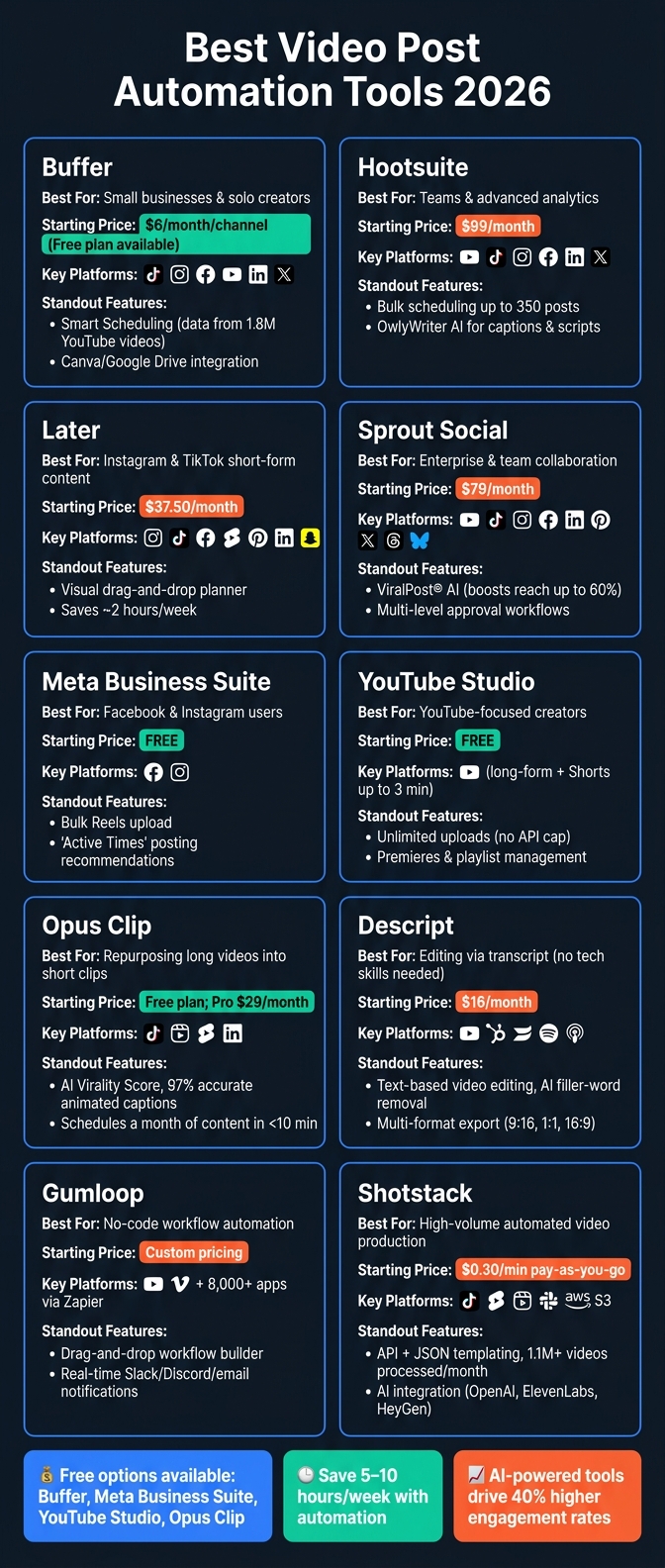
Best Video Post Automation Tools 2026: Features & Pricing Compared
How To Choose a Video Post Automation Tool
Picking the right video automation tool can save you from wasting both time and money. Start by focusing on multi-platform support. At a minimum, your tool should work with Instagram Reels, TikTok, YouTube Shorts, and Facebook. As of 2026, most top-tier tools also support Meta’s Threads. After platform coverage, consider how well the tool optimizes your content.
A great feature to look for is automatic format optimization. This means the tool adjusts your video’s aspect ratio, file size, and captions to fit the requirements of each platform. Combine that with bulk scheduling capabilities – some tools, like Hootsuite, allow you to schedule up to 350 posts at once – and you can map out an entire month of content in one sitting.
Analytics is another must-have. A unified dashboard that tracks performance across all platforms allows you to see what’s working. Tools with UTM link support are especially useful, as they let you track how much traffic your videos are sending to your website. Analytics become even more powerful when tied to a broader strategy. For example, if your website is optimized with local SEO tips (like UENI’s websites, which include verified Google Business profiles and SEO-ready pages), the traffic your videos drive has a better chance of converting.
Budget is another key factor, especially for small businesses. Affordable options like Buffer ($6 per channel per month) and Metricool (free tier with paid plans starting at $17 per month) work well for solo users. Mid-range tools like Sendible ($25 per month) add team collaboration features, while enterprise-level platforms like Sprout Social ($249 per user per month) are better suited for agencies.
Lastly, ease of use is critical. A drag-and-drop content calendar is a major plus for those who aren’t tech-savvy. Always test free trials with real video content to ensure the tool works reliably. If the platform doesn’t alert you about posting errors, it could disrupt your consistency.
"The right social media scheduler doesn’t just save time – it transforms how you approach content." – PostEverywhere
sbb-itb-5b82b38
1. Buffer
Best for: Small businesses and solo creators looking for an easy and affordable way to schedule videos across multiple platforms.
Buffer simplifies video publishing by supporting platforms like TikTok, Instagram Reels, Facebook Reels, YouTube Shorts, LinkedIn, and X – all from one dashboard. You can tweak captions, hashtags, and mentions for each platform directly within Buffer. This single interface keeps your workflow organized and helps you dive into advanced scheduling features with ease. Its straightforward design matches the need for efficiency, which is essential for small teams and solo creators.
Buffer’s Smart Scheduling feature uses data from 1.8 million YouTube videos to identify the best times to post. For instance, long-form videos perform best on Sundays at 10 a.m., while Shorts see the most engagement on Fridays at 4, 6, and 7 p.m.. Treating these formats as separate strategies can boost your reach without the need to create extra content.
The platform also integrates seamlessly with tools like Canva, Google Drive, Dropbox, and OneDrive. This means you can import video assets directly from these services, which is a game-changer for small businesses without a dedicated content team.
"With Buffer I can build social content out as far as I want into the future but also tailor campaigns if we see certain trends within the industry." – Justin Ozanich, Foster Coffee Company
Buffer offers flexible pricing plans to cater to different needs:
| Plan | Price | Channels | Scheduled Posts |
|---|---|---|---|
| Free | $0/month | Up to 3 | 10 per channel |
| Essentials | $6/month/channel | Unlimited | Unlimited |
| Team | $12/month/channel | Unlimited | Unlimited |
| Agency | $120/month | 10 | Unlimited |
More than 200,000 small businesses and creators use Buffer every month. With a 4.5/5 rating on Capterra from over 1,400 reviews, Buffer is a go-to tool for business owners who value simplicity and reliability.
2. Hootsuite

Best for: Small businesses and growing teams that want advanced analytics, multi-platform video scheduling, and efficient workflow tools all in one place.
Hootsuite allows video posting across eight platforms, including YouTube and TikTok, making it a versatile tool for managing content. It simplifies the process by enabling you to customize a single video post for multiple platforms at once, cutting down on repetitive tasks like copying captions. Plus, its CSV bulk scheduling feature lets teams queue up to 350 posts in one go, saving significant time.
But Hootsuite isn’t just about scheduling – it excels in analytics too. It tracks key video metrics such as average view duration, subscriber growth, and engagement rates, offering insights to refine your content strategy. It even provides tailored "Best Time to Publish" recommendations based on your audience’s activity over the last 30 days. For example, Stuckey’s, a beloved American candy brand, leveraged these tools to boost online sales by an impressive 750% over two years.
"The analytics dashboard is … invaluable! Hootsuite dashboards provide a birds-eye view on the performance of our many social campaigns. We can quickly analyze the results and create reports at the click of a button." – Slade Meadows, Digital Marketing Manager, Classic of Denton
Hootsuite also helps with content creation. Its OwlyWriter AI can generate video scripts, captions, and hashtags, while an integrated Canva feature lets you design thumbnails and graphics seamlessly. For added convenience, it connects with platforms like Wistia and Vidyard, allowing you to pull video files directly into your scheduled posts. This combination of scheduling, analytics, and creative tools makes Hootsuite a solid choice for businesses aiming to expand their business video marketing efforts.
Pricing for Hootsuite’s Standard plan starts at $99/month, and they offer a 30-day free trial to help you explore its features. With its detailed analytics and streamlined workflows, it’s a great option for scaling video content across multiple platforms.
3. Later
Best for: Small businesses creating short-form video content who need a visual, user-friendly scheduling tool with strong analytics for Instagram and TikTok.
Later takes the hassle out of posting by automatically publishing short-form videos to eight platforms: Instagram, TikTok, Facebook, YouTube Shorts, Pinterest, LinkedIn, Threads, and Snapchat. One thing to note: YouTube support is specifically for Shorts. This broad platform compatibility makes Later a go-to for streamlined scheduling.
Its Visual Planner is a standout feature, offering a drag-and-drop interface that lets you preview how video thumbnails will look on your Instagram grid. On top of that, it provides desktop tools for cropping and trimming videos tailored to each platform – no app-switching required. The Media Library integrates with Canva, Google Drive, and Dropbox, making it easy to organize assets directly within the drag-and-drop workflow.
When it comes to analytics, Later delivers detailed insights for Instagram and TikTok, including follower demographics, audience growth trends, and post performance metrics. The "Best Time to Post" feature goes a step further by analyzing your audience’s activity to recommend the most effective times to post – not just generic peak hours. On average, users save about 2 hours per week by using Later.
"Later’s TikTok auto publish is a game-changer. With two kids, I could never sneak in time to post. Now I can reliably post at peak times – PLUS, Later’s analytics allows me to reach peak viewership across all my platforms." – Kate Talcott, Founder, Splatter & Bloom
The Growth Plan starts at $37.50/month (billed annually), which includes 2 Social Sets, 180 posts per profile, and a full year of analytics history. If you’re curious, you can try it out first with a 14-day free trial.
4. Sprout Social
Best for: Small businesses seeking enterprise-grade video scheduling, team collaboration, and detailed performance analytics across multiple platforms.
Sprout Social enables automated video publishing for platforms like YouTube (including Shorts), TikTok, Instagram Reels, Facebook, LinkedIn, Pinterest, X, Threads, and Bluesky. One standout feature is ViralPost®, a patented AI tool that examines 16 weeks of audience engagement to identify the best posting times, potentially boosting reach by up to 60%.
For teams juggling numerous accounts, Sprout offers multi-level approval workflows and role-based permissions to simplify collaboration and ensure brand consistency. Melissa Fasano, Director of Audience Engagement, highlights this benefit:
"Being able to approve posts was a big part of why we chose Sprout… when you have a growing portfolio of over 120 properties, it’s really difficult for one or two people to have eyes and ears on everything."
Sprout’s Post Performance Report goes deep into metrics, tracking partial views (3–30 seconds), full views, and YouTube-specific stats like subscriber changes. You can also filter results by video or post type (Reels, Shorts, Ad Posts) to uncover what’s driving engagement. Plus, it integrates seamlessly with asset management tools like Adobe Experience Manager and Bynder, making the transition from content creation to scheduling more efficient.
Pricing starts at $79/month, with a 30-day free trial available – no credit card needed. Sprout Social’s comprehensive features make it a strong option before diving into more niche video automation tools.
5. Meta Business Suite
Best for: Small businesses active on Facebook and Instagram looking for a free, built-in tool to schedule video content without relying on third-party apps.
Meta Business Suite is a free platform designed to simplify video scheduling for Facebook and Instagram users. Accessible on both desktop and mobile, it allows you to manage posts, Stories, and Reels from a single dashboard. You can even schedule content for both platforms simultaneously, with options to tweak captions and hashtags for each. The bulk upload feature saves time by letting you upload, title, and schedule multiple Reels in one go. Plus, with a recent update, Facebook now categorizes all video uploads as Reels, no matter their length or format. This eliminates the need for external apps by offering scheduling and editing tools directly within the platform.
One standout feature is "Active Times", which recommends the best posting times based on your audience’s activity. The Planner calendar view makes scheduling even easier, letting you drag and drop content to fill gaps. Facebook supports videos up to 10GB and 240 minutes long, while Instagram Reels have a 4GB size limit and a 90-second duration.
| Spec | Facebook Video/Reels | Instagram Reels |
|---|---|---|
| Max File Size | 10GB | 4GB |
| Max Length | 240 minutes | 90 seconds |
| Recommended Ratio | 4:5 (Feed) or 9:16 (Reels) | 9:16 |
| Min Resolution | 1080p | 1080p |
| Bulk Upload | Supported | Not supported |
On the analytics side, Meta Business Suite provides insights into key metrics like total watch time, average watch time, and the percentage of the video watched. These stats help you identify where viewers lose interest, so you can fine-tune your content. The platform also supports A/B testing with 2–4 post variations, enabling you to see which captions or hooks perform best. While it offers strong, free analytics for Facebook and Instagram, businesses using other platforms will need additional tools.
6. YouTube Studio
Best for: Small businesses that focus heavily on YouTube for long-form videos, tutorials, or product demos and need a free scheduling tool without upload restrictions.
YouTube Studio is YouTube’s built-in, free management dashboard. Unlike third-party tools, which often cap uploads at around six per day due to API limitations, YouTube Studio allows unlimited uploads. Scheduling is simple – just upload your video, set the date, time, and time zone, and select the "Scheduled" visibility option to delay its release. It supports both long-form videos and YouTube Shorts up to 3 minutes in length, an increase from the previous 60-second limit as of October 2024. Keep in mind, if you’re uploading 4K videos, processing can take 6–8 hours.
"For full YouTube control including long-form, premieres, and playlists, YouTube Studio is free and unmatched." – Hasan Cagli, PostPlanify
YouTube Studio shines with its native features. You can set up Premieres, organize playlists, add end screens and cards, and manage captions – all directly from the platform. Many of these features are either unavailable or only partially accessible through third-party scheduling apps. Additionally, its analytics tools provide detailed insights into watch time, audience retention, subscriber growth, and traffic sources.
That said, YouTube Studio is designed exclusively for YouTube, meaning it doesn’t offer cross-posting, batch scheduling, or team approval workflows. If your strategy spans multiple platforms, you’ll likely need to supplement it with another tool. But for businesses focused solely on YouTube, its native functionality makes it an efficient and budget-friendly choice.
| Feature | YouTube Studio | Third-Party Tools (via API) |
|---|---|---|
| Cost | Free | Often requires a paid plan |
| Upload Limits | None | ~6 uploads/day |
| Shorts Support | Up to 3 minutes | Some tools capped at 60 seconds |
| Premieres | Yes | Limited support |
| Batch Scheduling | No | Yes |
| Cross-Posting | No | Yes |
| Community Posts | Yes | Not supported via API |
7. Opus Clip
Best for: Small businesses looking to transform a single long-form video into multiple short-form clips for TikTok, Instagram Reels, YouTube Shorts, and LinkedIn – without spending hours editing.
Opus Clip is an AI-powered video repurposing tool trusted by over 16 million creators and businesses worldwide. Simply upload a long video from platforms like YouTube, Zoom, Vimeo, or Google Drive, and the ClipAnything AI gets to work. It identifies key moments in your content – whether it’s an interview, a vlog, or an explainer video – and automatically generates polished short clips. These clips come with features like animated captions (97% accurate), auto-reframing, and matched B-roll, all done without manual effort.
For small businesses, tools like the Virality Score and built-in social scheduler make content planning a breeze. The AI assigns each clip a score to predict its potential performance on social media, helping you prioritize what to post. Plus, the scheduler allows you to plan an entire month’s content across major platforms in under 10 minutes. These features aren’t just convenient – they’ve delivered tangible results for users.
Take marketing agency leader Tom Ritter, for example. By incorporating Opus Clip into his team’s workflow, he cut content production costs by 300% and boosted output by 148%. Similarly, e-commerce seller Abja used the tool to create short product videos from existing footage, resulting in a 70% revenue increase within two months.
"What we’ve been doing as part of our strategy when it comes to growth is a lot more social media content… Opus Clip makes my job easier, freeing up significant time weekly." – JD F., Business Owner
Opus Clip offers a free plan with 60 minutes of AI video processing per month, perfect for trying out the tool. The Pro plan costs $29/month (or $14.50/month when billed annually) and unlocks additional perks like social scheduling, team workspaces, 3,600 annual credits, and 100GB of storage. However, keep in mind that the AI may struggle with silent or purely visual content, and advanced integrations are only available in paid tiers.
8. Descript
Best for: Small businesses looking to edit and repurpose video content effortlessly, without needing technical expertise.
Descript takes a unique approach to video editing by allowing you to edit through a text transcript. Want to cut a part of your video? Just delete the corresponding words from the transcript, and the video automatically updates. As Donna B. shared:
"With Descript I’ll be able to at least double my content output since editing is taking one-quarter the time it used to."
The platform’s AI co-editor handles tedious editing tasks like removing filler words, trimming silences, and improving audio quality. It also identifies standout moments in longer recordings. The "Find Good Clips" feature is a game-changer for creating short, engaging content for platforms like TikTok and Instagram Reels. Plus, you can export your videos in multiple formats – portrait (9:16), square (1:1), and horizontal (16:9) – all in one go.
Descript doesn’t stop at editing. It simplifies content distribution with integrations for YouTube, HubSpot, Wistia, and tools like Zoom, Riverside, and Google Drive. For podcasters, it supports hosting platforms like Buzzsprout and Transistor. It even sends team notifications via Slack. The Business plan’s Brand Studio feature lets you store your logo, fonts, and brand colors, ensuring your video content stays on-brand.
Collaboration is another standout feature. Ezra Bakker Trupiano, Lead Editor at HubSpot, explained:
"Descript is amazing for collaboration. It’s text-based, so it allows for non-technical people on the team to submit comments or do edits themselves without needing to understand how an editor works."
Descript has earned a solid reputation, boasting a 4.6/5 rating on G2 as of 2026. Its plans are designed to suit various needs. Beginners can start with the free plan, which includes 1 hour of transcription per month and 720p video exports. Paid plans range from $16 per month (Hobbyist) to $50 per month (Business, billed annually). The Business plan unlocks advanced features like Brand Studio, 4K exports, and video translation in over 20 languages. However, the free plan has limitations, such as watermarked exports and restricted AI functionality for frequent publishing.
Descript offers a streamlined, all-in-one solution for editing, repurposing, and publishing video content – making it an essential online marketing tool for small businesses aiming to maintain a strong online presence.
9. Gumloop
Best for: Digital tools for small businesses can help simplify video publishing workflows without diving into coding.
Gumloop brings a no-code approach to the table, making video publishing automation more accessible. With this platform, you can design custom workflows that connect your favorite apps, streamlining the entire process.
For example, you can automate video uploads by setting up workflows that pull content from cloud storage services like Google Drive, Dropbox, or Amazon S3. From there, the videos can be distributed to platforms such as YouTube or Vimeo without manual effort.
Gumloop integrates effortlessly with tools like Zapier (offering connections to over 8,000 apps), Make (over 3,000 apps), Pabbly Connect, and Albato. This ensures it fits seamlessly into your existing marketing toolkit. To keep your team in the loop, Gumloop also sends real-time notifications through Slack, Discord, or email whenever content goes live.
While the platform is user-friendly, setting up effective workflows does require some initial planning to align with your specific goals.
10. Shotstack
Best for: Small businesses looking to create large volumes of branded videos automatically, without the hassle of managing servers or hiring a video editor.
Shotstack is an API-driven platform that simplifies video production by using programmable JSON files. Instead of manually editing videos, you describe your video’s structure in a JSON file – specifying clips, text overlays, audio, transitions, and effects – and Shotstack handles the rendering in the cloud. With over 1.1 million videos processed monthly and more than 6.2 million videos rendered to date, the platform serves over 20,000 businesses in 119 countries.
One standout feature for small businesses is its dynamic templating system. This system uses master templates with merge fields, allowing you to pull data from spreadsheets or CRMs to generate thousands of personalized videos automatically. This approach has been shown to increase revenues by 5–15% and improve marketing efficiency by 10–30%. For those without technical skills, Shotstack integrates seamlessly with tools like Zapier and Make, enabling video renders to be triggered by actions such as adding a new row in Google Sheets or capturing a lead in HubSpot.
Shotstack also supports AI integration, letting you incorporate assets from providers like OpenAI for scripts, ElevenLabs for voiceovers, and HeyGen for avatars. These elements can then be combined into fully branded, polished videos. For social media, the platform natively outputs 9:16 vertical MP4s (720×1280), making it ideal for TikTok, YouTube Shorts, and Instagram Reels. It can even deliver finished videos directly to platforms like TikTok or cloud storage solutions such as AWS S3. These capabilities make it a powerful solution for businesses handling high video volumes.
The platform’s scalability is impressive. For instance, during an IKEA campaign, Shotstack produced thousands of personalized video messages per minute. Raúl Uranga, Technical Director at Grupo W for IKEA, shared:
"Our main concern going into this project was that it would be impossible to handle the enormous amount of videos… It quickly became apparent that this type of volume was no issue for Shotstack at all."
Pricing starts at $0.30 per minute on a pay-as-you-go plan, or $0.20 per minute with a subscription plan that includes volume discounts. A free developer sandbox is available, requiring no credit card, which provides a risk-free way to test your workflows. With its flexible pricing and automation capabilities, Shotstack offers an efficient solution for businesses aiming to scale their video production efforts.
Connecting Video Automation to Your Online Presence
Automating your video posts is just one piece of the puzzle. A well-designed website is critical to turning those viewers into paying customers. Without a functional and professional site, all that video traffic might not lead anywhere meaningful.
Automation makes publishing easier, but consistent branding across all platforms builds trust. When your business name, contact information, and branding match seamlessly between your website and automated video posts, it creates a sense of reliability. By storing your logos and brand colors in one central spot and applying them consistently to every video, you create a smooth experience – from a quick 15-second Reel to a booking confirmation page. In fact, Sprout Social found that marketers using scheduling and automation tools are 3x more likely to achieve successful social media strategies compared to those who post manually.
But here’s the thing: your website needs to be ready to handle the traffic your videos generate. As you use automation to boost engagement, ensure your site is optimized for mobile users and has features like online booking, e-commerce, and clear calls-to-action. These elements are essential for converting visitors into customers. Services like UENI can help with this, offering professional, mobile-friendly websites that are ready in just 7 days. Their plans start at $24.99/month and include built-in booking systems, e-commerce functionality, and SEO optimization. Higher-tier plans also offer extras like local SEO support and ongoing content updates.
Don’t forget to use UTM parameters with every link you share in your automated video posts. This allows you to track which platforms and video formats are driving the most traffic to your site. With this data, you can fine-tune your automation strategy to focus on what works best. Combining detailed traffic insights with a website optimized for conversions ensures that every automated post has the potential to deliver real results.
Conclusion
Modern video automation has transformed how businesses approach content creation, taking care of tasks like scripting, captioning, resizing, and publishing across all major platforms. For small businesses, this means saving 5–10 hours each week while maintaining a posting frequency that manual efforts just can’t match.
The tools available cater to a wide range of budgets, starting at just $6 per month per channel and scaling up to $249 per month for enterprise-level platforms. The key is finding a solution that aligns with your team’s size and workflow. This pricing flexibility reflects the diverse features these tools offer to help amplify your social media presence.
However, high posting volume alone won’t guarantee engagement. Founders using AI-powered automation tools post three times more consistently and enjoy engagement rates that are about 40% higher than those relying on manual methods. It’s this consistency, combined with a well-established online presence, that converts views into real business outcomes. To maximize results, pair your video automation efforts with a professional website to turn those views into paying customers.
The best way to adopt these tools is to start small. Test one tool with your primary video format for 30 days. Use this period to track how much time you save and whether your engagement improves. The goal isn’t to automate everything at once – it’s to eliminate the biggest bottlenecks slowing your workflow.
"The best tool is usually not the one with the flashiest demo. It is the one that helps a solo operator or lean team turn one idea into a usable video in roughly 20 to 45 minutes." – McCary Group
FAQs
Which tool is best for posting to TikTok, Reels, and Shorts at once?
If you’re looking to post videos across TikTok, Instagram Reels, and YouTube Shorts without the hassle, PostLink and PostOnce are fantastic options.
- PostLink: This tool lets you schedule posts for TikTok, Instagram, YouTube, and other platforms, all from one convenient dashboard. It’s perfect for managing multiple accounts efficiently.
- PostOnce: With this tool, you can publish videos on TikTok, Reels, and Shorts simultaneously. It even takes care of automatic formatting, ensuring your content looks great on each platform.
Both tools are designed to simplify the posting process and help you save time when managing video content.
Do these tools auto-resize videos for each platform?
Yes, many of these tools adjust video dimensions automatically to match the specifications of different platforms. This helps ensure your content looks right and captures viewers’ attention effectively.
How can I track which video posts drive sales on my website?
To figure out which video posts are boosting your sales, you’ll need the right tools and strategies. Start by using analytics tools that link your social media performance to website conversions. One handy method is setting up tracking links (UTMs). These links help you measure traffic and sales generated by specific posts.
Most social media management platforms come with built-in analytics. They let you track key metrics like engagement, click-through rates, and conversions. Pair this data with your website analytics tools (like Google Analytics). This combination helps you pinpoint which posts are performing well, so you can fine-tune your content strategy for better results.