Your business website is at constant risk. Cyberattacks, human errors, hardware failures, and natural disasters can lead to data loss, financial damage, and even legal issues. Shockingly, 75% of small businesses lack a backup plan, despite the median cost of a single cyberattack hitting $46,000. Without a strategy, recovery might be impossible – 60% of businesses shut down within six months of a major data breach.
Here’s what you need to know:
- Data loss risks: 75% of incidents stem from human error; ransomware strikes every second.
- Financial impact: Downtime costs average $8,600 per hour.
- Legal/reputation damage: Breaches in regulated industries can cost millions.
The solution? A solid backup plan. Follow the 3-2-1 Rule:
- Keep 3 copies of data.
- Store them on 2 different media types.
- Ensure 1 copy is offsite.
Automate backups, test recovery regularly, and store data securely (cloud + local options). Services like UENI simplify this process with secure hosting, SSL certificates, and professional management starting at $16.99/month. Don’t wait – prepare before disaster strikes.
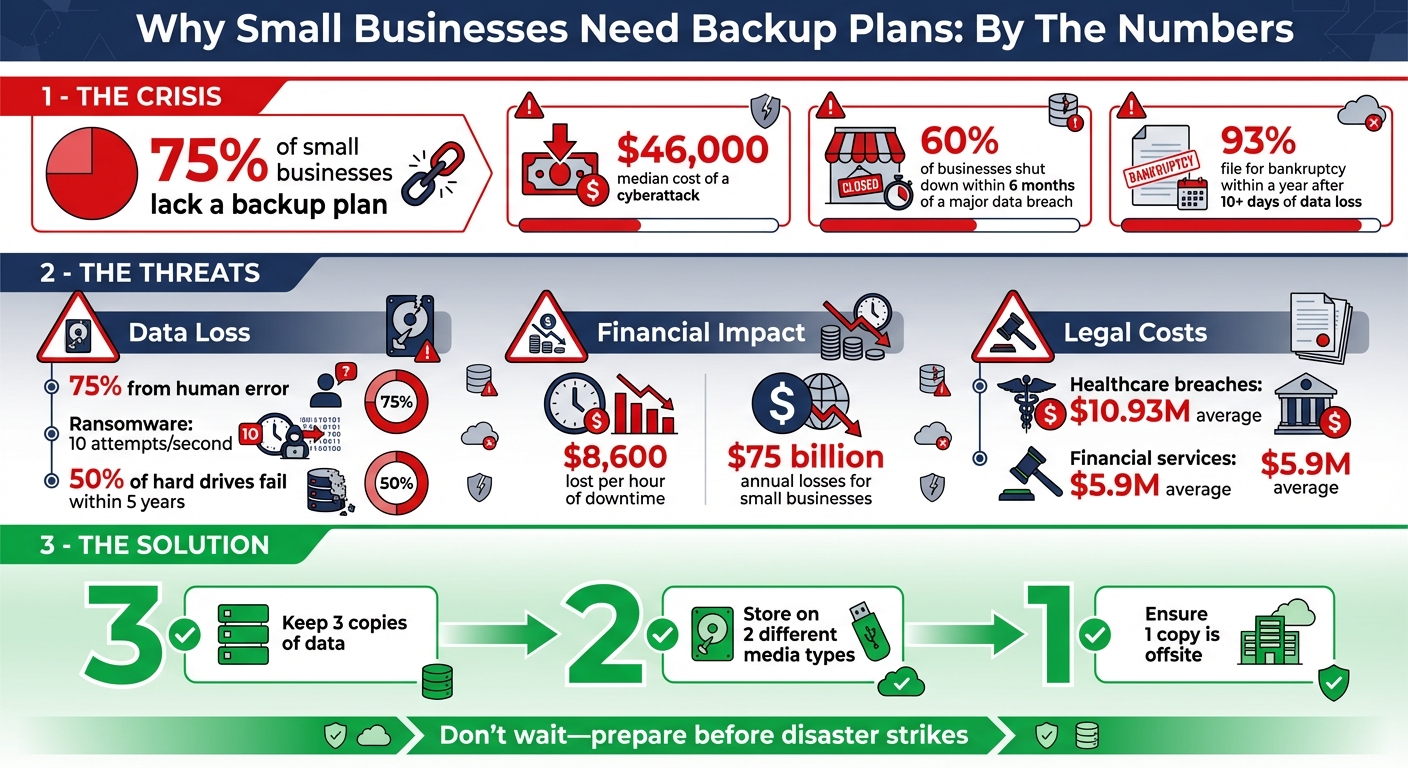
Small Business Backup Statistics: Risks, Costs, and the 3-2-1 Rule
What Happens Without a Backup Plan
Not having a backup plan in place leaves your business vulnerable to three major risks: data loss, financial losses, and legal consequences. Each of these threats has the potential to disrupt or even destroy your operations. Let’s break them down.
Data Loss from Cyberattacks and Human Error
Did you know that about 75% of data loss stems from human error? This includes everything from accidentally deleting files to misconfiguring servers or falling victim to phishing scams. But human mistakes aren’t the only concern – cyberattacks are becoming more dangerous by the day. Businesses face an average of 10 ransomware attempts every second, and fileless malware attacks have skyrocketed by 1,400% in recent years.
Even without external threats, data stored solely on-site is at risk. With 50% of hard drives failing within five years, a single hardware failure or natural disaster could make data recovery nearly impossible.
Financial Costs of Website Downtime
When your website crashes and you don’t have a backup, the financial toll can be staggering. On average, small businesses lose $8,600 per hour during downtime caused by data loss. This isn’t just about lost sales – appointments are missed, and customers often turn to competitors.
The long-term consequences can be devastating. Research shows that 93% of businesses experiencing prolonged data loss (over 10 days) end up filing for bankruptcy within a year. Even worse, if operations can’t resume within five days of a disaster, 90% of small businesses fail within the same timeframe. Altogether, small businesses lose more than $75 billion every year due to downtime related to data loss.
And it doesn’t stop at financial losses. The absence of a solid backup plan can lead to legal troubles and hit your reputation hard.
Legal and Reputation Damage
Data breaches without proper backups can result in serious legal headaches, especially for businesses in regulated industries. For example, healthcare organizations face average breach costs of $10.93 million, while financial services face $5.9 million in expenses. These figures include fines, legal fees, and settlement costs.
"Ignoring data backup best practices leaves your business vulnerable to a host of potential disasters." – Stephanie Reilly, Turn Key Solutions
Failing to comply with data retention laws only makes matters worse. Industries with strict regulations often impose penalties for not having accessible backups. Unfortunately, the consequences can be dire – 60% of companies that lose large amounts of data shut down within six months.
What to Include in Your Website Backup Plan
A solid website backup plan is your safety net against data loss, downtime, and compliance issues. It should clearly outline what to back up, how often to do it, and where to store your backups. Nail these three components, and you’ll be better prepared to recover quickly from unexpected issues rather than face permanent data loss.
What Data to Back Up
Your backup should include everything necessary to fully restore your website’s functionality. Start with the essentials: website code files – these are the building blocks that make your site work. Then, make sure to back up your databases, which hold critical information like blog posts, pages, customer comments, and site configurations.
Don’t overlook media files such as images, videos, and downloadable documents, as these are often integral to your site’s user experience.
Pay special attention to configuration files like wp-config.php and .htaccess. These files connect your site to its database and preserve important server settings. Without them, even a full content backup might leave you stranded. Additionally, include backups of customer records, employee data, financial information, and any other sensitive communications or records your business relies on.
How Often to Back Up and the 3-2-1 Rule
The frequency of your backups should match how often your website changes. For example, if you manage an e-commerce site that processes orders all day, you’ll need daily – or even real-time – backups. A static website, on the other hand, might only need monthly backups. Always perform a manual backup before making major updates to your site.
To safeguard your data, follow the 3-2-1 Rule:
- Keep three copies of your data (the original and two backups).
- Store these copies on two different types of media (like cloud storage and an external drive).
- Keep one copy offsite to protect against local disasters.
For added protection, consider the 3-2-1-1-0 Rule, which introduces one immutable backup (a backup that ransomware can’t modify) and ensures zero errors through regular testing. As the Center for Internet Security warns: “You must operate under the assumption that it’s not a matter of if you will be attacked but when”.
Where to Store Your Backups
Never store backups on your live server. If that server is hacked or fails, you risk losing everything. Instead, use cloud storage, which is offsite, scalable, and encrypts your data during transfer and storage.
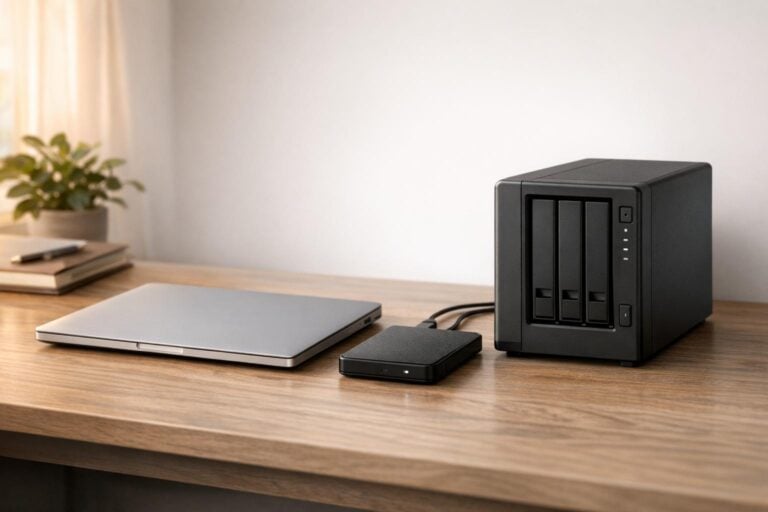
Local storage, such as an external hard drive, can be a fast recovery option but comes with risks like physical damage, theft, or disasters like fires or floods. A hybrid approach works best: use cloud storage for automated daily backups and an external hard drive for quick local recovery. This combination protects you from both cyberattacks and physical hazards.
| Storage Type | Best For | Main Risk |
|---|---|---|
| Cloud Storage | Automatic daily backups, disaster recovery | Requires internet for access |
| External Drive | Fast local recovery, offline security | Prone to physical damage |
| Same-Server Storage | Avoid entirely | Single point of failure |
How to Set Up Your Backup Plan
Now that you’ve identified what needs backing up and where to store it, it’s time to create a solid system to protect your website. This involves picking the right tools, automating backups, and having clear recovery steps in place. Here’s how to get started.
Selecting Backup Tools
The best backup tool for you depends on how comfortable you are with technology and how often your site changes. If you prefer hands-on control, manual methods like FTP or cPanel might work, but they can be tedious. For a simpler approach, WordPress plugins like UpdraftPlus or BackWPup are great options – they’re easy to set up and work well with cloud storage. If you want everything handled for you, managed services like CodeGuard (starting at $5/month) offer automated monitoring, offsite storage, and quick restoration.
Keir Desailly, a SOC Engineer at Sucuri, emphasizes the importance of automation:
"If you can’t automate the backups then you can’t guarantee the backups will get made."
Ultimately, choose a tool that fits your budget and skill level, but always prioritize automation to ensure consistency.
Automating and Testing Your Backups
Set your backups to run during off-peak hours, like 2:00 AM, to avoid impacting site performance. Match the backup frequency to how often your site gets updated, and before making any major changes, always run a manual backup.
Testing is just as important as backing up. Every few months, practice restoring your site – either to a test domain or an empty directory. This ensures your files load properly, databases are intact, and images display correctly. Don’t just check that the backup file exists; open it and confirm all the necessary data is there.
Training Staff and Monitoring Procedures
Write down your backup and recovery process, including storage locations, credentials, and step-by-step instructions. This way, anyone on your team can handle it if needed. Assign one person to oversee backups, but rotate the responsibility occasionally so multiple team members are prepared for emergencies.
The Cybersecurity and Infrastructure Security Agency (CISA) highlights the importance of preparation:
"A backup plan is only helpful if everyone knows how to use it. Write down your procedures and make sure your team can recover systems, networks and data from your backups."
Set up email alerts to notify you of backup failures or low storage space. Review logs monthly to catch any issues early. You might even establish a weekly "Backup Check Day" (e.g., every Friday) to ensure regular manual reviews. It’s worth noting that 93% of businesses experiencing data loss for more than 10 days end up filing for bankruptcy within a year. Taking these steps could make all the difference.
sbb-itb-5b82b38
How UENI Supports Website Backup and Recovery

Managing website backups and recovery can feel overwhelming, especially for small business owners who may not have the time or technical know-how. That’s where UENI steps in. By offering a security-focused, managed service, UENI handles the heavy lifting so you can concentrate on running your business.
Secure Hosting and SSL Certificates
UENI hosts its websites on Amazon Web Services (AWS) – a trusted, enterprise-level cloud provider known for its robust security. Every UENI website also includes a managed SSL certificate, which encrypts the data exchanged between your site and your customers. These certificates renew automatically, ensuring your site remains secure without any extra effort on your part.
Here’s what UENI has to say about their track record:
"In over 8 years, having served 700,000+ customers, we never had a security breach or cyber attack. All our data is stored on AWS (Amazon Web Services), one of the safest providers in the market."
That’s a 100% security record across more than 700,000 customers – a stark contrast to the alarming statistic that 60% of small businesses shut down within six months of a data breach.
Professional Website Management and Business Hub
With UENI’s Concierge Service, available as part of the Plus plan ($59/month), you can avoid the pitfalls of DIY website management. This service ensures professionals handle unlimited edits, reducing the risk of errors that could lead to data loss or downtime. Kenneth, the owner of Ins Adjuster POC, shares his experience:
"Time is money and UENI is money well spent! Tech is not my strength so being able to… allow a trusted partner like UENI handle edits, optimization and all the things that come with the plus plan far supersede the cost."
In addition, UENI’s Business Hub provides a centralized dashboard where you can monitor bookings, sales, and customer leads in real-time. The platform also includes automatic updates and ongoing technical maintenance, offering the convenience of an outsourced IT department while allowing you to retain full control over your content.
Affordable Plans for Small Businesses
UENI’s services are designed with small businesses in mind, offering professional-grade backup and security solutions at accessible prices. The Website Launch plan starts at just $16.99/month (plus a $79 one-time setup fee) and includes AWS hosting, SSL certificates, and technical maintenance. For businesses seeking a fully managed solution, the Plus plan at $59/month adds unlimited professional edits and VIP support. This is a small investment compared to the potentially massive costs of recovering from a data breach.
For instance, Wagner Krohling, owner of Princess Flock, saw a 5,000% ROI within six months of launching his UENI website in 2025. His business achieved the #1 ranking for "eggs Kissimmee" on both Google Search and Google Maps, thanks to UENI’s managed infrastructure. Wagner notes:
"The website has played a pivotal role in elevating our reach and visibility to unprecedented levels… UENI’s platform has effectively bridged the gap between our physical presence and the online world."
UENI’s affordable and secure hosting solutions don’t just support your website – they provide peace of mind, ensuring your business is protected from data loss and downtime.
Conclusion
Your website is the backbone of your business. Without a solid backup plan, a single cyberattack, system crash, or even a simple mistake could spell disaster. Shockingly, nearly two-thirds of small businesses shut down shortly after a security breach, and ransomware continues to pose a serious threat.
But here’s the good news: a well-thought-out backup strategy can shield your business from these risks. You don’t need a massive IT budget to stay protected. Stick to the 3-2-1 Rule: keep 3 copies of your data, store them on 2 different types of media, and ensure 1 copy is off-site. Automate your backups to avoid human error, and test your recovery process every quarter to ensure your files are intact when you need them. Define your Recovery Time Objective (RTO) – how long you can afford to be offline – and your Recovery Point Objective (RPO) – how much data you can afford to lose. Then, design your backup plan based on those metrics.
If handling backups feels overwhelming, you can always turn to a service like UENI. With secure AWS hosting and automatic SSL certificates, UENI takes care of the technical side so you can focus on growing your business. Plans start at just $16.99/month – a small price compared to the $46,000 median loss businesses face after a ransomware attack.
Remember, preparation is always better than trying to recover after a disaster. As Universal Data Inc. wisely puts it:
"If you don’t have regular backups, your business is one unexpected event away from potential collapse".
Now is the time to create your backup plan and safeguard your business’s future.
FAQs
Why is having a backup plan essential for my small business?
Without a backup plan, your small business could face serious risks, including losing vital data to cyberattacks, system failures, human mistakes, or natural disasters. The fallout from such events can be severe – think expensive downtime, interruptions to your operations, and even harm to your reputation. In extreme cases, it might even lead to the closure of your business.
A dependable backup plan acts as your safety net, keeping your data secure and recoverable. It helps you maintain smooth operations and steer clear of unnecessary setbacks. Simply put, it’s a crucial step to protect the stability and future of your business.
What is the 3-2-1 backup rule, and how can it protect my business data?
The 3-2-1 backup rule is a straightforward yet highly effective method for safeguarding your business data against risks like hardware failures, cyberattacks, or natural disasters. Here’s how it works:
- Keep 3 copies of your data: one primary version and two backups.
- Use 2 different types of storage media, such as external hard drives, cloud storage, or network drives.
- Store 1 copy off-site, whether in the cloud or another secure location.
By following this rule, you’re building multiple layers of protection. Even if one copy is compromised, you’ll always have a dependable backup ready to restore your data and keep your operations on track.
Why should small businesses automate and test their website backups?
Automating website backups takes the hassle out of safeguarding your data. By setting up scheduled backups and storing them in a secure off-site location, small business owners can rest easy knowing their files, databases, and media are consistently protected without the risk of human error. It’s like having a safety net in place, ensuring that the most recent version of your critical data is always preserved.
But here’s the thing – backups alone aren’t enough. Regularly testing those backups is just as crucial. Recovery tests help confirm that your data is intact, free from corruption, and ready to be restored at a moment’s notice. Skipping this step could mean discovering a problem at the worst possible time – during an actual emergency. The result? Potential downtime, lost revenue, and unnecessary stress. By combining automation with routine testing, you create a dependable, low-maintenance system to protect your website and keep your business running without interruptions.