



Looking to improve your small business’s online presence? 93% of consumers check reviews before purchasing, and 85% trust them as much as personal recommendations. Managing reviews is essential for building trust, boosting revenue, and improving local search rankings. Here’s a quick rundown of the best platforms to help you manage feedback and attract customers:
Platforms Covered:
- Google Business Profile: Increases local visibility; essential for search rankings—follow a Google Business Profile optimization checklist to maximize results.
- Yelp: Great for local discovery with detailed categories and high traffic.
- Facebook Reviews: Leverages a massive user base for long-term visibility.
- Better Business Bureau (BBB): Builds trust with accreditation and verified reviews.
- Angi: Ideal for home services; connects with high-intent customers.
- Trustpilot: Boosts SEO and credibility with verified reviews and integrations.
- Yellow Pages: Enhances local search visibility via business citations.
- Foursquare: Distributes accurate business data across directories.
Quick Comparison
| Platform | Best For | Key Benefit | Cost |
|---|---|---|---|
| Google Business | Local businesses | Improves search visibility | Free |
| Yelp | Niche/local discovery | High traffic from organic searches | Free/Paid Ads |
| Facebook Reviews | Broad audience | Permanent, visible reviews | Free |
| BBB | Trust-building | Verified reviews and accreditation | Free/Paid |
| Angi | Home services | Connects with ready-to-hire users | Free/Paid |
| Trustpilot | SEO and ecommerce | Boosts rankings and credibility | Free/Paid |
| Yellow Pages | Local services | Strengthens local citations | Free |
| Foursquare | Local search accuracy | Shares data across platforms | Free |
Key Takeaway:
Start by claiming free profiles on Google Business and Yelp. Respond to reviews within 24–48 hours and maintain consistent updates to stay visible and credible. Combining 2–3 platforms tailored to your audience ensures better results.

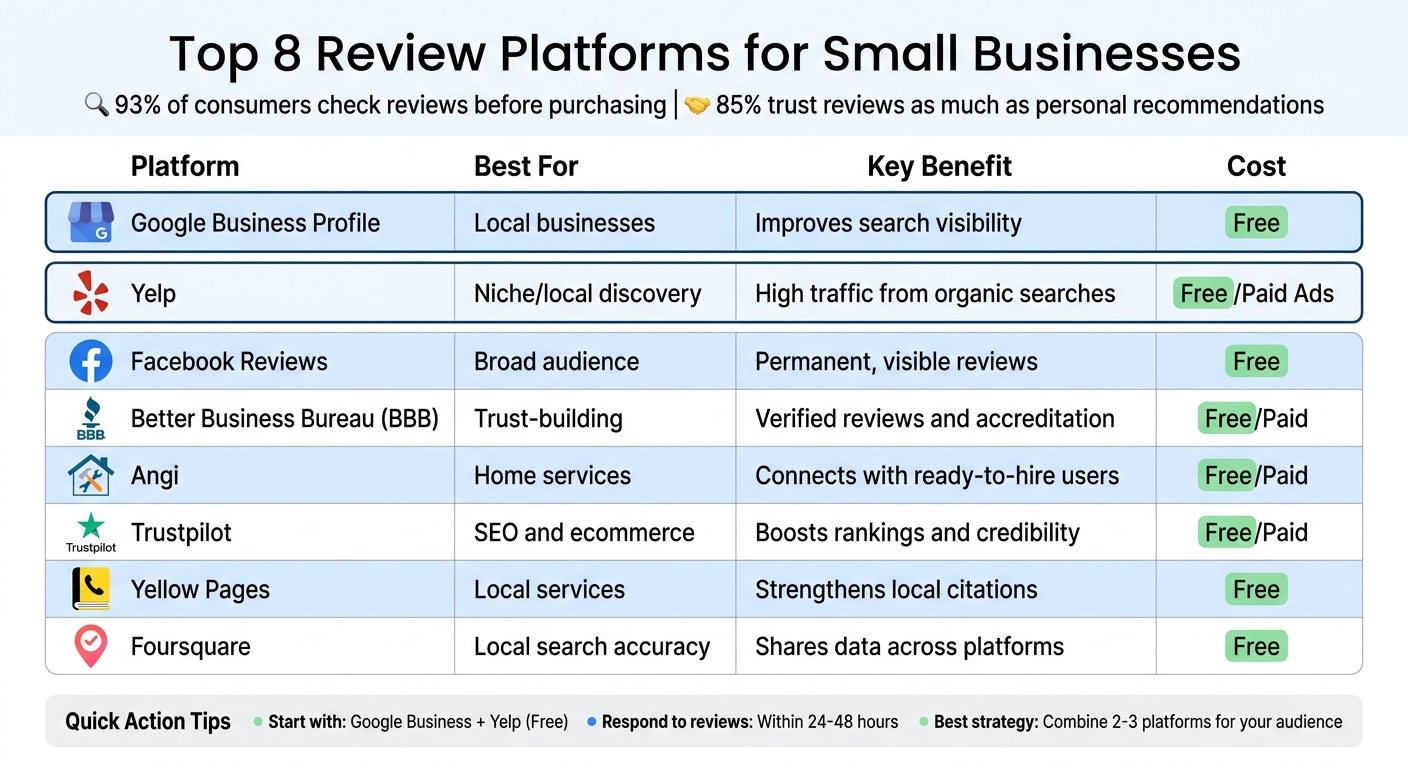
Top 8 Review Platforms for Small Businesses Comparison Chart
1. Google Business Profile

Google Business Profile is one of the most effective tools for local businesses to gain visibility and connect directly with potential customers.
Reach and Visibility for Small Businesses
This platform puts your business right in front of people actively searching for services like yours. For example, when someone searches for "plumber near me" or "coffee shop downtown", your profile could appear in the local pack – that map-based section showcasing the top three local results above the usual search listings.
Why is this placement so important? The top three results in the local pack capture the majority of clicks from local searches. As ReviewScout AI explains:
"If you are not in the local pack, you are invisible to most of the people searching for your type of business in your area".
Your profile isn’t limited to just Google Search. It also shows up on Google Maps, giving you multiple ways to get discovered.
The stats speak for themselves: businesses with complete profiles are 70% more likely to attract visits to their location. Including photos on your profile can lead to 42% more direction requests and 35% more website clicks compared to profiles without images. Google also factors in the number, quality, and freshness of reviews when determining rankings, so staying active is key.
Setting Up and Managing Your Profile
Creating a Google Business Profile is straightforward and free. All you need to do is log in to the Google Business Profile Manager, search for your business, and fill in details like your address, service area, and hours. Verification is required, and you can choose from several methods, including phone, email, video recording, or postcard.
| Verification Method | Typical Timeframe | Description |
|---|---|---|
| Phone or Text | Instant | Receive a code via call or SMS to your business number |
| Near-instant | Code sent to your registered business email | |
| Video Recording | 1–5 Business Days | Submit a short video showing your location, signage, and equipment |
| Postcard | 5–14 Days | A physical card mailed to your business address (being phased out) |
Once verified, upload 10–15 high-quality photos showcasing your business – both interior and exterior – and your team. Keep the content fresh by adding 2–3 new photos every month. Write a 750-character description that highlights your services and what makes your business stand out. Use the "Ask for Reviews" button to create a direct link for customers to leave feedback easily.
Timely responses to reviews are crucial. Aim to reply within 24–48 hours, as 89% of consumers read business responses before deciding to make a purchase. Engaging with reviews can make customers 45% more likely to visit your business. Google even considers review responses as a factor in search rankings.
These steps lay the groundwork for targeting specific audiences effectively.
Connecting With Local and Niche Markets
Google Business Profile is tailored for local businesses. You can choose a precise primary category – like "Dental Implants Periodontist" instead of just "Dentist" – to appear in specialized searches. Additionally, you can add up to nine secondary categories to cover all the services you offer.
If your business operates without a physical storefront, you can define specific service areas to show where you provide services. Don’t forget to fill out attributes like "wheelchair accessible", "women-owned", or "free Wi-Fi" to appear in filtered searches. These details help attract niche audiences looking for specific features.
Consistency in reviews is another ranking factor. As the ReviewGen Team explains:
"A business that got 100 reviews three years ago and then stopped getting reviews will rank below a business with 60 reviews that gets 5 new ones every month".
Instead of focusing solely on accumulating a high number of reviews, aim for a steady stream of fresh feedback to maintain strong local rankings.
Tools for Managing Customer Feedback
Google Business Profile makes it easy to handle customer reviews. From your dashboard, you can respond to all reviews – whether positive or negative. For negative feedback, acknowledge the issue, apologize if needed, and move the conversation to a private channel like email or phone.
The platform also includes a Q&A section, where you can address common questions proactively, giving potential customers immediate answers. Enabling messaging allows customers to contact you directly through your profile, which Google tracks as an engagement signal.
Staying active on your profile is essential. Post updates regularly, respond to reviews promptly, and avoid practices like incentivizing reviews or review gating (only directing happy customers to leave feedback), as these can result in account suspension. Regular activity not only boosts your visibility but also shows customers that your business is engaged and attentive.
sbb-itb-5b82b38
2. Yelp
Yelp, much like Google Business Profile, boosts your online presence and is especially effective for targeting niche audiences with its detailed category options.
Reach and Visibility for Small Businesses
Yelp is a powerhouse for visibility, often dominating the top organic spots on Google for searches like "Best [business type] near me". Even if people aren’t searching directly on Yelp, your business can still appear in front of potential customers. With 2.4 million daily visitors looking for local businesses, Yelp offers a steady stream of exposure.
Here’s a striking stat: 90% of customers check online reviews before visiting a business, and half of Americans consult Yelp before making a purchase decision [13, 16]. Businesses that invest in Yelp Ads can see a median of four times more leads. Rescue Air, a business using Yelp, shares:
"Yelp is unique in that it provides me with customers who are loyal and drive strong long-term return".
Clearly, a well-maintained Yelp profile can make a big difference in reaching potential customers.
Ease of Setting Up and Managing Profiles
Getting started on Yelp is straightforward. Search for your business, click "Claim this Business", or create a new page if your business isn’t listed. Verification is quick – via phone, text, or official documents – and typically takes 24–48 hours for moderation.
Once verified, you can choose up to three specific business categories and add a compelling call to action, like "Book an Appointment" or "Request a Quote" [14, 16]. Use the "From the Business Owner" section (1,500 characters) to highlight your story and what sets your business apart – this is your chance to make a strong first impression before potential customers dive into reviews [14, 16].
Managing your profile is even easier with the "Yelp for Business Owners" app. It lets you handle messages, update your details, and manage reviews on the go. Fun fact: businesses that respond to at least 40% of their reviews rank 11 positions higher on average, and responding within 24 hours can boost engagement by 45%.
Relevance to Local and Niche Markets
Yelp shines when it comes to niche markets. Its categorization system is incredibly detailed, offering 22 main categories and hundreds of subcategories. For example, restaurants alone have 157 subcategories, making it easier for niche businesses to be discovered through specific search terms. For local SEO, ensure your name, address, and phone (NAP) details match between Yelp and your Google Business Profile – this increases your chances of appearing in Google’s local pack.
While Yelp doesn’t allow businesses to ask directly for reviews, you can encourage organic feedback by displaying "Find us on Yelp" stickers or showcasing "People Love Us On Yelp" awards at your location [13, 14].
Beyond categories, managing reviews effectively is key to building trust and credibility on the platform.
Tools for Responding to Customer Reviews
Yelp offers free tools to respond to customer reviews, whether they’re glowing or critical. For negative reviews, a thoughtful response can go a long way. Apologize sincerely, propose a solution, and provide contact details to take the conversation offline. Interestingly, customers are more likely to upgrade their initial rating when their concerns are addressed, and one in three will even reverse a negative review if they feel heard [14, 16].
Don’t forget about positive reviews! Responding to praise helps build a sense of community and shows that your business is engaged. Additionally, Yelp Business Messages let you connect directly with potential customers who are already interested in your services, turning profile views into real inquiries.
3. Facebook Reviews
Reach and Visibility for Small Businesses
With an audience of about 2.9 billion monthly active users, Facebook provides small businesses with a massive platform to connect with local customers. Unlike fleeting social media posts that vanish from feeds quickly, reviews on your business profile remain permanently visible, creating a long-term trust-building tool. These permanent reviews not only strengthen your credibility but also benefit from Facebook’s vast user base, continuously showcasing your business to potential customers.
Your Facebook business profile doubles as a research hub for potential customers evaluating your trustworthiness. To make the most of this opportunity, ensure every "Page Info" field is filled out completely. This step is essential for improving local search rankings. Another tip? Create a custom username to replace the default, clunky URL with something clean and professional, like "facebook.com/yourusername". Such small adjustments can significantly boost your visibility and make managing your profile more efficient.
Ease of Setting Up and Managing Profiles
Setting up a Facebook business profile is simple, free, and can have a big impact on your local search presence. Once your page is live, optimize the "Short Description" using relevant local keywords to make your business easier to find. Adding a call-to-action button – like "Book an Appointment" or "Contact Us" – through the "+ Add a Button" feature can turn casual visitors into paying customers.
For managing your profile effectively, Facebook Insights is a handy tool to track engagement and time your responses. If you’re juggling multiple platforms, third-party tools can simplify things by combining Facebook messages and comments with other channels into one unified inbox.
Tools for Responding to Customer Reviews
Facebook equips you with free tools to respond to reviews, whether they’re glowing or critical. For negative reviews, it’s important to address the issue head-on – acknowledge the problem, apologize, and invite the customer to discuss the matter privately. This shows prospective customers that you handle concerns with professionalism and care.
Positive reviews deserve attention too. Thanking customers for their kind words reinforces trust and encourages loyalty. Facebook’s direct messaging feature can also help you provide quick, personalized responses to inquiries, enhancing the overall customer experience.
4. Better Business Bureau
While social media platforms can help businesses reach a broad audience, the Better Business Bureau (BBB) offers something different: credibility through its accreditation process.
Reach and Visibility for Small Businesses
The BBB is a powerful tool for small businesses looking to establish trust and improve visibility. With more than 400,000 accredited businesses across the U.S. and Canada, the BBB Accreditation Seal is widely recognized by consumers who value transparency. Plus, BBB business profiles are designed to rank well in search engines, which means your listing can show up when potential customers search for services in your area.
Beyond customer reviews, the BBB assigns letter grades from A+ to F, based on factors like complaint history, time in business, transparency, and proper licensing. This grading system focuses on ethical practices and responsiveness rather than just customer ratings. Melanie McGovern, Director of Public Relations and Social Media at the International Association of Better Business Bureaus, highlights the importance of responsiveness:
"If a company answers or resolves complaints, their letter grade stays the same because they’re upholding the BBB standards of being responsive, which is the number one standard of trust".
The BBB also stands out for its strict review authentication process. Out of over 4 million customer reviews submitted, only 62% were published due to rigorous vetting. Reviewers must validate their email or phone number, and anonymous reviews are not allowed. This ensures fake feedback is filtered out, protecting both businesses and consumers.
Ease of Setting Up and Managing Profiles
Creating a BBB profile is simple and free for basic listings. You can visit bbb.org/get-listed, search for your business, and either add or claim your listing. Before publishing, the BBB verifies your information with a phone call. Each state has its own local BBB office, which manages business profiles for that region.
If you want to take things further, accreditation is available as a paid service. Annual fees range from $500 to $1,500, depending on your business size and location. To qualify, businesses must meet eight "Standards for Trust", which include maintaining a positive track record, honest advertising, and transparency. Accredited businesses can display the BBB seal on their website and marketing materials, use the "Get a Quote" program, and incorporate the BBB trademark into their advertising.
Relevance to Local and Niche Markets
The BBB is especially effective for connecting local and niche businesses with the right customers. Its directory includes highly specific categories like "Acoustic Ceiling Removal", "Axe Throwing", "Abrasives", and "Apostilles", making it easier for specialized services to be discovered.
For small businesses, the BBB provides third-party validation of legitimacy. Reviews can influence local search rankings by 15%, and products with five reviews are 270% more likely to be purchased compared to those with none. This makes BBB accreditation particularly valuable in industries where trust is critical, such as home services (roofing, HVAC), auto repair, legal and financial services, and senior care. Over the years, the BBB has shifted from its "Yellow Pages" origins to become a digital-first platform for today’s marketplace.
Tools for Responding to Customer Reviews
The BBB gives businesses unique tools to manage their reputation. Unlike most platforms, the BBB sends reviews to businesses before publishing them, giving you a chance to respond or resolve issues first. Reviews are usually processed within 10 days. This proactive approach not only builds consumer trust but also helps improve your local search rankings.
Responding to complaints and reviews within 10 days is crucial, as it protects your grade even if a complaint is filed. Quick responses matter – 30% of consumers reverse negative reviews when a business addresses their concerns. The BBB also offers a structured dispute resolution process, with human oversight, that typically takes up to 30 days.
Complaints stay on a company’s profile for three years, allowing potential customers to see how a business has handled past issues. To encourage honest feedback, reach out to customers a week or two after their purchase and include a link to your BBB Business Profile or "Leave a Review" page on your small business website or social media.
5. Angi
Angi plays a key role in helping home service businesses connect with potential customers.
Reach and Visibility for Small Businesses
Angi connects service-based businesses with over 7 million monthly users actively searching for estimates and professional assistance. With around 150,000 service requests generated monthly for its 250,000 listed businesses, it offers access to a pool of high-intent customers ready to hire.
The platform’s specialty categories allow businesses to target specific service areas, even down to individual zip codes. This ensures your business appears in searches relevant to your location. To stand out, optimize your profile with high-quality before-and-after photos, clear business highlights, and detailed service descriptions.
Earning "Angi Certified" status requires maintaining at least one review with a 3-star rating or higher, which helps build credibility. This matters because 93% of people rely on online reviews when making purchasing decisions, and having at least five reviews can increase your chances of being hired by 270%.
Ease of Setting Up and Managing Profiles
Creating an Angi listing is simple and free. Start by searching for your business on the platform. If it’s already listed, claim it. If not, visit the "Join Our Pro Network" page, select your primary service, enter your zip code, and complete your business details. Be sure to fill in mandatory fields such as your business description, service categories, and service area.
The "Angi for Pros" app makes it easy to manage your profile. You can import up to five recent Google reviews to kickstart your presence and request feedback from recent customers to ensure your listing becomes searchable.
Susie Marino, Senior Content Marketing Specialist at LocaliQ, emphasizes:
"Since getting your business listed on Angi is such a breeze, there’s no reason not to take advantage of this free marketing opportunity!"
These straightforward steps can help you grow your business online by attracting local customers actively seeking your services.
Relevance to Local and Niche Markets
Angi is tailored for local service professionals. With an estimated 9.1 million monthly U.S. visits, it’s a trusted directory for homeowners looking for qualified contractors and specialists. Customers can compare prices, read verified reviews, and book services all in one place.
For niche markets – whether you’re a roofer, landscape designer, or HVAC technician – Angi’s detailed category system ensures your business reaches the right audience. Additionally, it improves your local SEO, making it easier for potential customers to find you online.
Using Angi alongside other review platforms can help small businesses expand their online visibility and build credibility.
Tools for Responding to Customer Reviews
Angi provides tools to help businesses manage customer feedback directly from their dashboard. You can send review requests via email or text after completing a job. With around 60,000 reviews submitted to the platform each month, staying on top of feedback is crucial.
Make it a priority to respond to all reviews – especially negative ones – within 24 to 48 hours. This shows accountability and builds trust with potential customers. If you encounter fake or harmful reviews, Angi’s reporting system allows you to request their removal. Regularly engaging with reviews signals to customers and the platform that your business is active and focused on delivering quality service.
6. Trustpilot
Trustpilot has established itself as a global leader in online reviews, hosting over 350 million reviews for 1.3 million businesses. With around 190,000 new reviews added daily, it’s a powerful resource for small businesses looking to improve their SEO and reputation management.
Reach and Visibility for Small Businesses
Trustpilot’s strong relationship with Google plays a key role in boosting search engine rankings. Verified reviews on the platform can enhance Google Store Ratings and increase online visibility . Trustpilot also provides high-quality backlinks that contribute to better SEO performance. Its influence extends to Answer Engine Optimization (AEO), helping businesses appear in AI-generated responses – an advantage in a world where 58% of consumers now rely on AI tools for recommendations. Additionally, 71% of buyers are more inclined to purchase from brands with a strong TrustScore.
Businesses can further amplify their credibility by embedding Trustpilot review widgets on their websites. Research shows that 73.6% of visitors are more likely to make a purchase when they see customer reviews displayed. Trustpilot’s commitment to maintaining the integrity of online reviews is evident through its role as a founding member of the Coalition for Trusted Reviews.
This enhanced visibility is paired with tools that make managing profiles straightforward.
Ease of Setting Up and Managing Profiles
Getting started with Trustpilot is simple. The platform offers a free plan with basic features like profile customization, review collection, and a widget for displaying reviews. Paid plans unlock additional options, such as custom widgets, ad-free profiles, review tagging, and in-depth analytics . Trustpilot also automates the process of inviting customers to leave reviews, ensuring a steady stream of feedback.
For businesses using tools like Salesforce, Zendesk, Hootsuite, Shopify, or Freshdesk, Trustpilot’s integrations make managing reviews seamless. Real-time email notifications allow businesses to prioritize urgent feedback by filtering reviews based on star ratings .
Relevance to Local and Niche Markets
While Trustpilot is a strong choice for global and ecommerce brands, it’s equally effective for local and niche businesses . Beyond boosting global SEO, it enhances local search rankings. Its Market Insights tool uses AI to group similar businesses, enabling users to compare performance with up to five direct competitors. For local businesses, Trustpilot’s Google integration helps improve visibility in location-based searches .
Matt Gale, Chief Strategy Officer at Lawfully, shared how Trustpilot helped their business stand out:
"We’re able to showcase that we truly are a standout company when it comes to delivering on that value, and we’ve got evidence of that on Trustpilot."
This approach contributed to Lawfully improving its TrustScore from 4.6 to 4.9 in just one year.
Trustpilot also offers tools that make managing customer feedback efficient and impactful.
Tools for Responding to Customer Reviews
Trustpilot’s AI-powered "smart replies" help businesses craft personalized, editable responses tailored to the sentiment and length of reviews. These tools adapt to your brand’s tone over time, ensuring consistent and meaningful interactions as review volumes grow. Public responses to reviews build trust with potential customers, and the platform’s integrations with tools like Zendesk, Freshdesk, Slack, and Hootsuite make it easy to monitor and address feedback.
For Salesforce users, syncing Trustpilot data with your CRM creates a centralized hub for customer feedback. Notifications for low-star reviews ensure that issues are addressed promptly, preventing escalation. Research from Harvard Business Review even shows that responding to reviews can lead to better overall ratings.
With a 4.5/5 average rating from over 23,000 client reviews, Trustpilot is praised for being user-friendly for both beginners and experienced users alike.
7. Yellow Pages
Reach and Visibility for Small Businesses
Yellow Pages has been connecting people with local businesses since 1886, helping countless individuals find services like auto repair shops and restaurants. Acting as both a directory and a review platform, it’s especially useful for service-focused local businesses.
One key advantage of Yellow Pages is its role in generating business citations – records of your business’s Name, Address, and Phone number (NAP). These citations are crucial for search engines like Google to verify your business’s legitimacy and determine its ranking in local search results. Considering that nearly 80% of Americans look at online reviews before visiting a local business or making a purchase, having a strong presence on Yellow Pages can be a game-changer for attracting new customers.
Ease of Setting Up and Managing Profiles
Setting up your Yellow Pages profile is simple. You can either claim an existing listing or create a new one, ensuring all business details are accurate. The platform allows you to register quickly using your Google or Facebook account, speeding up the process.
To make your listing more effective, include not just your contact information but also a detailed description of your services and specialties. This helps both Yellow Pages users and search engines like Google match your business with relevant searches. Basic listings, which include your NAP details, are free, while premium features are available for a small monthly fee. This setup not only boosts your credibility but also helps you reach customers actively searching for local services.
Relevance to Local and Niche Markets
Yellow Pages is particularly valuable for businesses targeting customers with local intent – those looking for services within their immediate area. It’s often listed as a top alternative to Yelp for small businesses aiming to improve their online reputation.
To maximize your presence, ensure your NAP details are consistent across all platforms. Accurate citations on Yellow Pages can enhance your visibility and strengthen your position in local search rankings. Many small businesses use listing management tools to maintain consistent information across directories like Yellow Pages, with costs typically ranging from $15 to $20 per month.
Since customers are more likely to trust updated profiles, it’s essential to keep your information current. While print directories are updated annually, online updates should be made regularly to stay relevant and attract potential customers.
8. Foursquare
Reach and Visibility for Small Businesses
Foursquare acts as a Primary Data Aggregator, distributing your business information to various online directories and search engines. This simplifies managing your online presence and ensures your data remains consistent across platforms.
By leveraging Foursquare’s role in SEO, your business listing can show up on high-ranking directory pages. Studies indicate that sharing your business details across 10 or more directories can boost local search visibility by 91% within 13 months. This makes Foursquare particularly valuable for businesses targeting location-specific searches like "Chicago pizza" or "Austin hair salons."
Ease of Setting Up and Managing Profiles
Setting up your Foursquare profile is straightforward. Visit business.foursquare.com, search for your business, and claim your listing. Once claimed, double-check that your Name, Address, and Phone number (NAP) align with the details on your website and other directories. Consistency here is key – any discrepancies could spread across platforms, confusing potential customers and harming your search rankings.
Also, keep your operating hours updated, especially during holidays or special events, and upload quality photos to make your profile more appealing.
Relevance to Local and Niche Markets
Foursquare shines when it comes to local searches; nearly half (46%) of all searches have local intent. It’s especially effective for "near me" queries, as search engines rely on Foursquare’s data to determine proximity to the searcher. Plus, Google has started prioritizing customer reviews and feedback from platforms like Foursquare, further boosting its role in local search rankings.
Tools for Responding to Customer Reviews
Managing customer feedback on Foursquare is simple yet impactful. Users can leave text reviews, star ratings, and photos. Unlike some platforms, Foursquare allows businesses to actively request reviews – though incentives are not permitted. Assigning a team member to monitor reviews regularly can help maintain a positive reputation. Thank satisfied customers and address any negative feedback quickly, taking sensitive conversations offline to resolve issues.
To encourage more customer reviews, link your Foursquare profile directly from your business website. If you’re juggling reviews across multiple platforms, tools like BrightLocal (starting at $44/month) or Moz Local (from $16/month) can help you track and manage feedback efficiently.
Conclusion
Picking the right review platform starts with figuring out where your customers are already searching. For instance, home service providers might want to prioritize Angi, while nearly every local business benefits from maintaining a strong Google Business Profile to improve search visibility and AI discoverability. A smart approach often includes using two or three platforms at the same time – Google for search, Yelp for local discovery, and Facebook for social engagement. This focused strategy, paired with responding to reviews promptly, creates a solid foundation for long-term growth.
With 93% of consumers reading reviews and 85% trusting them as much as personal recommendations, actively managing your reviews can have a noticeable impact on revenue. Make it a habit to collect reviews and respond to them consistently. Try to reply to every review – whether it’s glowing or critical – within 24 to 48 hours. Businesses that address feedback are more than twice as likely to convert potential customers compared to those that stay silent. Show appreciation for positive reviews to build customer loyalty, and handle negative feedback with professionalism by apologizing and offering a clear solution.
Don’t wait – claim your free profiles on major platforms like Google Business Profile and Yelp today. Automate review requests by sending them to customers within 24 to 48 hours after their purchase or service to encourage more feedback. Consistent interaction on these platforms not only boosts your online presence but also strengthens trust with both existing and potential customers. By adopting these strategies, small businesses can enhance their reputation and achieve measurable growth.
FAQs
Which 2–3 review platforms should my business prioritize first?
Start with Google to boost your local search visibility and take control of your online reputation. After that, shift your attention to platforms like Yelp or Facebook. These are key players in the U.S. market, perfect for collecting customer reviews and building strong social proof.
How can I get more reviews without breaking platform rules?
Encouraging happy customers to leave reviews can make a big difference – just be sure to do it the right way. After a positive interaction, kindly ask them to share their experience. However, steer clear of offering rewards or posting fake reviews, as this can lead to serious consequences.
Make sure your Google Business Profile is up-to-date and active. Respond to reviews – whether they’re glowing or critical – to show you’re engaged and value customer feedback. Genuine reviews not only strengthen trust but also boost your reputation, all while staying within platform rules.
What’s the best way to respond to a negative review?
Responding to a negative review requires a thoughtful and professional approach. Start by showing empathy and acknowledging the customer’s concerns. Offer a genuine apology, taking responsibility where appropriate, and clearly explain the steps you’re taking to resolve the issue. By addressing the root cause, you demonstrate a commitment to improvement and a genuine care for your customers. Handling negative feedback this way can transform a challenging situation into an opportunity to build trust and strengthen your business’s reputation.