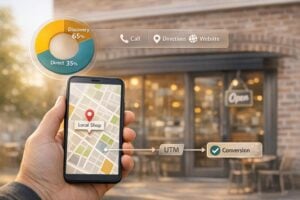
Your Google Business Profile (GBP) is a powerful tool for local businesses to connect with customers directly on Google Search and Maps. Through Google Posts, you can share updates, promotions, events, and product highlights to engage your audience and drive action – completely free.
Here’s why it matters:
- 91% of consumers search for local businesses online, and nearly 30% choose based on promotions.
- Businesses with updated profiles see 4x more website visits, 12% more calls, and 10% more direction requests.
- 47.5% of customers are more likely to return to businesses offering discounts or promotions.
This guide provides 50+ examples of how small businesses can use Google Posts effectively. From event promotions and special offers to product highlights and customer updates, you’ll find practical ideas to boost visibility, engagement, and conversions. Each example includes actionable tips, high-impact strategies, and real-world use cases.
Key takeaways:
- Event Promotions: Announce workshops, seasonal celebrations, or community events with clear CTAs like "Book" or "Sign Up."
- Offers & Discounts: Use compelling phrases like "Save 20%" or "Limited Time Only" to drive urgency.
- Product Highlights: Showcase bestsellers, new arrivals, or before-and-after results with high-quality visuals.
- Updates: Share milestones, customer reviews, or behind-the-scenes content to keep your profile active.
- Industry-Specific Ideas: Tailor posts to your niche, like health tips for clinics or seasonal menus for restaurants.
Google Posts are easy to create, trackable with UTM parameters, and can significantly impact your local marketing efforts. Start posting 1-2 times per week to keep your profile fresh and engaging. For additional support, services like UENI can help manage your online presence, so you can focus on growing your business.
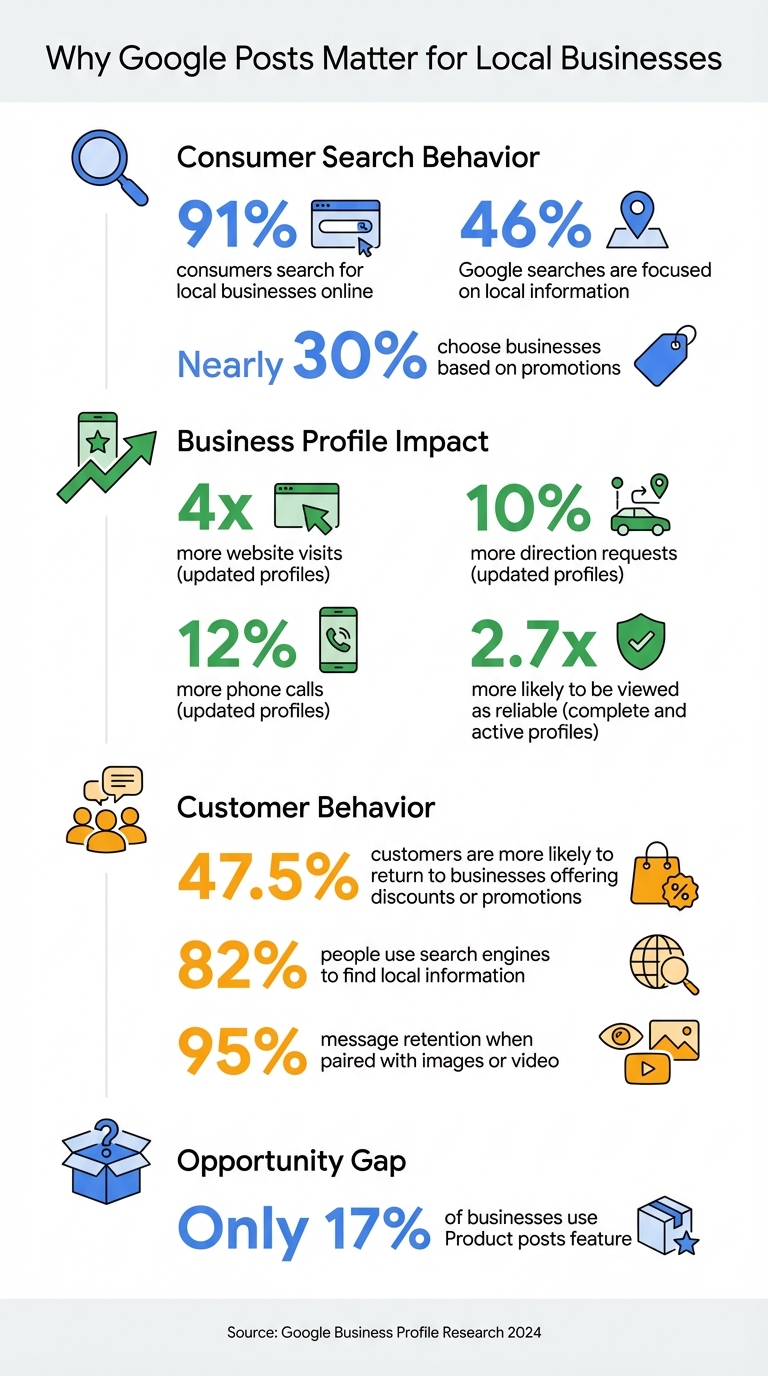
Google Business Profile Impact Statistics for Local Businesses
1. Event Promotions
Event Posts on your Google Business Profile (GBP) stick around for the entire duration of the event, unlike regular posts that disappear after seven days. This extended visibility makes Event Posts a powerful way to engage your audience at the right time. To make the most of them, include a short and snappy title (up to 58 characters), specify the start and end dates with times, and add a clear call-to-action like "Book", "Sign up", or "Buy tickets".
Here are some event promotion ideas you can start using right now:
- Holiday & Seasonal Celebrations: Highlight themed events like New Year’s Eve parties, St. Patrick’s Day specials, or Halloween-inspired dessert launches to tap into the festive spirit.
- Educational Workshops: Organize wine tastings, health seminars, or hands-on classes to showcase your expertise and connect with your audience.
- Flash Sales & Limited-Time Promos: Create urgency with one-day-only discounts or "Happy Hour" specials that encourage quick action.
- Community Festivals: Announce your participation in local events like beer festivals, street fairs, or neighborhood markets to strengthen community ties.
- Free Consultations & Exams: Attract new customers by offering complimentary services like dental x-rays, auto body estimates, or legal case evaluations.
- Product & Menu Launches: Build excitement around a new seasonal menu or the debut of a much-anticipated product line with a dedicated launch event.
- Grand Openings & Milestones: Celebrate big moments like new location openings, anniversaries, or major business changes to draw in foot traffic and media buzz.
To make your Event Posts stand out, use bright, high-quality photos (at least 720px by 720px). Also, include UTM parameters in your call-to-action links to track engagement and measure the success of your efforts.
2. Offers & Discounts
Promotions, offers, and discounts are excellent tools for keeping customers engaged, encouraging repeat visits, and prompting quick actions. Google’s Offer post feature is particularly effective, as it includes a built-in "View Offer" button for seamless interaction. Unlike regular posts, these offers remain visible for the entire duration you select, appearing across the "Updates", "Overview", and "Deals" tabs on Google Search and Maps. This extended visibility helps turn interest into action. And it works – 47.5% of consumers say special promotions or discounts encourage them to revisit a business, while nearly 30% decide which local business to visit based on such offers.
To make the most of your offer, keep the message short and powerful. The first 100 characters are critical, as that’s what searchers see first. Be direct about the discount, use action words like "Save", "Claim", or "Get", and include urgency phrases like "Limited Time Only" or "Last Chance". Also, clearly outline terms and conditions to avoid confusion.
Here are some tried-and-true types of offers that work well for small businesses:
- BOGO (Buy One Get One): A great way to boost foot traffic and move inventory.
- Fixed Dollar Discounts: Simple deals like "$10 off your first service" are effective for auto shops, salons, and home service providers.
- Free Introductory Services: Dentists, consultants, and other professionals often attract new clients by offering free exams, consultations, or x-rays.
- Percentage-Based Sales: Discounts like "20% off all winter gear" appeal to budget-conscious shoppers.
- Seasonal & Holiday Promotions: Deals tied to events like Cyber Monday, Halloween, or local festivals tap into seasonal shopping trends.
- Complimentary Add-ons: Adding value, such as free teeth whitening with a cleaning, can make your offer more enticing.
- Flash Sales: Short, high-urgency discounts are perfect for clearing out inventory or boosting sales on slow days.
For the best results, use high-quality, original photos sized at 1,200 x 900 px (4:3) to highlight your product or service. Add a "Redeem Online" or "Book Now" button to drive immediate conversions, and don’t forget to include UTM parameters to track the revenue generated from your Google Posts.
3. Product Highlights
Product posts on a Google Business Profile are a hidden gem that many businesses overlook. Despite their potential, only 17% of businesses take advantage of this feature, even though 82% of people use search engines to find local information. These posts let you showcase products by adding details like the name, category, price, and description. This means potential customers can explore your offerings directly from search results.
Here’s a key tip: visuals are powerful. Research shows that people retain 95% of a message when it’s paired with images or video. So, make sure to use high-quality, original product photos sized at 1,200 x 900 pixels with a 4:3 ratio. Keep headlines concise (under 58 characters) and descriptions between 150 and 300 characters to ensure your message is fully visible. And don’t forget a clear call-to-action like "Shop", "Order Online", or "Buy".
Here are seven strategies to make the most of Product posts:
- New Arrivals: Highlight fresh inventory with sharp photos, pricing, and a direct "Buy" link.
- Seasonal Collections: Use photo carousels (up to nine images) to showcase themed products. For example, Magnolia Bakery created buzz in October 2020 with a nine-photo carousel of its Halloween desserts.
- Best Sellers: Feature popular items with posts like "Staff Pick of the Week" to build social proof.
- Behind-the-Scenes: Share short videos (under 30 seconds) of how products are made or prepared to build trust and authenticity.
- Before & After: Perfect for service-based businesses, this approach highlights real results. Davida Salon, for instance, showcased caramel balayage transformations with detailed descriptions and a "Book" button.
- Product Demonstrations: Use 30-second videos (at least 720p) with captions to show how products work.
- Multi-Angle Showcases: Display products from various perspectives. Ruby Jane Boutique in Denver, Colorado, used two-photo posts to show sweaters from different angles, paired with a "Buy" button for easy mobile shopping.
"Showcasing products on your Google Business Profile offers quick access for purchase."
– Robin Samora, Marketing & PR Expert
To make your Product posts even more effective, link each one directly to its corresponding product page. Group your offerings into fun, easy-to-browse categories like "Seasonal" or "Best Sellers". Posting 2-3 times per week keeps your content fresh, as most posts expire after seven days.
If you’re looking for help creating a professional online presence, check out services like UENI (https://ueni.com). They specialize in building mobile-friendly, conversion-focused websites for small businesses in as little as seven days.
4. Updates & Engagement
Event and offer posts are great for promoting time-sensitive deals, but regular updates are key to keeping your audience engaged over the long haul.
"What’s New" posts are ideal for keeping customers informed and maintaining a lively online presence. Posting once or twice a week is enough to keep your profile active and relevant. Keep your updates short – between 150 and 300 characters – so the full message is visible, and always include a clear call-to-action button like "Learn more", "Book", or "Sign up."
Here are seven ideas for creating engaging update posts:
- Business Milestones: Celebrate achievements like awards, anniversaries, or major successes. For example, California Attorney Group shared news of a $1.3 million auto accident settlement to highlight their expertise and build trust.
- New Team Members: Welcome new hires with a photo and brief bio, giving your brand a personal touch and fostering a sense of connection.
- Behind-the-Scenes: Share glimpses of your daily operations through photos or short videos to create transparency and authenticity.
- Customer Testimonials: Turn glowing Google reviews into posts to showcase social proof – this works especially well for service-focused businesses.
- FAQ Answers: Address common customer questions in your posts to help remove any doubts or barriers to conversion.
- Operational Changes: Keep customers informed about updates like holiday closures, new hours, or pricing adjustments.
- Industry Tips: Share useful advice, such as maintenance tips or health facts, to establish authority and keep your audience engaged.
Did you know that 91% of consumers find local businesses online? Even more compelling, nearly 30% make their choice based on promotions they discover. Businesses with regularly updated profiles see up to 4 times more website visits, 12% more calls, and 10% more direction requests . Regular updates aren’t just a good idea – they’re a powerful way to drive engagement and grow your business.
sbb-itb-5b82b38
5. Industry-Specific Promotions
To make the most of events, offers, and updates, customizing your Google Posts for your specific industry can create stronger connections and boost engagement. By aligning your posts with industry-specific needs, you can deliver more relevant content and encourage targeted actions.
Here are some tailored ideas for different industries:
- Healthcare: Share Health Tips
Provide short, actionable health advice or seasonal wellness updates to position yourself as a trusted resource. For instance, you could highlight common vitamin deficiencies during winter or share insights on managing seasonal illnesses. - Healthcare: Promote Free Screenings
Use "Offer" posts to advertise limited-time deals on initial consultations, x-rays, or preventative screenings. This approach can encourage more bookings and attract new patients. - Restaurants: Highlight Seasonal Menus
Announce new seasonal dishes or a "dish of the week" with eye-catching photos. Including a clear end date can create urgency and excitement. - Restaurants: Advertise Live Events
Use event posts to promote wine tastings, live music nights, or holiday celebrations. Include start and end times, and add a "Reserve" button to make it easy for customers to book. - Retail: Showcase New Products
Highlight new arrivals with high-quality images (recommended size: 1,200 x 900 px) and short, punchy headlines like "Just In – Limited Stock Available." - Retail: Launch Exclusive Products
Create buzz around exclusive product launches by offering discounts or early access codes through offer posts. - All Industries: Feature Your Team
Build trust and add a personal touch by spotlighting team members. Share their photos and short bios to give your audience a behind-the-scenes look, whether you’re in healthcare, retail, salons, or professional services.
6. Goal-Oriented Templates
These goal-oriented templates are designed to help you create Google Posts that align with specific business objectives, making your efforts more focused and effective.
Every Google Post should serve a clear purpose. Whether you’re aiming to boost sales, fill seats at events, or bring in more foot traffic, tailoring your post to match your goal is key. Below are seven templates to help you hit your targets:
Drive Immediate Sales with Limited-Time Offers
Offer posts are perfect for promoting discounts and time-sensitive deals. Include a "Get Offer" or "Order Online" button to make it easy for customers to act. For instance, in March 2024, the Aussie-style café Hole in the Wall introduced $10 espresso martinis with rotating flavors every two weeks, successfully driving local engagement.
Increase Event Attendance
Event posts stand out because they remain visible for the entire duration of the event, unlike standard posts that may disappear after 7 days. Include key details like event dates, location, and a "Book" or "Sign Up" button to streamline registration. This approach ensures your event promotions are both visible and actionable.
Showcase Products for Direct Conversion
Use Product posts to highlight specific items with clear names, prices, and high-quality images (ideally 1,200 x 900 pixels). Keep headlines concise (under 58 characters), and add a "Buy" or "Shop" button to encourage quick conversions.
Build Authority with Media Mentions
Highlight press coverage, awards, or other major media mentions using "What’s New" posts. For example, Spodek Law Group uses these posts to showcase when they are featured in national news outlets or TV segments, reinforcing their credibility in the New York legal market. This not only builds trust but also strengthens your online reputation.
Generate Leads with Sign-Up Incentives
Use Update posts to promote free consultations, downloadable guides, or newsletter subscriptions. Pair these with a "Sign Up" or "Learn More" button. Keep descriptions between 150 and 300 characters to ensure they remain fully visible.
Boost Repeat Visits with Exclusive Promotions
Encourage repeat visits by offering exclusive deals. Since nearly half of consumers (47.5%) say they are more likely to return to a business if they see a special promotion or discount, consider offering perks like early access codes or members-only deals to keep them coming back.
Track Performance with UTM Parameters
Google Business Profile lacks detailed click data for individual posts, but you can track performance by appending UTM codes to your CTA links. This allows you to measure traffic and revenue generated from your posts.
For a fully optimized digital presence that supports these strategies, check out UENI’s done-for-you website creation and management services at https://ueni.com.
7. Versatile Ideas
Boost your promotional efforts with these flexible ideas that work for any small business.
- Employee Spotlights: Share stories about your team members or celebrate their work anniversaries. This adds a personal touch to your brand and lets customers connect with the people behind the business.
- Educational Tips: Provide quick, practical advice tailored to your industry. A dentist might share tips for maintaining a bright smile, while a mechanic could offer guidance on preparing cars for winter.
- Project Portfolios: Use before-and-after photos to showcase the impact of your work. It’s a great way to demonstrate the quality and results you deliver.
- Community Involvement: Share your participation in local charity events or initiatives. It shows your commitment to the community and builds goodwill.
- Business Milestones: Celebrate achievements like anniversaries, awards, or key accomplishments that highlight your growth and success.
- Content Repurposing: Reuse and share snippets from your blog posts, interviews, or media features. It’s an easy way to keep your audience engaged and extend the life of your content.
Conclusion
Google Posts give small businesses a powerful way to connect with local customers in real-time. Considering that 91% of consumers search for local businesses online and 46% of Google searches are focused on local information, keeping your Google Business Profile (GBP) active and engaging is essential. Think of it as your digital storefront – it needs to stay fresh and welcoming.
Regularly posting updates – whether it’s about special offers, new products, or customer success stories – shows that your business is active and trustworthy. In fact, businesses with a complete and active profile are 2.7 times more likely to be viewed as reliable.
"Your GBP is a living, breathing online storefront that should be updated." – Ashley Nhien Do, Google
A good way to start is by creating one or two posts per week. Use the tips shared earlier, like including high-quality visuals, clear calls-to-action, and concise messages that cater to what your customers care about most. Keep your descriptions between 150–300 characters to ensure the key points are immediately visible. This approach keeps your profile vibrant and engaging.
If managing your online presence feels overwhelming, professional services are available to help. For example, UENI offers solutions like building professional websites and keeping your Google Business Profile updated. This allows you to focus on running your business while ensuring your digital storefront stays competitive and appealing. With consistent effort and the right strategy, Google Posts can become a cornerstone of your marketing efforts, helping you attract more local customers and drive meaningful results.
FAQs
How often should I create posts for my Google Business Profile?
To keep your Google Business Profile vibrant and engaging, try to post at least once a week. Frequent updates not only help your business stay visible but also invite customer interaction and demonstrate that you’re actively involved. Staying consistent builds trust and keeps your business fresh in the minds of potential customers.
What are the best types of offers to attract local customers?
The best way to draw in local customers is by offering deals that deliver instant value, create a sense of urgency, and feel tailored to them. Here are some tried-and-true options:
- Buy-One-Get-One-Free (BOGO) offers: These are a favorite because they instantly double the perceived value of a purchase.
- Limited-time discounts: Phrases like “today only” or “this weekend” create urgency and push customers to act quickly.
- Loyalty programs: Reward repeat visits with points, discounts, or free items to keep customers coming back.
- Referral incentives: Offers like “Give a friend $10 off and get $10 off yourself” tap into the power of word-of-mouth while expanding your customer base.
Discounts for first-time customers can help reduce hesitation and encourage them to give your business a try. Additionally, exclusive email or SMS deals let you reach engaged shoppers directly with timely offers. Seasonal promotions and social media giveaways add a fun, community-oriented vibe, making it easier to connect with local shoppers while providing savings they’ll appreciate.
When these strategies combine clear benefits, urgency, and a personal touch, they’re incredibly effective at turning casual visitors into loyal, repeat customers.
How can I measure the performance of my Google Posts?
To see how your Google Posts are doing, head over to the Insights section in your Google Business Profile. This feature gives you important data, including post views, clicks, direction requests, and phone call stats, so you can track engagement over time.
Checking these insights regularly helps you figure out which posts connect best with your audience. From there, you can tweak your approach to improve visibility and encourage more interaction.