
A suspended Google Business Profile can cripple your business visibility on Search and Maps, leaving potential customers unable to find you. Google only allows two chances to appeal, so getting it right is critical. Here’s what you need to know:
- Common suspension triggers: Keyword stuffing, using P.O. Boxes or virtual addresses, ineligible businesses, and excessive edits.
- Steps before appealing: Fix all violations, ensure profile details match official documents, and gather proof like business licenses, tax certificates, and utility bills.
- Filing your appeal: Use Google’s appeals tool, submit accurate evidence within 60 minutes, and explain the corrections made.
- If denied: You can request one additional review with stronger evidence.
Losing your profile impacts calls, foot traffic, and online reputation. Follow this guide to resolve suspensions and prevent future issues.
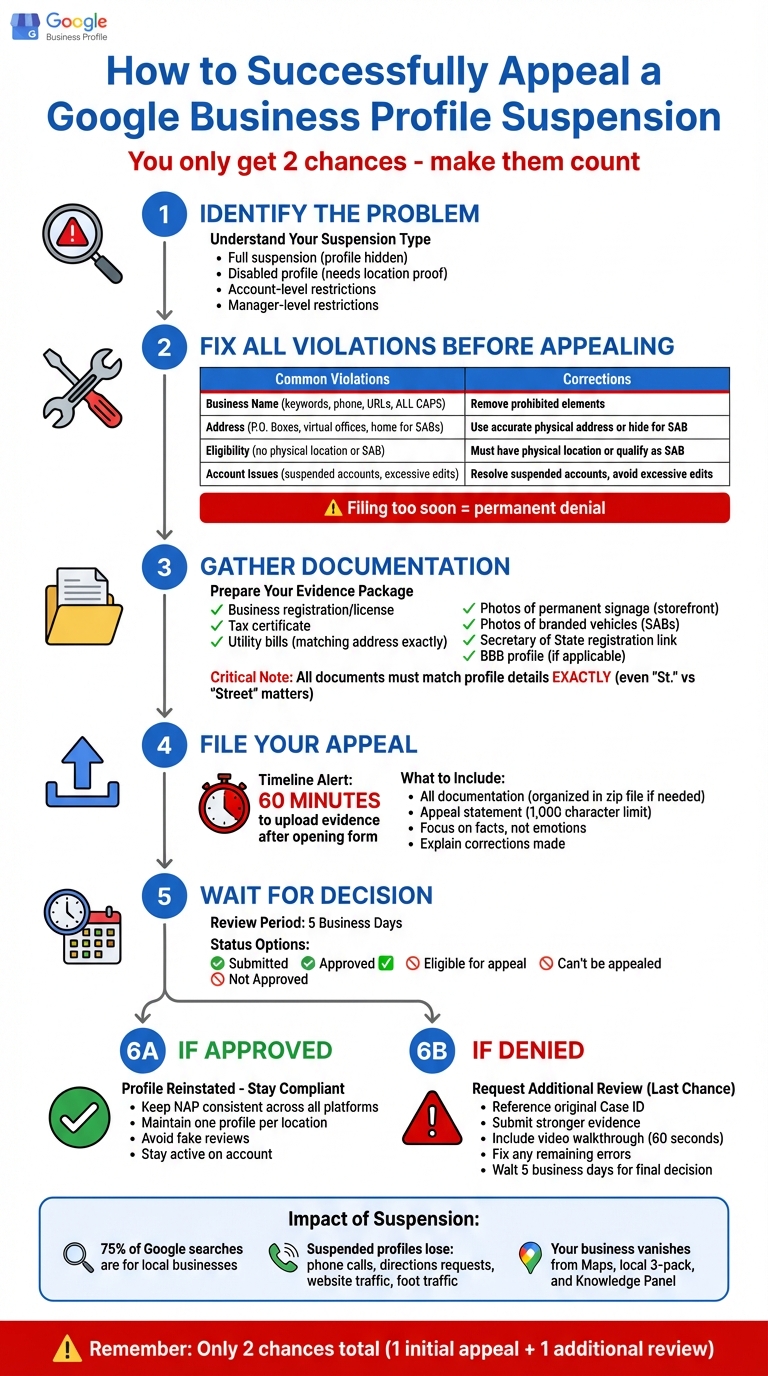
Google Business Profile Suspension Appeal Process: Step-by-Step Guide
What You Need to Know About Google Business Profile Suspensions
What is a Google Business Profile Suspension?
A Google Business Profile suspension means your listing is hidden from Search and Maps, and you lose the ability to manage it until you address specific policy violations. The severity of the suspension depends on the issue at hand. Google may impose:
- A full suspension, which disables your profile entirely.
- A disabled profile, requiring proof of your business location.
- Account-level restrictions, which suspend all profiles tied to your account if there’s a history of policy violations.
- Manager-level restrictions, which limit one user’s ability to make changes while keeping the business listing visible to the public.
Sometimes, Google enforces content restrictions instead of suspending the entire profile. For instance, they might block edits to your business name, category, or address, or reject photos and videos that violate their guidelines. In these cases, your profile remains active but with limited functionality.
Understanding these different suspension types is key since each one impacts your business in unique ways.
Why Google Suspends Business Profiles
Google enforces strict rules to maintain accurate and trustworthy search results, ensuring customers find reliable local businesses. Here are some common reasons for suspensions:
1. Business Name Violations
Using keywords like "Best Pizza Downtown", adding phone numbers or URLs, or writing in ALL CAPS can lead to a suspension. Your business name must match what’s on your storefront and legal documents – no extra flair allowed.
2. Address and Location Issues
Google has clear rules about business addresses. You can’t use P.O. Boxes, UPS Store mailboxes, or virtual office addresses. If you run a Service Area Business (SAB) from home, like a plumber or electrician, displaying your home address publicly is not permitted.
3. Eligibility Problems
Not all businesses qualify for a Google Business Profile. Online-only businesses, lead generation companies, and businesses operating at locations they don’t own or manage are ineligible. High-risk industries, such as locksmiths, HVAC companies, lawyers, and rehab centers, face stricter scrutiny to ensure legitimacy.
4. Account-Level Issues
If your Google Account shows a pattern of violations or is suspended, all profiles you manage will be affected. Even making too many edits in a short time can trigger Google’s automated fraud filters, leading to account-level restrictions.
| Violation Category | Common Suspension Triggers |
|---|---|
| Business Name | Keyword stuffing, marketing phrases, phone numbers/URLs, all-caps names |
| Address & Location | P.O. Boxes, virtual offices, displaying home addresses for SABs |
| Business Eligibility | Online-only businesses, lead generators, unauthorized locations |
| Account Issues | Suspended accounts, repeated violations, excessive edits |
| Content & Behavior | Fake reviews, prohibited content, exaggerated descriptions |
These violations don’t just break Google’s rules – they can cause immediate disruptions to your business operations.
How Suspensions Affect Your Business
The consequences of a suspension are immediate and can be severe. Your business vanishes from Google Maps, the local "3-pack" of top listings, and the Knowledge Panel, which provides key details like your hours, reviews, and contact info. Considering that 75% of all Google searches are for local businesses, this can be devastating.
Here’s how it impacts your day-to-day operations:
- Phone calls and customer inquiries drop.
- Fewer people request directions to your location.
- Website traffic takes a nosedive.
- Foot traffic to your store decreases significantly.
For many small businesses, their Google Business Profile is the first – and sometimes only – way potential customers discover them.
On top of that, you lose control over your online reputation during a suspension. You can’t respond to reviews, update business information, or promote special offers. Meanwhile, your competitors remain visible and accessible to customers.
"Lose your profile, and your presence in the physical world loses its reflection in the digital one." – Chris Abraham, Digital Strategist
If the suspension is due to account-level restrictions, the damage spreads to every profile you manage. A single violation can take down your entire portfolio of business locations until you resolve the underlying issue.
What to Fix Before You File an Appeal
Before filing an appeal, it’s crucial to ensure your Google Business Profile (GBP) complies with all of Google’s policies. Address every violation first – filing too soon can lead to a permanent denial. Google won’t reinstate a profile that still violates its rules, and rushing the process can hurt your chances. As Sherry Bonelli, a Google Business Profile Platinum Product Expert, warns:
"If you file the appeal and are denied due to sending the wrong documents or not fixing the information on your GBP listing, you may be denied and prevented from having a Google Business Profile. Period".
Start by reviewing your profile for any guideline violations. Fix them, then gather the necessary documentation to prove your business is legitimate. This step-by-step approach increases the likelihood of a successful appeal.
Review Your Google Business Profile for Errors
Go through every field in your profile carefully. Your business name must match your storefront and official documents exactly. Avoid adding marketing terms like "Best NYC Plumber", store codes, phone numbers, URLs, or legal suffixes like LLC or Inc. unless they are part of your actual branding. Google’s guideline is straightforward:
"Represent your business as it’s consistently represented and recognized in the real world across signage, stationery, and other branding".
Also, check that your address complies with Google’s rules. If you run a Service Area Business (SAB) from your home, hide your residential address and show only your service area. For co-working spaces, your business must have permanent signage, staff on-site during business hours, and the ability to receive customers.
Eliminate any duplicate listings. If you’ve created multiple profiles for the same location, merge or delete the extras immediately. Make sure your business hours, phone number, and website are accurate and reflect your actual operations. Finally, ensure your profile’s name, address, and phone number (NAP) match what’s listed on your website and across online directories. Even small inconsistencies can trigger a suspension.
Correct Common Policy Violations
Focus on these common problem areas:
| Violation Category | Common Mistake | Correction Needed |
|---|---|---|
| Business Name | Adding terms like "Best NYC Plumber" | Use only your legal or signage name, e.g., "Smith Plumbing" |
| Address | Using a P.O. Box or virtual office | Provide a physical storefront or hide the address for SABs |
| Categories | Using extra categories as keywords (e.g., "Pizza", "Delivery") | Select only the fewest categories that describe your core business |
| Website/Phone | Using a tracking number or redirect URL | Use a local phone number and a direct website link |
| Business Hours | Listing 24/7 hours for non-emergency services | Provide the actual hours when staff is available |
If you operate in a high-risk industry like locksmith services, HVAC, plumbing, legal services, or rehab centers, expect stricter scrutiny. These industries face more frequent suspensions, so your documentation needs to be airtight.
After correcting your profile, update your website and third-party listings to match. Consistency across platforms helps demonstrate that your business is legitimate.
Gather Your Business Documentation
Make sure all submitted documents match your profile details exactly. Even small discrepancies – like writing "Street" instead of "St." – can result in a denied appeal.
Key documents include your business registration, license, and tax certificate to confirm your legal status. Utility bills (electricity, phone, water, internet, or cable) showing your business name and address can further validate your claim.
Visual proof is also important. If you have a storefront, provide clear photos of your permanent signage. For service-area businesses, photos of branded vehicles can add credibility. Including links to your Secretary of State business registration or an accredited Better Business Bureau (BBB) profile can further strengthen your case.
Prepare all your documents before starting the appeal process. Keep in mind that once you access the appeals tool, you’ll have only 60 minutes to upload your evidence. With everything in order, you’ll be ready to file your appeal confidently.
How to File a Google Business Profile Suspension Appeal
Once you’ve corrected your profile and gathered the necessary documents, you’re ready to file an appeal. Google offers an official appeals tool that walks you through the process step by step. Be mindful of time – you’ll have a strict deadline to upload your evidence once you begin.
How to Access the Appeals Tool
Start by signing in to your Google Business Profile dashboard and locating the suspension notification. Click on the restricted profile to access the appeals tool. Here, you’ll find the reason for the suspension and a link to the specific policy you violated. Take a moment to review this information carefully before moving forward.
If your entire Google Account is restricted, you’ll need to resolve that issue first. Head to the "My accounts" page to appeal the account restriction, as individual Business Profile suspensions can only be addressed after your account is reinstated.
Before submitting your appeal, ensure your profile is verified. Unverified profiles won’t appear on Google, even if reinstated, so verification is a critical first step.
Once verified, gather and prepare the necessary evidence to support your case.
What Evidence to Submit With Your Appeal
After clicking "Submit Appeal", you’ll receive a link to an evidence submission form. Keep in mind, you have just 60 minutes to upload your documents. Google clearly states:
"Once you open the evidence form, you must submit it within 60 minutes or it won’t be attached to your appeal".
To strengthen your appeal, include the following documents:
- Business registration, license, and tax certificate: These confirm your business is legitimate and compliant with local regulations.
- Utility bills: These verify your physical location and should match the address on your profile.
- Photos: For storefronts, provide images of permanent signage. For service-area businesses, include photos of branded vehicles.
If you’re appealing for more than 10 profiles, select "Yes" when prompted for a bulk appeal. Attach a spreadsheet listing each Business Profile ID along with the corresponding evidence.
For large files, organize them in a zipped folder. You can also include links to your Secretary of State business registration or a Better Business Bureau profile for additional verification.
| Document Type | Purpose | Requirements |
|---|---|---|
| Official Business Registration | Confirms the business is legally established | Must display the legal business name |
| Business License | Proves eligibility to operate in your industry/location | Must be current and valid |
| Tax Certificates | Government-issued proof of business existence | Must match the business name on the profile |
| Utility Bills | Verifies the business’s physical location | Must match the profile address; can include electricity, water, or internet bills |
Once your evidence is organized, focus on crafting a clear and concise appeal statement.
How to Write Your Appeal Statement
Your appeal statement has a 1,000-character limit, so stick to the essentials. Clearly outline what steps you’ve taken to resolve the issue and why your profile should be reinstated.
"Explain what you’ve done to address the reason for suspension or why you think the suspension is not valid. You’ll have a limit of 1000 characters here so it’s best to focus on the facts".
Avoid emotional appeals or unnecessary details. Instead, be direct. For instance: "The business name has been updated to match our official signage and state registration. Attached are our business license, utility bill, and storefront photos showing our permanent signage."
Don’t submit multiple appeals for the same issue, as this can cause delays. After submission, Google typically takes up to five business days to review your case. You can monitor the status of your appeal in the tool, where updates like "Submitted", "Approved", "Not Approved", "Can’t be appealed", or "Eligible for appeal" will be displayed. Check regularly to stay informed about your appeal’s progress.
sbb-itb-5b82b38
What to Do After Filing Your Appeal
How to Check Your Appeal Status
To check the status of your appeal, sign in to your Google Account, open the appeals tool, and select the profile you appealed. You’ll see its status on the right, labeled as one of the following: Submitted, Approved, Not Approved, Eligible for appeal, or Can’t be appealed.
Google typically reviews appeals within five business days. However, during busy periods, it might take longer. You’ll receive the final decision via email sent to the account linked to your profile. If you don’t see it in your inbox, check your spam folder. Submitting multiple appeals for the same issue can delay the process, so avoid doing so.
For bulk appeals involving more than 10 profiles, the appeals tool will only show updates for the primary profile selected during submission.
If your appeal isn’t approved, there are steps you can take to address the issue.
What to Do If Your Appeal is Denied
A denied appeal doesn’t mean the end of the road. Google allows a one-time additional review, giving you another chance to prove compliance. Here’s what you should do to strengthen your case:
- Identify and Fix Errors: Review your profile for issues like keyword stuffing, using a P.O. box, or selecting inaccurate categories. Correct these before moving forward.
- Gather Strong Evidence: Collect documents that demonstrate your legitimacy, such as tax certificates, utility bills that match your profile address, and clear photos of permanent signage. If you operate from a physical location, create a short video (around 60 seconds) showing the street view, your signage, and the interior of your staffed space. Example: A local remodeling company successfully overturned a denial by simplifying its category selection and submitting a thorough package. This included a walkthrough video, tax documents, and utility bills, all tied to its original Case ID. The profile was reinstated within five days.
- Request an Additional Review: When submitting your request, reference your original Case ID to help Google’s support team locate your case. Clearly explain the changes you made to bring your profile into compliance. Stick to the facts and avoid using promotional language.
The additional review process usually takes about five business days, and the decision will be sent via email.
If the second review is unsuccessful, consider reaching out to Product Experts in the Google Business Profile Help Community. For businesses in the European Economic Area, additional options such as out-of-court dispute resolution are available.
How to Prevent Future Suspensions
Once your profile is reinstated, focus on maintaining compliance to avoid future issues. Here’s how:
- Ensure Consistency: Your business name, address, and phone number should match what’s on your physical signage, official documents, and branding. Avoid adding marketing phrases, store codes, or special characters to your profile name (e.g., use "TD Bank" instead of "TD Bank, America’s Most Convenient Bank").
- Limit Profiles: Stick to one profile per location to avoid triggering review flags. Use only the categories that precisely describe your business (e.g., "Pizza Restaurant" instead of "Pizza Delivery").
- Avoid P.O. Boxes or Virtual Offices: If you’re in a co-working space, ensure you have permanent signage, the location is staffed during listed hours, and customers can visit in person. For home-based businesses that serve customers at their locations, hide your physical address on the public profile.
- Steer Clear of Fake Reviews: Never solicit fake or incentivized reviews. Google may restrict your profile from receiving new reviews or even remove existing ones if fake activity is detected.
- Stay Active: Regularly log into your Business Profile. Prolonged inactivity could result in losing access.
- Keep Important Documents Handy: Maintain digital copies of your business registration, licenses, tax certificates, and utility bills. Make sure the details on these documents match your profile exactly. Use a local phone number whenever possible and limit access to authorized owners and managers only. A suspended manager account can impact the entire profile’s management.
Conclusion
Getting a Google Business Profile suspension lifted takes careful planning, accurate paperwork, and a good dose of patience. Since you only get one initial appeal and a single follow-up review, it’s crucial to fully understand the process. Sherry Bonelli, a Google Business Profile Platinum Product Expert, puts it plainly:
"If you file the appeal and are denied due to sending the wrong documents or not fixing the information on your GBP listing, you may be denied and prevented from having a Google Business Profile. Period."
Before submitting your appeal, go over every issue identified in this guide. Address the specific policy violations that led to the suspension – whether it’s keyword stuffing, using a P.O. Box, or selecting the wrong categories. Gather all necessary documents, such as business licenses, tax certificates, and utility bills, ensuring they perfectly match the details on your profile. It’s also important to avoid submitting multiple appeals or creating a new profile while waiting for a response, as these actions can make matters worse.
Once your profile is reinstated, focus on staying compliant. Keep your business name, address, and phone number consistent across all platforms. Avoid using promotional language in your profile, stick to one profile per location, and stay active on your account. Having your official documents updated and accessible will make it easier to maintain your profile in good standing.
FAQs
How can I avoid having my Google Business Profile suspended again?
To maintain a healthy standing for your Google Business Profile, it’s crucial to stick to all of Google’s guidelines. Always represent your business with accurate, up-to-date information, and avoid practices like keyword stuffing or using fake addresses. Also, steer clear of any restricted content that could violate their policies.
Make it a habit to review Google’s policies regularly to ensure your profile stays compliant. If there are any changes to your business details, update your profile promptly. Being proactive can save you from potential suspensions down the road.
What steps can I take to improve my chances of getting my Google Business Profile appeal approved?
To boost the likelihood of a successful appeal, ensure your Google Business Profile aligns completely with Google’s guidelines. Use accurate and honest details about your business, and back up your appeal with solid evidence like official business documents.
Review every detail in your profile to confirm it matches your business’s legal and operational records. These steps can help establish trust and make it simpler for Google to validate your appeal.
What can I do if my Google Business Profile appeal is rejected even after providing additional evidence?
If your appeal doesn’t succeed, don’t get discouraged. You can submit another review request through Google’s support channels. Ensure that your evidence directly tackles the reasons for the suspension and is presented in a way that’s clear, detailed, and well-structured.
Should the problem continue, you might want to escalate the situation by reaching out to a Google Product Expert for guidance. Persistence, combined with well-prepared documentation, can improve your chances of finding a resolution.