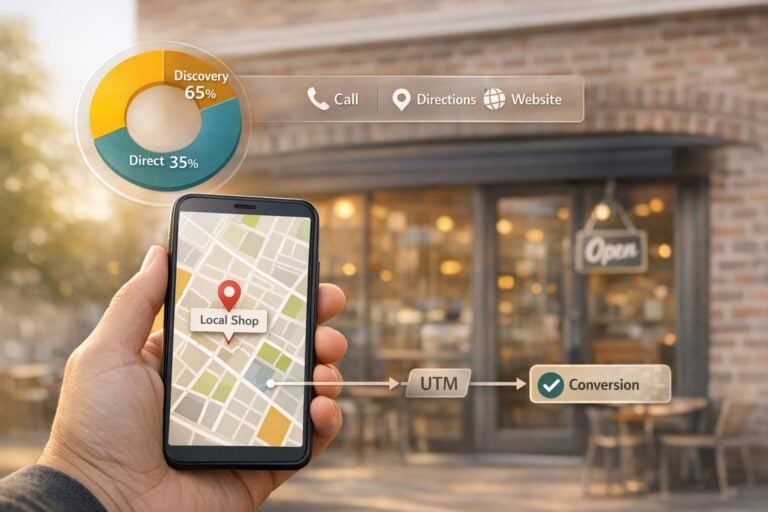
Local SEO is all about helping nearby customers find your business online. Google Business Profile (GBP) is a key tool for tracking and improving local search visibility. It provides valuable data like how people discover your business, what actions they take (calls, clicks, or visits), and which search terms lead them to you.
Key Takeaways:
- Discovery searches dominate: 84% of users find businesses by searching for services or categories, not specific names.
- Track key metrics: GBP Insights provides data on profile views, customer actions, search queries, and photo interactions.
- Optimize performance: Use insights to refine keywords, improve photos, and track trends over time.
- Connect to Google Analytics: Use UTM parameters to track GBP traffic and measure conversions effectively.
By regularly reviewing GBP Insights and acting on the data, you can improve your local SEO strategy and attract more customers.
What is Google Business Profile Insights?
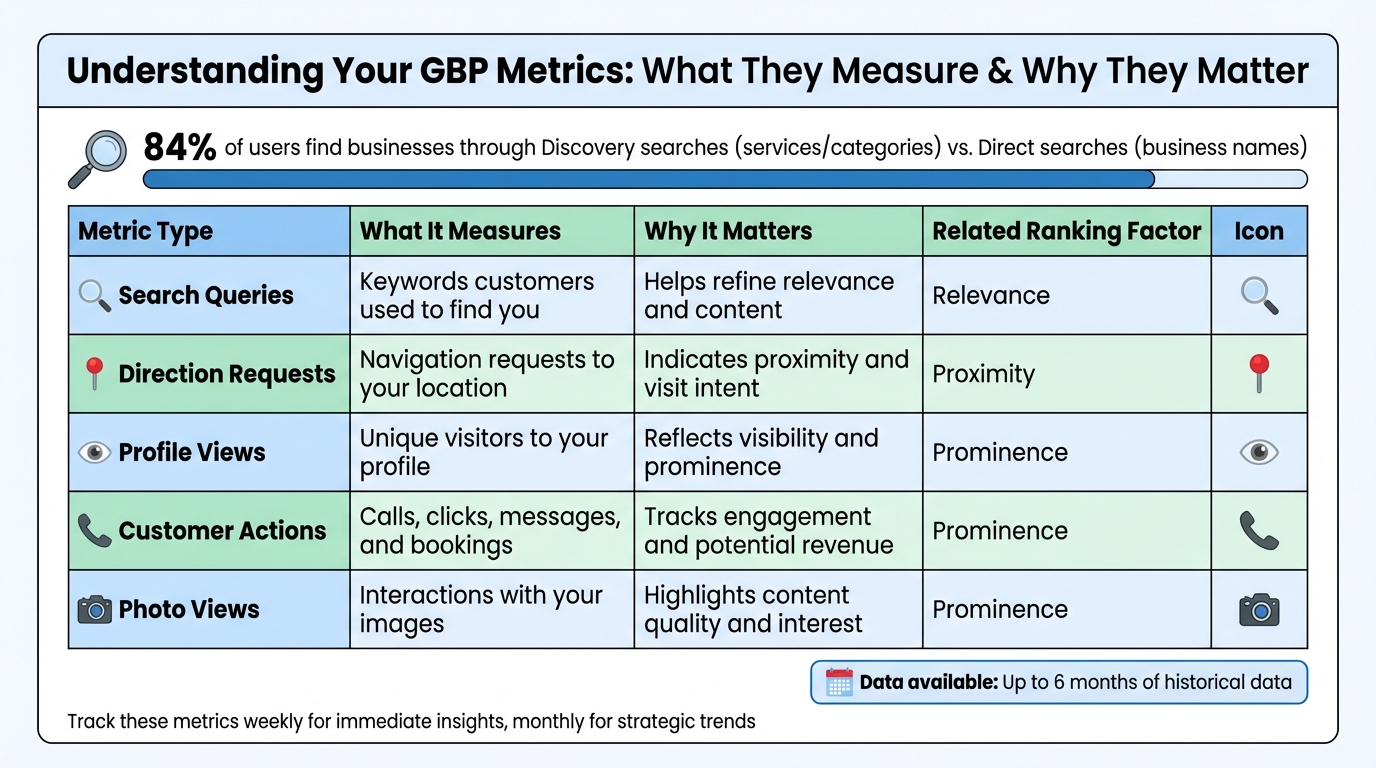
Google Business Profile Key Metrics and Their Impact on Local SEO
Google Business Profile Insights is the analytics tool built right into your Google Business Profile (GBP) dashboard. It tracks how customers discover your business on Google Search and Maps, what actions they take after finding your profile, and which search terms brought them there. Unlike website analytics that focus on post-click behavior, GBP Insights focuses on high-intent actions like calls, direction requests, and photo views – actions that often lead directly to conversions.
This tool also ties into the three key factors Google uses to rank local businesses: relevance, proximity, and prominence. Each of these is reflected in specific metrics:
- Relevance is captured through "Search Queries", which show the exact keywords that triggered your profile in search results.
- Proximity is highlighted by "Direction Requests", revealing how many people nearby are looking to visit your location.
- Prominence is measured through profile views, photo engagement, and customer interactions, signaling to Google that your business is active and dependable.
Claire Carlile, a Google Business Profile Silver Product Expert, sums it up well:
"Google Business Profile Performance Insights… delivers clear insights into your search presence. Plus, useful metrics that demonstrate how often customers and potential customers are taking action on your listing that might lead to a conversion."
The dashboard allows you to review up to six months of historical data, making it easier to identify trends and measure how updates to your profile impact performance. Data like search queries refresh monthly, though it may take a few days to fully update.
Types of Data Available in GBP Insights
GBP Insights gives you a detailed look at how your business performs in local search. Here are the key data points it tracks:
- Profile Views: This shows the number of unique visitors to your profile each day. Even if someone visits multiple times on the same device, they’re only counted once per day. It’s a clear indicator of your business’s visibility.
- Customer Actions: These are the interactions that matter most – calls, website clicks, message requests, bookings, and direction requests. These actions often lead directly to revenue and are a strong indicator of customer interest.
- Search Queries: This metric reveals the specific keywords people used to find your profile. It’s a valuable tool for refining your content strategy and ensuring you’re ranking for the right terms.
- Photo Views: Tracks how often people engage with your visual content. High photo engagement can build trust and boost your search rankings.
The tool also breaks down whether users found you via Google Search or Maps and whether they were on a mobile device or desktop. For some industries, additional metrics are available. For instance, restaurants can track "Food Orders" and "Menu Clicks", while hotels may see "Hotel Bookings."
However, certain metrics depend on your business type. For example, service area businesses that don’t display a physical address won’t see "Directions" data. Similarly, tracking bookings requires using a third-party booking provider integrated with Google.
Here’s a quick overview of the key metrics GBP Insights organizes for you:
| Metric Type | What It Measures | Why It Matters |
|---|---|---|
| Search Queries | Keywords customers used to find you | Helps refine relevance and content |
| Direction Requests | Navigation requests to your location | Indicates proximity and visit intent |
| Profile Views | Unique visitors to your profile | Reflects visibility and prominence |
| Customer Actions | Calls, clicks, messages, and bookings | Tracks engagement and potential revenue |
| Photo Views | Interactions with your images | Highlights content quality and interest |
sbb-itb-5b82b38
How to Access and Review GBP Data
Log into the Google Account connected to your business. From there, you can either search for your business name or type "my business" directly into Google Search. Once your profile appears, click the Performance button to access your data. If you’re on a mobile device, open the Google Maps app, tap Business at the bottom right, and your performance data will be displayed.
For businesses managing multiple locations, head to the Business Profile Manager at business.google.com/locations. Select the profiles you want to review, click Actions, and then choose Insights. Just remember, performance data is only available for verified profiles.
How to Navigate the GBP Dashboard
Inside the Performance section, you’ll find your data grouped into two main areas: Interactions (like calls, messages, bookings, directions, and website clicks) and How people discovered you (which includes search terms and device usage). Use the date range selector at the top to compare data over custom periods. While the dashboard provides preset views, you can access up to six months of historical data.
The device breakdown is particularly helpful, showing whether users accessed your profile via mobile or desktop and whether they used Google Search or Maps. This information can shape your outreach strategies. For example, mobile users often act quickly, especially for service-based businesses, while Maps traffic often signals immediate purchase intent. To avoid losing historical data, set a monthly reminder to export your performance reports as CSV files using the Actions menu, as Google’s dashboard only retains data for a limited time.
Next, let’s explore how to use this data to spot trends and refine your strategy.
How to Spot Performance Trends
Once you’ve reviewed your dashboard, the next step is to identify trends that can enhance customer engagement. Pay particular attention to the split between Direct and Discovery searches. Direct searches happen when someone specifically looks up your business name or address, often signaling loyalty. Discovery searches, on the other hand, occur when users search for a category like "pizza near me", which indicates how well you’re attracting new customers. This distinction can help you measure both brand awareness and your ability to draw in fresh leads.
Keep an eye on the Calls and Directions tabs to pinpoint the busiest days of the week. This data can guide decisions like adjusting staffing levels or scheduling ads to align with peak demand.
"Check your Google Business Profile performance insights and see how you’re doing every month. Find ways to improve the engagement you have with visitors."
- Sherry Bonelli, Platinum Product Expert, Google Business Profile
Seasonal trends are another key factor to monitor. For instance, colder weather often drives searches for furnace repairs, while spring tends to boost landscaping inquiries. The Search Queries metric is updated monthly but may take up to five days to fully populate. Regularly reviewing these trends allows you to identify which search terms are delivering traffic and adjust your strategy accordingly.
How to Connect GBP Insights to Website Analytics
Google Business Profile (GBP) Insights can show you clicks and calls, but it doesn’t track what happens after visitors land on your website. To follow the entire customer journey – from clicking your GBP listing to completing a purchase or booking – you need to connect GBP data with Google Analytics 4 (GA4). Without this connection, GBP traffic often gets mislabeled as "Direct" or lumped into "Organic" search, making it harder to gauge performance accurately.
"Without tracking your GBP traffic separately, you’re missing out on understanding how your local SEO is truly performing." – Jinnat Ul Hasan, SEO Consultant, Whizz People
Using UTM parameters on your URLs can solve this issue. These tags help identify traffic sources clearly and track key actions like purchases, form submissions, and bookings.
How to Use UTM Parameters to Track Traffic
UTM parameters are small tags added to your URLs (e.g., ?utm_source=google&utm_medium=organic&utm_campaign=gbp) to specify where your traffic comes from. They allow GA4 to categorize and report traffic sources more effectively.
To create these URLs, use Google’s Campaign URL Builder, which minimizes errors. Focus on these key UTM parameters:
utm_source=google: Identifies Google as the traffic source.utm_medium=organic: Keeps the traffic in the Organic Search channel.utm_campaign=gbp: Labels the traffic as coming from your GBP listing.
Consistency is crucial – always use lowercase letters, as GA4 treats "Organic" and "organic" as separate entries.
You can also use the utm_content parameter to differentiate between links, like your Appointment URL, Menu link, or individual Google Posts. For example:
- An appointment link might include
utm_content=appointment. - A summer sale post could use
utm_content=summer_sale.
| GBP Link Type | Example UTM Tagged URL |
|---|---|
| Main Website | https://example.com/?utm_source=google&utm_medium=organic&utm_campaign=gbp |
| Appointment | https://example.com/book?utm_source=google&utm_medium=organic&utm_campaign=gbp&utm_content=appointment |
| Google Post | https://example.com/offer?utm_source=google&utm_medium=organic&utm_campaign=gbp&utm_content=summer_sale |
After updating your GBP links, test them in incognito mode to ensure they work correctly. Check GA4’s Realtime report to confirm that the UTM parameters are being captured. Make sure your tagged URLs don’t redirect, as redirects can strip UTM parameters and disrupt tracking.
"Consistency is key… It’s better to spend hours carefully planning out your tagging structure… than it is to spend days unpicking borked data." – Claire Carlile, Google Business Profile Silver Product Expert
With proper tracking in place, you’ll have the tools to analyze how GBP-driven traffic interacts with your site.
How to Analyze Website Behavior from GBP Traffic
Once UTM tagging is set up, go to Reports > Acquisition > Traffic acquisition in GA4. Filter by your campaign name (e.g., "gbp") to see how many users came from your GBP listing, how long they stayed, and what actions they took. Comparing metrics like Engagement Rate and Time on Site against other traffic sources can reveal how effective your local SEO efforts are.
The most valuable insights come from tracking conversions – specific actions like purchases, form submissions, or bookings. To do this, mark these actions as conversions in GA4’s Admin > Events. Then, review the Conversions report to measure how many leads or sales originated from GBP traffic. If your business accepts online payments, you can even track the revenue generated by local search traffic.
"The inability to connect a local search click directly to a final conversion event… represents a critical blind spot that must be addressed by modern businesses." – GMB Daddy
For phone leads, consider adding call tracking to measure how extended calls contribute to your local SEO efforts.
Keep in mind that GA4 data updates can take 24–48 hours to appear in standard reports. Schedule monthly reviews to evaluate your GBP performance, compare it to other channels, and identify which landing pages perform best for local visitors. If you need assistance setting up your GBP with tracking from the start, UENI offers services to build, verify, and optimize your profile, ensuring everything is configured to measure your local SEO success effectively.
How to Use GBP Insights to Improve Performance
Once you’ve analyzed your Google Business Profile (GBP) data, the next step is acting on it to improve your profile’s performance. Data only becomes useful when it drives meaningful changes. GBP Insights can reveal customer behavior patterns that highlight areas for improvement. For example, if you notice high views but low engagement or plenty of clicks but few conversions, these metrics can guide where to focus your attention.
"If multiple customers are complaining about the same issue… that’s a business problem, not just a Google review problem. Your GBP data is giving you valuable customer insights." – Synup
An increase in discovery searches compared to direct searches shows you’re successfully reaching new audiences. On the other hand, if you’re seeing many direction requests but low physical visits, it might be time to update your storefront photos or parking details. These insights provide clear direction for optimizing your profile.
How to Optimize Based on Customer Actions
By comparing customer actions, you can pinpoint areas that need improvement. For instance, if your profile gets a lot of website clicks but few phone calls, it could mean your website has issues like slow load times or unclear calls-to-action. In this case, auditing your landing page and ensuring your contact details are easy to find on mobile devices could make a difference.
Similarly, if you’re getting many direction requests but not seeing those translate into visits, it might be time to improve the physical experience. Adding parking information, nearby landmarks, or refreshing your storefront photos can help bridge that gap.
| Metric Pattern | What It Reveals | Immediate Action |
|---|---|---|
| High Website Clicks / Low Calls | Website usability issues | Audit mobile experience, improve CTAs, and ensure phone number is easy to find |
| High Direction Requests / Low Visits | Location confusion | Add parking details, update exterior photos, and include nearby landmarks |
| Low Photo Views vs. Competitors | Weak visual content | Upload geotagged, high-quality photos blending professional and candid shots |
| Stagnant Discovery Searches | Limited keyword reach | Add relevant categories and use customer-friendly terms in descriptions |
Visual content plays a key role in customer engagement, so don’t overlook it.
How to Improve Photos and Content
Photos can significantly influence customer actions. Businesses that regularly update their photos see a 42% increase in direction requests and 35% more website clicks. Product and menu photos, for example, often receive 50% to 100% more views than generic exterior shots.
Use GBP Insights to identify which photo types resonate most with your audience. For instance, a restaurant in 2026 discovered that photos of individual menu items received three times more views than dining room shots, leading to a 45% increase in website clicks and phone calls.
"If a photo isn’t driving action, replace it." – Swat SEO, Leverage Local
Update your photos every 2–4 weeks to keep your profile fresh. Use JPG or PNG files sized between 10 KB and 5 MB with a minimum resolution of 720×720 px. Rename files with descriptive keywords, like "downtown-bakery-exterior.jpg", instead of generic names like "IMG1234.jpg".
Additionally, check your Search Queries data to see how customers find your business. Swap out industry jargon in your descriptions for the phrases your customers actually use. Use "Popular Times" data to schedule Google Posts during peak engagement periods for better visibility.
How to Monitor and Improve Over Time
To make the most of your GBP Insights, set up a routine for monitoring and improving your profile. Weekly checks can help you spot immediate issues like changes in calls, clicks, or direction requests. Monthly reviews allow you to analyze broader trends and compare your performance to similar businesses.
| Review Frequency | Focus Area | Key Metrics |
|---|---|---|
| Weekly | Immediate Engagement | Calls, website clicks, direction requests |
| Monthly | Strategic Trends | Discovery vs. direct searches, competitive benchmarks, photo performance |
| Quarterly | Long-term Growth | Seasonal patterns, geographic trends, year-over-year growth |
Google Business Profile Insights provides up to six months of historical data, which is helpful for spotting trends. Advanced tools can store up to 18 months of data, allowing you to identify seasonal patterns. If you manage multiple locations, download bulk reports to compare performance across branches.
Use the "Compare to average" feature to track how your profile stacks up against competitors. For example, if your photo views are 40% higher than similar businesses after updating your content, you’ve found a winning strategy. Keep in mind that most interaction data updates within one to two days, while search query metrics update monthly and may take up to five days to appear.
If managing all this feels like too much, platforms like UENI can handle your GBP setup, verification, and optimization, ensuring you’re tracking the metrics that matter for local SEO success.
Conclusion
Google Business Profile Insights gives you a clear picture of how local customers find and interact with your business. It highlights areas that are performing well and those that could use improvement – like updating your photos, fine-tuning your keywords, or tweaking how you respond to customer behavior. By regularly reviewing this data, you can make targeted changes that lead to real growth. It’s not just about tracking performance; it’s about using that information to take action.
"If you’re not tracking and analyzing GBP insights, you’re leaving money on the table." – Synup
To stay ahead, make it a habit to monitor your data weekly for quick fixes and export it monthly to save records before Google’s six-month limit kicks in.
Feeling overwhelmed by the details? UENI can handle everything from setting up and verifying your Google Business Profile to keeping it optimized – so you can focus on growing your business.
FAQs
Which GBP metrics matter most for local SEO?
When it comes to local SEO, the key Google Business Profile (GBP) metrics to watch are engagement signals. These include clicks, calls, direction requests, and visits. Why? Because these actions show genuine customer interest and trust in your business. Plus, they play a big role in improving your local search performance and driving real business results. Keep an eye on these metrics to measure how well your profile is working and its influence on your local SEO efforts.
How do I track GBP clicks as conversions in GA4?
To monitor Google Business Profile (GBP) clicks as conversions in GA4, start by adding UTM parameters to your GBP website links. Use tags like utm_source=google, utm_medium=organic, and utm_campaign=gbp. These parameters allow GA4 to recognize and categorize traffic coming specifically from your GBP.
Next, set up conversion tracking in GA4. You can do this by creating custom events or leveraging existing ones to track specific actions, such as website clicks, bookings, or phone calls. Once set up, these events will be recorded and analyzed as conversions within GA4, giving you valuable insights into user interactions.
Why are my views high but calls and visits low?
High views on your Google Business Profile indicate that people are finding you, but if calls and visits are low, it might mean your profile isn’t connecting with them the right way. This often happens when the profile doesn’t clearly match what users are looking for, fails to communicate your value, or lacks compelling calls-to-action. To fix this, make sure your profile speaks directly to user needs, showcases what makes your business stand out, and motivates them to take action. Using tools like UENI can help turn those views into real engagement, like calls or visits.