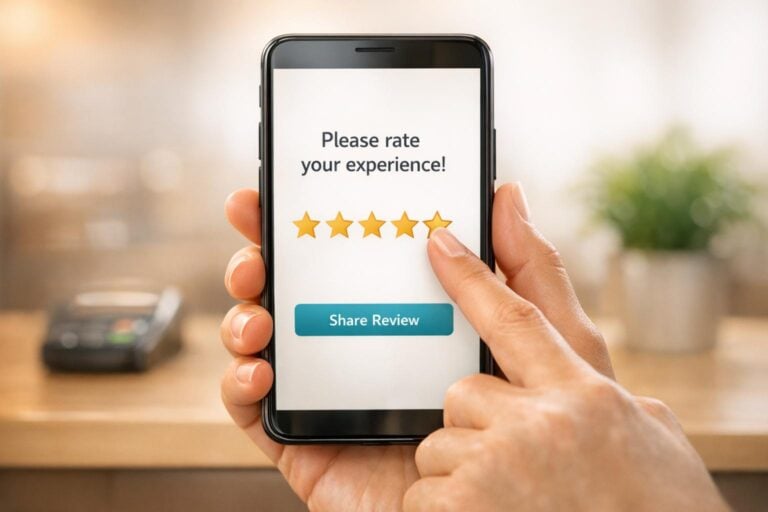
Customer reviews are a game-changer for businesses. They influence purchase decisions, boost online visibility, and build trust. With 95% of consumers reading reviews before buying and 81% checking Google reviews, asking for feedback is essential for growth. But timing and approach matter. Here’s how to get it right:
- Ask at the right moment: After a positive experience or once customers have had time to use your product/service.
- Choose the right channel: SMS for quick responses, email for personalized messages, or in-person for higher success.
- Keep it simple: Use short messages with direct review links and always say thank you.
- Avoid bad timing: Don’t ask during complaints or before customers can form an opinion.
Best Practices for Asking Customers for Reviews: Timing, Channels, and Messaging Guide
When to Ask for Reviews
Timing plays a crucial role in getting reviews, especially positive ones. The goal is to ask when customers are most likely to share their satisfaction. The sweet spot? Right after a positive experience, when the memory is fresh, and enthusiasm is high.
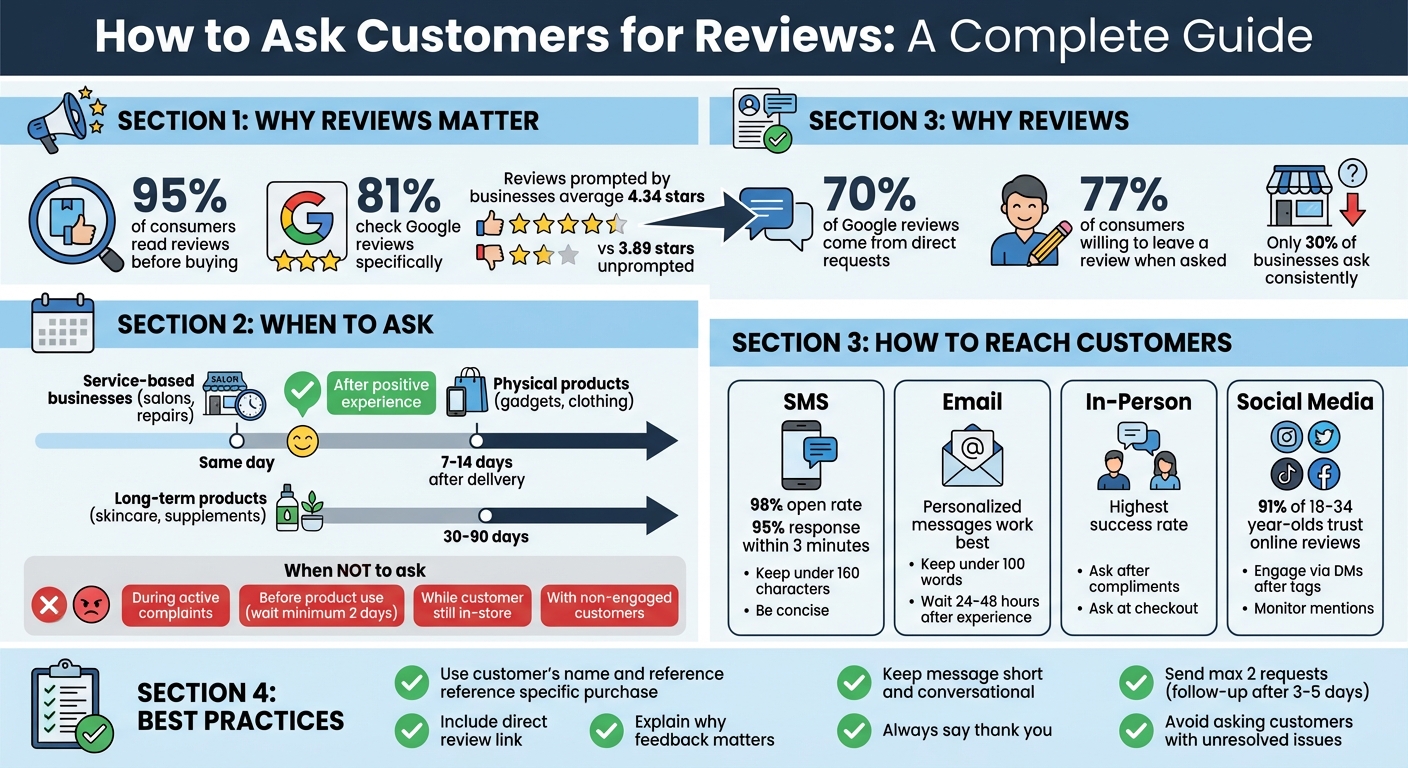
Studies reveal that reviews prompted by businesses average 4.34 stars, compared to just 3.89 stars for unprompted feedback. Plus, about 70% of Google reviews come from direct requests. So, being proactive works – if you time it right.
The right timing depends on what you’re offering. For service-based businesses like salons or repair shops, ask the same day to capture immediate impressions. For physical products such as gadgets or clothing, wait 7–14 days after delivery so customers have time to use their purchase. Products like skincare or supplements require even more patience – 30–90 days – to allow customers to see results.
After a Positive Experience
The best opportunity to ask comes when customers are already expressing their happiness. Did a diner compliment their meal? That’s your moment. Did someone tag your business in a glowing social media post? Reach out while the excitement is still fresh. These "engagement moments" are ideal for securing reviews.
"Consumer psychology tells us that a request that arrives at a moment of high satisfaction feels less like a marketing ask and more like a natural continuation of a positive interaction." – Expert Reputation
SMS requests are great for quick follow-ups, boasting a 98% open rate and 95% response rate within three minutes. However, don’t send texts while the customer is still on-site, as it can feel pushy. For email requests, give it 24–48 hours after the experience to allow for reflection.
For loyal, repeat customers, timing your request right after their latest transaction can reinforce their connection to your business and encourage them to share their thoughts.
When Not to Ask for Reviews
Avoid asking for reviews when the timing or situation isn’t right. For example, if a customer is dealing with an active complaint, a damaged order, or unresolved support issues, requesting feedback can backfire. Focus on resolving the issue first. Include customer support details in your review requests so unhappy customers can voice concerns privately instead of leaving a negative review.
Don’t ask for reviews before customers have had time to use their purchase. Most online shoppers take at least two days after receiving a product to write a review. Rushing them can lead to uninformed or negative feedback.
Lastly, limit follow-ups to a single polite reminder. Two well-timed messages spaced a few days apart can improve response rates by up to 60%.
| Situation | Why Avoid Asking | What to Do Instead |
|---|---|---|
| Customer Complaint | Risks a public 1-star review and damages trust | Resolve the issue through customer support and learn how to respond to negative reviews if they occur |
| Pre-Product Use | Customer can’t give an informed opinion | Wait 2–14 days (or longer for specialized products) |
| In-Store (Still Present) | Feels pushy and awkward | Send a follow-up SMS or email after they leave |
| Non-Engaged Customer | Asking feels forced and may annoy them | Only ask those who’ve shown positive feedback |
Now that you know when to ask, the next step is learning how to reach out effectively for reviews.
sbb-itb-5b82b38
How to Reach Customers for Reviews
Knowing the right time to ask for reviews is just part of the equation. The channel you choose to make that request is equally important. Did you know that while 77% of consumers are willing to leave a review when asked, fewer than 30% of businesses actually ask consistently? This gap isn’t because customers are unwilling – it’s because businesses often miss the mark on how and where they ask.
The key is to match your approach to your customer’s preferences. SMS works great for quick visibility, email allows for a more personal touch, in-person requests capture peak moments of satisfaction, and social media creates opportunities for organic engagement. For example, a contractor might text a review link right after finishing a job, while an online retailer might send a follow-up email a week after delivery. A café owner? They might casually ask during checkout. Let’s break down how each method can work for you.
Email and Text Message Requests
If you’re looking for quick results, SMS is your go-to. Text messages boast open rates of over 90%, and 80% of people check their notifications within five minutes. Keep your message short (under 160 characters) and include a direct link to make it easy. Here’s an example:
"Hi Sarah! Thanks for choosing us for your AC repair. Mind leaving a quick review? [link] – Mike at Cool Breeze HVAC."
As Michael Power, CMO of DTF Transfers, puts it:
"I would never write ‘5-minutes’ in a professional setting, but over text, it’s an easy way to convey just how fast and simple reviewing can be."
Emails, on the other hand, are perfect when you need more space to personalize your message. Keep it under 100 words, address the customer by name, and reference the specific product or service they purchased. Don’t forget to include a single, clear call-to-action link that takes them straight to the review form.
Aktug Dogan of Refermate emphasizes:
"Pay attention to these small details because you don’t want to come across as if you’re sending a generic, templated message."
Adding personal touches like “I’m glad we could get your AC fixed before the weekend” makes your request feel genuine. A direct Google review link is ideal, and if you don’t hear back, send a polite reminder 3–5 days later.
Using Social Media
Social media is a great way to encourage reviews without being too direct. Share positive reviews you’ve already received on platforms like Instagram or Facebook to showcase social proof. Posts or Stories featuring customer feedback can naturally inspire others to share their own experiences.
When customers tag your business in their posts or Stories, take the opportunity to thank them via direct message. Then, ask if they’d consider leaving a formal review on Google or another platform. This approach works especially well with younger consumers – 91% of people aged 18–34 trust online reviews as much as personal recommendations. By engaging with them where they already are, your request feels more like a natural continuation of the conversation than a formal ask.
Asking in Person
If you can catch customers in person, you’re likely to see the highest success rates. Timing is everything: ask right after a compliment, at checkout, or when revealing a completed project. The face-to-face connection makes it harder for customers to say no.
Start by asking about their experience, then segue into the review request. For instance:
"I’m so glad you loved the new color! If you have a minute, would you mind sharing that on Google? I can text you the link right now to make it easy."
Offering to send the link via text removes any extra steps, making it more likely they’ll follow through.
You can also use physical tools like QR codes printed on receipts, business cards, or table tents. These allow customers to scan and leave a review instantly. Considering 8 out of 10 shoppers use their smartphones to look up reviews while shopping in-store, this method is both timely and convenient.
Pay attention to the situation before asking. Focus on customers who seem engaged or have already shared positive feedback. Avoid making the request when someone seems rushed or stressed. For long-term clients, you might say:
"A review from a regular like you carries a lot of weight. No pressure, but we’d appreciate it if you have a free minute."
This personal touch acknowledges their loyalty and makes your request feel more meaningful.
How to Write a Review Request
Timing and channel selection are crucial when asking for reviews. A short, focused message with a direct link works best. Skip the long-winded paragraphs and guilt-driven pleas – ask for feedback when your customer is happiest, like right after a successful purchase or service experience. This approach plays a key role in building visibility and trust through reviews.
An effective review request should feel personal. Use the customer’s name, reference their purchase or service, and keep it brief – emails under 100 words and texts under 160 characters are ideal. Include a clear review link and explain why their opinion matters. For instance, saying, "Your feedback helps other shoppers make informed choices" is more compelling than "It helps our business." And don’t forget to express gratitude, whether they leave a review or not. A simple thank-you can strengthen the connection.
Example Messages for Different Situations
Here are some examples of how to craft review requests for various scenarios:
For a product purchase (email):
"Hi Sarah, thanks for your recent order! How’s the standing desk working out for you? It only takes 2 minutes to share your thoughts: [Review Link]. Your feedback helps other shoppers and helps us improve. Thanks, Mike"
For a completed service (SMS):
"Hi Tom, thanks for choosing Cool Breeze HVAC! How was your experience? Share your thoughts here: [Link]. We appreciate your feedback!"
After an appointment (SMS):
"Hi Jessica, it was great to see you at Bright Smile Dental today. Please rate your experience here: [Link]. Thanks! Dr. Martinez"
For a repeat customer (email):
"Hi David, you’ve been with us for over a year now, and we’re so grateful. A review from a loyal customer like you means a lot. No pressure, but if you have a moment, we’d love to hear your thoughts: [Review Link]. Thanks for your continued support!"
Each message keeps a conversational tone, references a specific product or service, and provides a direct link. That’s the winning formula.
Keep It Simple and Say Thank You
The easier you make it, the more likely customers are to leave a review. A direct link eliminates the hassle of navigating through multiple pages, which is why 70% of consumers are willing to leave a review when asked – if the process is simple.
Always include a thank-you in your message. Something like, "Thanks for being a customer!" feels much more genuine than "We’re counting on your review." Make sure to close every request with sincere appreciation – even a quick "We value your feedback!" adds a personal touch that makes the message feel less transactional.
One last tip: be selective about who you ask. Avoid sending review requests to customers dealing with unresolved issues or recent complaints. Timing and context are everything. Aim to send requests when the customer’s experience is still fresh and positive. Keep it short, make it easy, and always say thank you. This approach turns happy customers into enthusiastic reviewers.
This method aligns perfectly with UENI’s one-click review request feature, available in your customer dashboard.
Using UENI to Request Reviews
Managing review requests can feel overwhelming when juggling multiple digital tools, but UENI simplifies the process by consolidating everything into one platform. With UENI’s Business Hub, you can handle your website, emails, bookings, sales, reviews, and social media posts all in one place. This setup not only builds on strategies discussed earlier but also makes following up and responding to reviews much easier. Instead of hopping between tabs or remembering countless passwords, you can manage everything seamlessly.
The platform syncs directly with your Google Business Profile, allowing you to manage your online reputation through the My Customers tab. Reviews left on Google automatically appear on your UENI dashboard. From there, you can read and reply to them with just one click of the Reply button. Your response is then synced back to Google within a day or two. UENI has already built over 700,000 websites for small businesses across more than 1,000 categories, and their centralized approach can save you up to 20 hours of manual work per month. That’s time you can reinvest into building stronger connections with your customers.
How UENI’s One-Click Feature Works
Once your Google Business Profile is linked to the UENI Business Hub, managing customer interactions becomes straightforward. In the My Customers tab, you’ll find all incoming reviews, where you can quickly respond and keep track of your online reputation. The process is simple – click Reply, type your message, and send it off.
Additionally, you can showcase your Google reviews on your UENI website. Just go to the Pages menu in the editor and add a dedicated Google Reviews section with a few clicks. This feature helps display social proof to potential customers, which is crucial since 6 out of 10 customers turn to Google to check business reviews. For customers who don’t leave Google reviews, you can manually add testimonials through the Testimonials section in the UENI editor. Include star ratings, reviewer names, and quotes to further enhance your credibility.
Why UENI Makes Review Requests Easier
Traditional review management often involves juggling multiple logins, platforms, and tasks that can eat up your time. UENI eliminates this hassle by uniting everything in one place. As the platform explains:
"Manage your reputation across trusted platforms and review sites from one place. Making your brand look more professional is only a few clicks away."
For users subscribed to the Plus and Growth plans, UENI offers on-demand reviews collection, making it even easier to request feedback from customers. The Plus plan, priced at $59 per month, includes unlimited professional edits, VIP phone and live chat support, and advanced marketing and SEO tools. UENI’s approach is built on a simple but powerful idea:
"Acquiring and responding to reviews is the life force of online presence, the more positive reviews and responses you have, the more highly you will rank on search engines."
With a 4.8 out of 5 rating on Trustpilot, UENI is widely praised for its user-friendly design and excellent customer support.
Conclusion: Create a Regular Review Request Process
Key Takeaways for Success
Building a reliable review request process doesn’t have to be complicated. The goal is to make it consistent and easy to replicate. Start by picking a primary communication channel – whether that’s email, text, or another platform – and stick to it. Timing is everything, so ask for reviews when customers are at their happiest and have had enough time to experience your product or service. Personalize your requests by including the customer’s name and details about their purchase. Keep your messages short, include a direct link to leave a review, and always thank your customers for their time. If needed, follow up with a polite reminder 3–5 days later, but limit yourself to two requests total.
Don’t stop there – respond to every review, whether positive or negative. This shows potential customers that you value feedback. Tools like UENI’s Business Hub simplify this process by connecting your Google Business Profile directly to your dashboard, allowing you to respond quickly with just one click.
Take Action Today
Now that you have the basics, it’s time to put your review strategy into motion. A steady flow of reviews not only boosts customer trust but also enhances your visibility in AI-driven searches. With 60% of consumers using AI tools for product research, businesses with fresh and detailed reviews stand a better chance of being recommended by platforms like ChatGPT.
Keep your approach straightforward and consistent. UENI’s platform can help you manage reviews alongside your website, bookings, and customer communications, making the process seamless. Start by requesting reviews weekly and tweak your strategy based on what works best. Over time, you’ll see that success doesn’t come from having a flawless product – it comes from asking for feedback and making it easy for customers to share their experiences.
FAQs
How do I automate review requests?
Automating review requests can be a game-changer for your business. Tools that send prompts based on customer actions – like a completed purchase or appointment – make this process seamless. For example, UENI offers a one-click review request feature directly in the customer dashboard, simplifying the task significantly. Additionally, platforms like Zapier allow you to create automated workflows to trigger review requests at just the right moment. These strategies not only ensure consistency but also save you time by cutting down on manual work.
Should I ask for Google reviews or other sites?
Asking for Google reviews is a smart move – they can enhance your credibility, improve local SEO, and strengthen your online reputation. That said, depending on your industry and what your customers prefer, it might also make sense to request reviews on other platforms that are relevant to your business. The trick is to keep the process simple and convenient, no matter the platform, to encourage more people to share their feedback.
How do I handle unhappy customers before they review?
When dealing with unhappy customers, it’s important to approach the situation with care and understanding. Start by actively listening to their concerns – this means hearing them out without interrupting or becoming defensive. Acknowledge their frustration and respond promptly with empathy. Simple phrases like, “I understand how this could be frustrating,” can go a long way in showing you care.
Once you’ve understood their issue, offer a clear solution. If appropriate, consider providing compensation or an alternative resolution to make things right. The key is maintaining open and honest communication while demonstrating genuine concern for their experience. This approach not only helps rebuild trust but can also transform a bad situation into a positive one, potentially preventing negative reviews down the line.