
Managing social media effectively doesn’t require a huge budget. Here’s a quick rundown of 20 actionable tips to help you save time, money, and effort while growing your online presence:
- Set a Budget: Allocate 12-20% of your marketing budget and track spending with a simple spreadsheet.
- Focus Platforms: Use only 1-2 platforms where your audience is most active.
- Free Tools: Use scheduling tools like Buffer or Hootsuite to save time.
- Evergreen Content: Create reusable content that stays relevant over time.
- Automate Curation: Use free tools like Raindrop or Hootsuite for content discovery.
- Leverage AI: Use free AI tools like ChatGPT or Canva AI for captions and visuals.
- Cross-Post: Share the same content across multiple platforms with minor tweaks.
- Design Templates: Use Canva to create reusable branded templates.
- User Content: Share customer photos, reviews, or videos for free promotion.
- Engage Directly: Personally respond to comments and messages to build trust.
- Repurpose Blogs: Turn blog posts into bite-sized social media updates.
- Stick to One Strategy: Focus on a single content strategy for organic growth.
- Use Free Analytics: Platforms like Instagram Insights and Facebook Insights track performance.
- Batch Content: Create all your content in one session for efficiency.
- Join Groups: Participate in local Facebook groups to reach nearby audiences and boost visibility.
- Boost Wisely: Spend on posts that already perform well organically.
- Track Expenses: Use a spreadsheet to monitor costs and ROI.
- Host Live Sessions: Use free tools like Instagram Live or Zoom to engage in real-time.
- Share Testimonials: Post customer reviews and success stories as social proof.
- Measure ROI: Use free UTM tracking links to see which posts drive traffic or sales.
These tips focus on maximizing free tools, reusing content, and engaging with your audience directly. By implementing these strategies, you can maintain a strong social media presence without overspending.
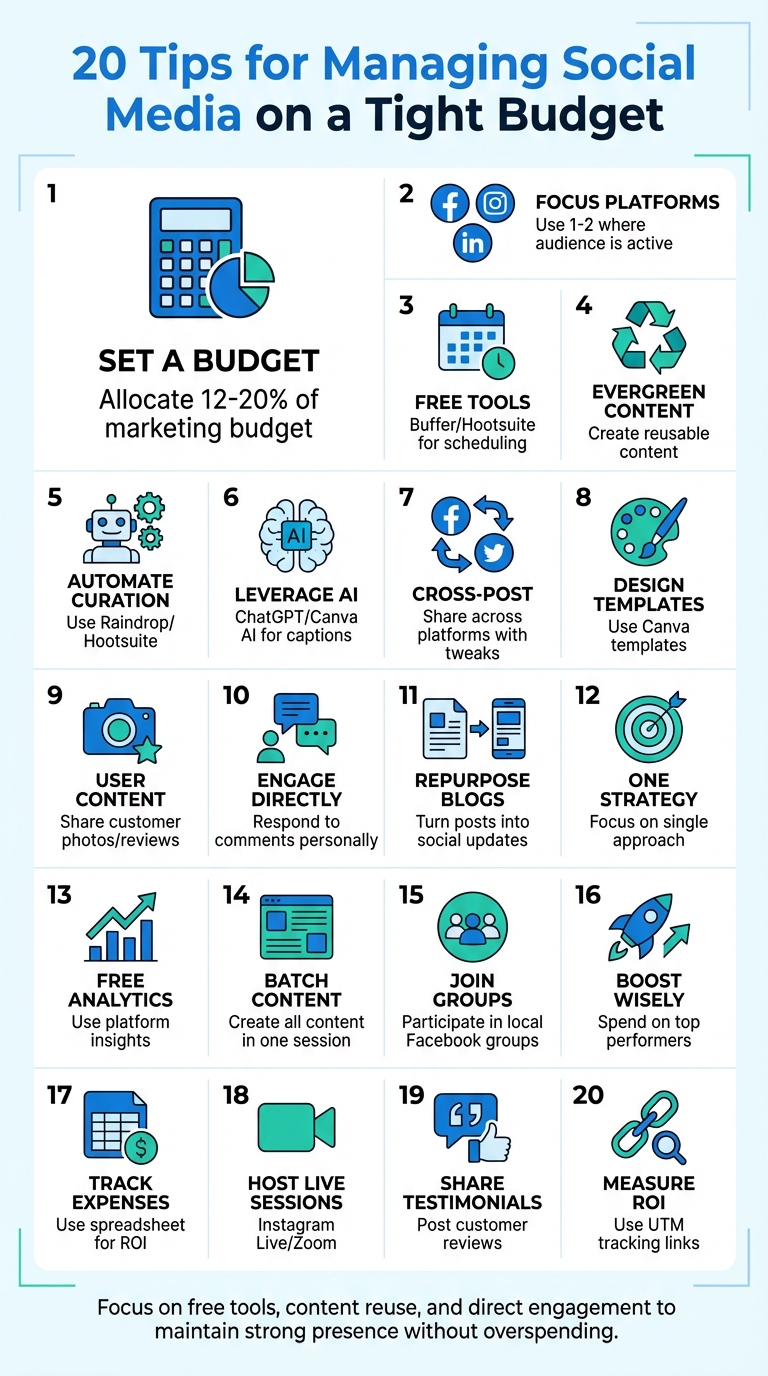
20 Budget-Friendly Social Media Management Tips Infographic
1. Set a Social Media Budget and Track It
Before spending a dime on social media, define clear, SMART goals. John Kawecki, Marketing Manager at F1 Blast, puts it perfectly:
"I’ve learned to start by asking, ‘What are we actually trying to do here?’ Because if you’re not clear on that, you’ll simply end up wasting time and money."
Are you aiming to boost brand awareness, attract leads, or enhance customer service? Pin down your priorities first, then figure out what fits within your financial limits.
Experts recommend allocating 12%–20% of your overall marketing budget to social media. For example, B2C businesses often dedicate around 16%, while B2B companies usually stick closer to 7%. Break down your spending into categories like content creation, paid ads, software tools, and outsourced help.
To stay on top of your spending, use a straightforward spreadsheet. Separate one-time campaign costs from recurring subscriptions, and always set aside 10%–15% of your social media budget as a cushion for unexpected opportunities. Keep an eye on critical metrics like conversion rates, click-throughs, and revenue to measure performance.
When your budget is clear and well-tracked, you’ll be ready to invest in platforms where your audience is most engaged.
sbb-itb-5b82b38
2. Choose Platforms Where Your Audience Is Active
Instead of trying to be everywhere, focus your energy on one or two platforms where your audience spends most of their time. Laura Moss, cofounder of Adventure Cats, shared how this strategy worked for her:
"Social media is our second-biggest driver of sales. Most customers say they discover us on Instagram and didn’t realize we had a content site or a store until we promoted them on social."
Start by setting your budget and identifying the platforms that matter most. Tools like Google Analytics and CRM data can help you figure out which channels are driving traffic and match your customer demographics. If you’re just starting, surveys are a great way to ask customers directly about their favorite platforms.
Choosing the right platform comes down to understanding your audience. For example, if you’re in B2B, LinkedIn is a powerhouse – it generates 80% of B2B marketing leads from social media and converts visitors to leads at a rate of 2.74%, which is three times higher than Twitter or Facebook. On the other hand, if your brand thrives on visuals, like a restaurant or fashion boutique, Instagram is ideal, reaching 75% of U.S. adults aged 18–24. Local service businesses often find success in Facebook Groups and neighborhood-focused platforms like Nextdoor.
Take Danni Eickenhorst from Steve’s Hot Dogs in St. Louis, for instance. She promoted her "Six Feet ApartY" event in local Facebook Groups and on Nextdoor, reaching 28,100 people, gaining 150 Facebook likes, 75 Instagram followers, and tripling typical Saturday sales.
Once you’ve pinpointed your key platforms, channel your budget and energy into them. Check out where your competitors are active and which platforms bring them the most organic traffic. Free tools like Facebook advertising insights and Instagram Analytics can also give you a clearer picture of your audience’s behavior. By focusing your efforts on a few key platforms, you’ll make the most of your resources. Once you’re seeing success, you can think about expanding to other channels.
3. Use Free Scheduling Tools Like Buffer or Hootsuite
Managing social media doesn’t have to consume your entire day. Tools like Buffer and Hootsuite let you schedule posts across multiple platforms from one easy-to-use dashboard, saving you valuable time. Interestingly, only 42% of social media users actually plan their posts ahead of time. By scheduling your content in advance, you can gain a competitive edge over most of your peers.
Buffer, for instance, offers a free plan that supports up to three social channels and allows you to schedule 10 posts per channel. It even includes an AI assistant for crafting captions and a handy "Link in bio" page builder to drive traffic to your site or products. With over 190,000 creators and small businesses using Buffer monthly to grow their audiences, it’s clearly a popular choice. Hootsuite, on the other hand, provides a free trial with similar features and even lets you bulk upload 350–500 posts at once.
To make the most of these tools, try batching your content creation. Dedicate one afternoon each week to brainstorming, creating, and scheduling posts. Buffer’s calendar view makes it easy to spot any gaps in your schedule, while Hootsuite’s "Best Time to Post" feature helps you identify how often your business should post to reach your audience when they are most active. Both platforms support major networks like Instagram, Facebook, LinkedIn, X (Twitter), and TikTok.
For now, stick to the free plans and upgrade only if you need more functionality. For example, Buffer charges just $6 per month for each additional channel. These tools are a simple yet effective way to stay consistent with your posting while freeing up time for other strategies.
4. Create Evergreen Content You Can Reuse
Evergreen content is like the gift that keeps on giving. It’s the kind of material that stays relevant for months – or even years – without needing constant updates. Think about timeless topics like "How to tie a tie" or "What is SEO?" These are subjects people search for regularly, making them a smart investment for small businesses keeping an eye on their budgets. You create it once, and it continues to drive traffic and engagement without the ongoing expense of producing new content.
But here’s the real magic: you can breathe new life into evergreen content by repurposing it. Take a blog post and turn it into an infographic, a short video, or even a series of social media tips. This approach can reduce content creation costs by 50-70% while extending its value by over 300%. Instead of constantly brainstorming fresh ideas, you’re making the most of what you already have.
When crafting evergreen content, focus on "what is" and "how-to" topics. Use straightforward language and steer clear of details that might quickly become outdated. Educational content, in particular, tends to perform well, driving 66% higher engagement. By building on these enduring themes, you can amplify the impact of your efforts through strategic repurposing.
To get started, use analytics to identify your top-performing evergreen pieces. Then, adapt them into new formats – like Instagram carousels, LinkedIn updates, or Facebook tips. A quick refresh of captions or visuals can keep the content feeling fresh and engaging. This strategy often delivers 3-5x better ROI compared to creating brand-new content.
5. Automate Content Curation with Free Tools
Automation can make managing your social media a whole lot easier, especially when it comes to finding and sharing content. Free tools can help you discover relevant articles, trending topics, and industry news, saving you valuable time. For instance, Raindrop allows you to save web links with just one click while browsing, organizing them into collections you can revisit later when planning your social posts. This approach not only saves time but also helps you repurpose content efficiently across different platforms.
Another way to simplify content discovery is through social listening. Tools like Hootsuite offer free features that monitor brand mentions and hashtags, sending keyword alerts directly to your inbox to keep you updated on trending conversations.
Once you’ve gathered content, you can automate its publication using free scheduling tools. For example, Buffer lets you schedule up to 10 posts per day across three channels, and CoSchedule allows unlimited posts for one user on two accounts. By batching your curation efforts weekly and scheduling posts to go live over the following days, you can maintain a consistent posting schedule without the daily hassle.
Considering that content creation takes up 40%–50% of a social media budget, automating tasks like discovery and scheduling can significantly reduce costs. To maintain your brand’s personality and engagement, add brief, thoughtful commentary to curated posts. Aim for about 20% of your content to be curated, mixing it with educational and original posts.
| Tool | Best For | Free Plan Limits |
|---|---|---|
| Zoho Social | Value for money | 1 user, 7 accounts, unlimited posts |
| Buffer | Flexible pricing | 1 user, 3 accounts, 10 posts per day |
| CoSchedule | Collaboration | 1 user, 2 accounts, unlimited posts |
| Raindrop | Content curation | Digital bookmarking and link organization |
| Hootsuite | Listening/discovery | Free standalone tools for search and alerts |
6. Use Free AI Tools for Captions and Images
AI tools can make creating social media content easier and faster – without costing you a dime. Instead of staring at a blank screen, you can turn to tools like ChatGPT for brainstorming captions, Copy.ai for generating social ads in seconds, or Canva AI’s Magic Design for crafting professional graphics that align with your brand. As Georgie Walsh, Content Marketing Manager at GWI, explains:
"AI tools can help you go from staring at your screen to drafting social posts, promo graphics, and SEO snippets in an afternoon, all without having to skip your lunchtime mental health walk."
These tools not only speed up the content creation process but also help you produce eye-catching visuals. For example, Rytr and Hootsuite’s AI generators can create versatile captions tailored to specific platforms. Need custom images? DALL·E transforms text prompts into unique visuals, perfect for situations where stock photos just don’t cut it.
AI tools work best as a starting point. Once you’ve generated content, take the time to refine it so it matches your brand’s voice and tone. Bernard Huang from Clearscope emphasizes:
"The key to getting the best out of AI content generators is to use them where your team needs a helping hand."
Visuals are especially important – LinkedIn posts with images see a 98% higher comment rate, and tweets with visuals get three times more engagement. By leveraging AI-generated visuals and testing multiple caption options, you can find what resonates most with your audience. The best part? Many of these tools, like Copy.ai, Rytr, and Canva, offer free versions, and ChatGPT’s basic plan is completely free.
7. Cross-Post Content Across Multiple Platforms
Cross-posting is all about making the most of your content by sharing it across multiple platforms. Instead of creating brand-new posts for every social media channel, you can adapt one piece of content to fit different networks. For instance, a short video can be shared on TikTok, Instagram Reels, and YouTube Shorts simultaneously, while a text-based update can work across X (formerly Twitter), Threads, Bluesky, and Mastodon.
The trick is to tweak details like captions, hashtags, and @mentions to suit each platform’s vibe. While the main image or video remains the same, these small adjustments make your content feel like it belongs. For example, LinkedIn is better suited for a polished, professional tone, whereas Instagram thrives on relaxed, visually engaging updates. As Brian Peters from Buffer puts it:
"Creating a unique post for each social media channel can be a challenge, but it’s well-worth the effort. This will help to give your content a fresh feel no matter where your audience lands."
One big advantage of cross-posting is that it protects your reach from being entirely dependent on one platform’s algorithm. By staying active on two or three platforms, you reduce the risk of losing visibility if one platform changes its rules. Plus, it’s a cost-effective way to try out newer platforms like Threads – just repurpose content you already have and see how it performs.
If you’re already batching content weekly, cross-posting can make your workflow even smoother. Use free scheduling tools or built-in platform features to share your content efficiently. With 51% of consumers discovering new brands on social media in the past six months, being active on multiple platforms can make a big difference with minimal extra effort.
8. Design Visual Templates in Canva for Free
Canva offers small businesses access to over 20,000 free templates tailored for various business needs, including Instagram Reels covers, LinkedIn banners, and YouTube thumbnails. Its drag-and-drop editor is incredibly user-friendly, so even without design experience, you can create polished, professional graphics in-house – no designer required.
One of Canva’s biggest advantages is the ability to create reusable templates that align with your brand. Simply upload your logo, fonts, and set your brand colors, and you’ll have a consistent look across all your social media posts. And consistency isn’t just about aesthetics – it builds trust. Studies show that 76% of consumers are more likely to purchase from a brand they feel connected to compared to a competitor. When your Instagram Stories, Facebook posts, and TikTok videos share a cohesive style, you’re fostering that connection while keeping costs down.
Take the example of SunnySide Retirement Home in 2025. They used Canva to revamp their social media presence, creating high-quality visuals like facility photos, activity videos, and infographics about their services. They also experimented with carousel posts to showcase amenities and used GIFs for community events. These efforts led to a noticeable increase in service inquiries and stronger online engagement.
Another time-saving feature is Canva’s ability to resize designs for different platforms with just a few clicks. A single design can easily be transformed into an Instagram post, a Facebook cover, or a LinkedIn banner, saving you from starting over each time. This efficiency makes it easier to batch-create content – design templates in one session and reuse them weekly to stick to a consistent posting schedule of two to three times per week.
To ensure your designs are optimized for each platform, you can browse templates by categories like "Instagram Stories" or "TikTok Mobile Video", which are pre-set to the correct aspect ratios. With 83% of social media ad spending happening on mobile devices, it’s essential to make sure your text is easy to read on small screens and your visuals are clean and uncluttered.
9. Share User-Generated Content for Free Promotion
User-generated content (UGC) – like photos, videos, and reviews from your customers – is a budget-friendly way to keep your social media feeds active. Instead of constantly creating fresh content, you can simply reshare what your audience has already made. Interestingly, 33% of small businesses with 1–25 employees say that using UGC delivers the best return on investment for their social media efforts.
What makes UGC so impactful? Its authenticity. Studies show that 76% of people trust content shared by peers, and UGC can increase engagement rates by up to 6.9×. When potential customers see real people enjoying your products or services, it feels more relatable and credible.
To make the most of UGC, consider creating a branded hashtag. You can use it to run simple contests or quizzes, encouraging followers to share their own photos or videos for a chance to win a small prize or discount. Timing matters too – ask for content when customers are happiest, like right after they’ve expressed satisfaction with your product or service. A quick, polite request such as, “We’d love to feature your photo – would you mind sharing it?” can go a long way. Always make sure to get explicit permission before reposting anything. A direct message asking, “Can we share this on our page?” not only shows respect but also builds goodwill. Don’t forget to tag the original creator in your post and caption to give proper credit and strengthen your relationship with them.
Another tip: Keep an eye on your social media tags and location mentions. You can often find great content to share just by monitoring these. Even a simple customer photo or testimonial can be repurposed for Instagram Stories, Facebook posts, or even your small business website design. This approach helps you maintain a steady flow of content without the constant need to create something new. Plus, it’s an easy way to extend your reach organically without spending extra money, aligning perfectly with other cost-effective strategies you’re already using.
10. Respond to Comments and Messages Yourself
Taking the time to personally reply to comments and messages is one of the simplest and most effective ways to grow your social media presence. Did you know that over 71% of small-to-mid-sized businesses use social media to connect with their customers? When you respond to a follower’s comment or answer a direct message, you’re doing more than just offering customer service – you’re building trust and giving your brand a human touch. Plus, platforms reward engagement, meaning posts with higher interaction are more likely to be seen by others.
To make this work for you, consider setting up a routine. Block out 15 minutes in the morning, at lunchtime, and in the evening to check your messages and comments. Aim to respond within 24 hours whenever possible. For negative comments, address them publicly to show transparency, but move detailed conversations into private messages to resolve issues without unnecessary escalation. This approach not only builds trust but also strengthens your relationships with your audience.
Don’t stop at your own posts – get involved in conversations happening on other creators’ or businesses’ pages within your niche. Jumping into relevant discussions can expand your visibility without costing a dime. And here’s a bonus tip: end your posts with a question. It’s a simple way to encourage comments and start conversations that keep your audience engaged.
11. Turn Blog Posts into Social Media Content
Your blog posts are a goldmine for creating engaging social media content. Lizzie Davey, a professional SaaS writer at Sendible, puts it perfectly:
"Repurposing content is basically recycling content you already have or are already creating and turning it into social media posts."
Start by picking out your top-performing or evergreen blog posts – those that consistently attract traffic or offer timeless advice. Break these posts into bite-sized pieces for social media. For example:
- Turn a blog listicle into an Instagram carousel.
- Highlight key stats with branded graphics.
- Transform how-to sections into quick 60–90 second videos for TikTok or Instagram Reels.
Visual content is especially powerful. LinkedIn posts with images see a 98% higher comment rate, and tweets with visuals are three times more likely to drive engagement.
Here’s a real-world example: A small cleaning business, SparkleClean, took a popular blog post about eco-friendly cleaning tips and repurposed it into a series of social media updates. They created a branded infographic, shared quick tips as posts, and even made a short instructional video. This simple strategy not only boosted their online presence but also led to more customer inquiries.
To maximize this approach, stagger your posts. Spread them out over time – a Twitter thread today, a Reel in a few days, and an infographic next week. This keeps your social media feed fresh and extends the life of your content. Various digital tools for small businesses like Canva can help you design visuals, while platforms like Buffer or Hootsuite make scheduling a breeze.
12. Focus on One Content Strategy for Organic Growth
Trying to tackle every content strategy at once can lead to burnout and scattershot results. When working with a limited budget, it’s far more effective to concentrate on a single approach. As business technologist Joe Manna puts it:
"Spreading yourself too thin may hinder your effectiveness. Start with one and expand as needed."
The secret lies in picking a strategy that matches where your audience spends their time. By narrowing your focus, you can craft content that resonates with your audience on the platforms they use most. Take Kelsey from Rope Drop Design as an example – she zeroed in on showcasing her creative process, turning a vintage sleeping bag into a puffer jacket. This singular focus led to one of her Instagram videos going viral, racking up 28 million views and helping her grow to over 328,000 followers – all without spending a dime on ads.
Consistency is key. Posting regularly, even just once a week, delivers better results than sporadic bursts of activity. A helpful framework is the 80/20 rule: dedicate 80% of your content to informing, entertaining, or educating your audience, and reserve 20% for promotion. This balance has been shown to boost engagement by 66% compared to purely promotional content. To stay organized and avoid repetitive posts, establish 3–5 core themes – often called content pillars – that align with your business goals.
Another effective strategy is outbound engagement. Actively comment on posts from other creators and industry leaders in your niche. This tactic not only increases visibility but also doesn’t require any ad spend – a reason why 41% of organizations are testing it as a primary growth method. Combine this with content atomization – breaking down a larger piece of content into smaller, platform-specific assets – to stretch your reach without adding to your workload.
13. Use Free Analytics from Social Media Platforms
To fine-tune your social media strategy, you need data – and the good news is every major platform provides free analytics tools for business accounts. Platforms like Facebook Insights, Instagram Insights, Twitter Analytics, and YouTube Analytics offer detailed information about your content’s performance, audience engagement, and the times when your followers are most active. These tools give you the foundation to adjust your posting schedule and refine your content strategy.
Instead of focusing solely on follower counts, prioritize engagement and conversion metrics. Research shows these are better indicators of success. For example, you can calculate your engagement rate by dividing total interactions (likes, comments, shares) by your follower count or impressions. This metric helps you understand how well your content connects with your audience.
Facebook’s "When Your Audience is Online" graph is particularly helpful for identifying the best times to post. Scheduling your posts during these peak activity hours can boost visibility. On Instagram, audience retention metrics reveal when viewers stop watching your videos, giving you insights into what content keeps them hooked – and what doesn’t.
The Meta Business Suite takes it a step further by allowing you to compare your performance against up to 100 similar businesses. You can even download CSV files to track trends over time. This makes it easier to spot which formats, captions, or topics consistently generate the most clicks.
Another key metric to watch is Net Followers – the difference between new follows and unfollows. A noticeable drop after promotional posts might indicate it’s time to shift gears toward more educational or entertaining content.
14. Create Content in Batches Each Week
Instead of scrambling to create posts daily, carve out a few hours each week to produce all your content in one go. This strategy, known as content batching, helps you avoid the inefficiencies of multitasking. Studies reveal that switching between tasks can increase the time it takes to complete them by up to 50%, and only 2% of people are genuinely skilled at multitasking.
To make this work, group similar tasks together. For example, dedicate one session to writing captions and another to designing graphics. This keeps your focus consistent and allows you to take a big-picture view of your content. With this approach, it’s easier to ensure your posts reflect your brand’s voice and align with your business goals.
Start by setting aside 1–2 hours each month to plan out topics and mark essential dates. Then, schedule a weekly session to bring those plans to life. Stick to 3–5 core content themes – like customer testimonials, industry advice, or behind-the-scenes glimpses – to guide your brainstorming. A simple spreadsheet can serve as your content calendar, helping you stay organized and on track. This method not only simplifies your workflow but also gives you a buffer of ready-to-post content for unexpected situations.
Batching also adds flexibility to your schedule. With posts pre-scheduled, you can stay active even during busy periods or breaks. Plus, it allows you to quickly shift gears to address trending topics while freeing up time to engage with your audience – whether that’s responding to comments, answering questions, or building connections.
15. Join Local Facebook Groups for Free Visibility
Local Facebook groups can be a goldmine for small businesses looking to increase their visibility without spending a dime. With over 1.8 billion people actively participating in Facebook Groups every month, posts in these communities can drive engagement by as much as 18%. This makes them a great addition to your overall strategy for improving organic reach with SEO.
Start by searching for groups in your area using keywords like "[City Name] Homeowners" or "Buy/Sell/Trade [City Name]." Focus on groups with active discussions rather than just large memberships. Before posting, check the group rules to ensure they allow business-related content.
Here’s an example of how this works in real life: In 2020, Danni Eickenhorst of Steve’s Hot Dogs in St. Louis used local Facebook groups to promote a "Six Feet ApartY" event. The effort reached 28,100 people, brought in 150 new page likes, and tripled the restaurant’s Saturday sales.
When participating in these groups, it’s crucial to focus on adding value rather than pushing sales. Answer questions, share useful tips, and engage in conversations. As Sprout Social wisely puts it:
"Members join a group for the community and value, not for a sales pitch. Overt self-promotion and constant link-dropping are the fastest ways to kill engagement".
Before jumping in, spend a few days observing what kinds of posts resonate with members. This will help you understand the tone and content that get positive reactions.
Using your personal profile to interact in these groups can also make your brand feel more relatable. By building genuine connections, you’ll naturally be part of the conversation when someone asks for recommendations in your industry. To further capture local interest, ensure you have optimized your Google Business Profile to appear in local search results. This approach allows you to offer help without coming across as overly promotional. Combine these local group tactics with your broader content strategy to increase both your visibility and your connection with the community.
16. Boost Only Your Best-Performing Posts
If you’re looking to amplify your organic success, the smartest move is to invest your budget in posts that are already thriving. This strategy is a low-risk way to shift from organic content to paid advertising without diving in headfirst.
Take advantage of the free analytics tools available on platforms like Meta Business Suite for Facebook and Instagram, X Analytics, or LinkedIn Analytics. Instead of focusing solely on total likes, pay attention to engagement rates – they’re a better indicator of content that resonates. For example, a post with 100 likes from 500 impressions (a 20% engagement rate) is far more effective than one with 200 likes from 2,000 impressions (a 10% engagement rate). By identifying these high-performing posts, you can make smarter decisions about which ones to boost.
Start small with your boosting budget. Facebook allows you to boost posts for as little as $1 per day, while Instagram offers options like $5 for six days. Christina Newberry from Hootsuite puts it best:
"Boosted social media posts are a low-risk way to get started with Facebook advertising".
This approach lets you test the waters without overspending. If a boosted post performs well, you can gradually increase your budget. If it doesn’t, simply stop boosting and try another post with strong organic results.
The beauty of this strategy lies in its simplicity: you’re scaling content that already connects with your audience. It’s a way to minimize risk while maximizing potential returns. With 81% of small and medium-sized businesses planning to ramp up their paid social media efforts, starting with proven content puts you in the best position to see meaningful results.
17. Track All Expenses in a Simple Spreadsheet
Once you’ve set up your budget, the next step is keeping a close eye on every dollar spent. Tracking all your expenses not only helps you stay organized but also ensures you’re making the most of your social media budget. If you’re just starting out, having a professional business website is a critical foundation for converting social traffic. A simple spreadsheet – whether in Excel or Google Sheets – can give you a clear picture of your spending. Plus, you can update it on the go, whether you’re using your phone or computer. This is more important than ever, as 60% of marketers say their budgets and ROI are under greater scrutiny now than before. By tracking expenses accurately, you’ll be able to reallocate funds to the campaigns that deliver the best results.
Your spreadsheet should include the following columns: Date, Category, Description, Amount (Out), Amount (In), Balance, and Receipt Link. To measure ROI effectively, add a column for revenue generated by specific campaigns and use this formula: (Total Revenue – Total Investment) / Total Investment x 100. Don’t forget to link digital receipts for each transaction – these records will come in handy for tax purposes.
| Spreadsheet Column | What to Include |
|---|---|
| Date | The date of the transaction |
| Category | Type of expense (e.g., Software, Ad Spend, Freelancer) |
| Description | Details like "Monthly Buffer Subscription" |
| Amount (Out) | The cost of the activity |
| Amount (In) | Revenue tied to the activity |
| Balance | Remaining budget after each transaction |
| Receipt Link | Link to a folder with invoices or receipts |
Set aside 15 minutes each week to update your spreadsheet and review your analytics. This habit will help you quickly identify wasteful spending and shift resources to campaigns or platforms that are actually driving results. As John Kawecki, Marketing Manager at F1 Blast, wisely points out:
"I’ve learned to start by asking, ‘What are we actually trying to do here?’ Because if you’re not clear on that, you’ll simply end up wasting time and money".
Finally, leave room in your budget for unexpected opportunities. A contingency fund ensures you’re ready to act on promising ideas without derailing your financial plan.
18. Host Free Live Sessions to Engage Your Audience
Live streaming on social media is a fantastic way to connect with your audience – and it won’t cost you a penny. Whether it’s a Q&A, a behind-the-scenes look, or a quick tutorial, live sessions offer a level of real-time interaction that pre-recorded content just can’t replicate. Platforms like Instagram, Facebook, YouTube, and X (formerly Twitter) make it easy with free live streaming options that don’t limit your audience size.
If you’re looking for a more structured approach, free video conferencing tools can help. Options like Zoom Workplace Basic (supports 100 participants for 40 minutes, with breakout rooms and automated captions), Google Meet (up to 60 minutes with integrations for Google Docs and Slides), or Zoho Webinar (accommodates up to 100 attendees and includes features like polls and Q&A) provide excellent frameworks for hosting professional live sessions. Christine Hofmann, a Franchising Recruiter at McDonald’s, shared her thoughts:
"Zoho Webinar allowed me to condense these inquiries into a single, efficient session. It’s the perfect tool for a one-to-many approach, saving me valuable time and effort".
Choose topics that resonate with your audience and deliver clear value. Interactive Q&A sessions, educational tutorials, and candid business updates are often well-received. For instance, in late 2024, Mala the Brand, a soy candle company based in Vancouver, saw a surge in community support when founder Melody Chen shared a heartfelt live video about lower-than-expected sales. This moment of transparency highlighted the power of authentic communication.
Don’t let your live sessions end when the stream does. Repurpose the content to increase its reach. In fact, by 2026, around 63% of webinar views come from on-demand replays, and making those recordings available can boost total views by as much as 80%.
To maximize attendance, promote your sessions across multiple channels. Share announcements on your social platforms, post in local Facebook groups, and include session links in your email signature. You can even use polls to let your audience vote on topics, creating early engagement and ensuring your session aligns with their interests.
19. Share Customer Testimonials as Social Proof
Customer testimonials are more than just feedback – they’re endorsements that can significantly influence potential buyers. Research highlights that 92% of consumers trust recommendations from family and friends over traditional advertising, and 40% have made a purchase based on word-of-mouth. By showcasing real customer experiences, you provide the social proof needed to build trust and encourage others to choose your business.
Start by actively seeking reviews from satisfied customers. The best time to ask for feedback? Right after a customer has expressed their satisfaction. Keep an eye on platforms like Google Reviews, Yelp, and Facebook for positive comments you can repurpose into social media posts. Always remember to get permission before sharing someone’s story or photo, and take the time to respond to all reviews – whether they’re glowing or critical. This shows you value customer input and are committed to engagement.
When sharing testimonials, focus on stories that highlight how your product or service solved a specific problem. Free tools like Canva can help you turn text-based reviews into visually appealing graphics. You can also create “Customer Spotlight” posts that celebrate individual success stories. For even greater impact, consider using video testimonials or before-and-after photos, as these tend to grab more attention than plain text posts.
The benefits of sharing testimonials are clear: 33% of small businesses with 1–25 employees report that these strategies deliver the highest ROI. Encourage customers to share their own photos or videos featuring your products and tag your business. This authentic, user-generated content adds another layer of credibility to your brand.
Don’t stop at one platform – repurpose positive reviews across multiple channels. For example, a glowing Google review can become an Instagram post, or a customer quote can be featured in your Facebook Stories. Consistently sharing these endorsements helps build trust and gives your brand a more personal, relatable touch.
20. Measure ROI with Free UTM Tracking Links
Getting likes and shares is great, but they don’t tell you how much money your campaigns are actually making. That’s where UTM (Urchin Tracking Module) codes come in. These are small text snippets added to the end of a URL that act like digital breadcrumbs, showing you exactly which social media post or campaign drove traffic to your website. For small businesses working with tight budgets, this method is a game-changer.
"UTM codes might sound technical, but they’re actually the secret weapon marketers use to measure their campaign success on different channels." – Benjamin Paine, Managing Director, Digital Digest
Each UTM tracking link should include three essential elements:
- utm_source: Identifies the platform, like
facebook. - utm_medium: Specifies the channel type, such as
organic_social. - utm_campaign: Tags the specific promotion, like
jan_2026_promo.
To create these links accurately, use Google’s free Campaign URL Builder. Be sure to stick to lowercase letters because Google Analytics treats "Facebook" and "facebook" as different sources, which can mess up your data.
Once you start using these tagged links, Google Analytics 4 will give you clear insights. For instance, in September 2025, a small business spent $700 on Facebook and Instagram ads. By tracking the campaign with UTM links, they found it led to 50 sales at $50 each, generating $2,500 in revenue – a 257% ROI. Even if you’re not directly selling products, you can assign dollar values to actions like email sign-ups or webinar registrations to measure returns.
To keep things organized, maintain a simple spreadsheet for your UTM links. This ensures consistency in naming conventions and helps your team avoid errors. Always test each link before posting to make sure the tracking works correctly. With around 30% of companies failing to track their marketing budgets with UTM codes, you’ll have a clear edge by knowing which social media campaigns are paying off. Proper ROI tracking helps you focus your budget on what works best, making your overall social media strategy smarter and more cost-effective.
Conclusion
Managing social media on a tight budget isn’t about trying to do it all – it’s about focusing on the right strategies and sticking with them. The numbers back this up: smart, deliberate efforts yield results. Concentrate on just one to three platforms where your audience is most active, use free marketing tools like Canva and Google Analytics, and prioritize real engagement over simply pushing out messages.
For example, 33% of small businesses with 1–25 employees report strong ROI from user-generated content. This highlights that being authentic and relatable often matters more than having a big budget. You don’t need to outspend competitors; instead, focus on being transparent, consistent, and genuinely connected to your community.
"People always share the highlights, but never really talk about what went wrong. Our community loves our transparency and personal connection." – Emily Cook, PR and Partnerships at Mala the Brand
To get started, schedule your posts with a content calendar, create reusable templates on Canva, and respond quickly to comments. Use free analytics tools and UTM tracking links to monitor what’s working, then refine your approach based on those insights. Consistency and quality will always beat sporadic efforts.
The best part about budget-friendly social media? It levels the playing field. You don’t need a massive ad budget to compete – just authenticity and a sense of community. With 45% of small businesses crediting TikTok for their growth, now is the perfect time to explore new formats. Your next customer is already scrolling – make sure they find you.
FAQs
How do I choose the best social media platforms for my business?
To choose the best social media platforms for your business, start by understanding your audience and the kind of content you create. Think about your ideal customers – their age, location, interests, and habits – and match them to platforms that suit their preferences. For example, Facebook and Instagram serve a broad audience, LinkedIn works well for B2B professionals, and platforms like TikTok or Snapchat appeal to younger users. If your business thrives on visual content, such as photos or videos, Instagram, TikTok, or Pinterest are excellent options. On the other hand, LinkedIn is better suited for sharing professional updates or industry-related insights.
Next, evaluate the features and resources you need. Determine what’s most important for your business – whether it’s e-commerce tools, video functionality, live streaming, or analytics – and compare the strengths of each platform. For instance, Facebook offers cost-effective organic reach, while other platforms may require a bigger focus on paid advertising. Concentrating on two or three platforms can help you make the most of your time and resources without becoming overwhelmed.
Lastly, make sure to test and evaluate. Spend 30 days experimenting with your selected platforms, tracking key metrics like engagement, clicks, and conversions. Use the results to refine your approach and double down on the platforms that give you the best return on investment. If you’re looking to complement your social media efforts with a professional website, UENI can deliver a mobile-friendly, SEO-optimized site in just seven days, helping you turn social traffic into loyal customers.
How can I measure the ROI of my social media efforts effectively?
To figure out the ROI of your social media efforts, start by setting specific business goals. These might include boosting online sales, increasing booked appointments, or growing newsletter sign-ups. Then, assign a dollar value to each conversion – this could be the average order value or the lifetime value of a customer. Track these actions with tools like UTM-tagged links or website analytics to see where your traffic is coming from.
Next, add up your total social media costs. This includes ad spend, any paid tools you’re using, and even the estimated hourly cost of managing and creating posts. Once you have these numbers, you can plug them into the ROI formula: [(Revenue – Cost) ÷ Cost × 100]. This will give you the percentage return on your investment.
To get a clearer picture, focus on important metrics like engagement rate (likes, comments, shares), click-through rate, conversion rate, and revenue generated from social traffic. If you’re using a UENI-built website, its built-in analytics can simplify tracking how social media contributes to your business results.
How can I create engaging social media content on a small budget?
Creating engaging content doesn’t have to break the bank. You can use your smartphone to snap genuine photos or record videos, repurpose content shared by your customers, or post curated material from reliable sources. Plus, free social media tools make it easier to plan and schedule posts ahead of time, saving you both time and energy.
If you’re a small business owner, services like UENI can lend a hand with marketing support. They offer tools like SEO-friendly content creation, helping you maintain a polished online presence without stretching your budget.